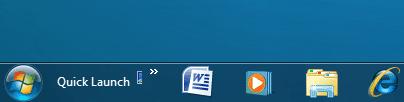
I tried this tutorial, but it does not work ...
http://www.sevenforums.com/tutorials/888-quick-launch-enable-disable.html
I didn't try Method 3 , but just because that's not how it is supposed to look.
Any other way to add quick launch to windows taskbar?
thanks in advance.
http://www.sevenforums.com/tutorials/888-quick-launch-enable-disable.html
I didn't try Method 3 , but just because that's not how it is supposed to look.
Any other way to add quick launch to windows taskbar?
thanks in advance.
My Computer
At a glance
Windows 7
- OS
- Windows 7