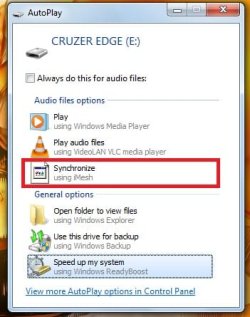
S Skyier New member Local time 1:41 AM Messages 4 Jun 27, 2011 #1 Greetings fellow sevenforumers, I'm using Windows 7 Home Basic 64-Bit version. I would like to ask how do you remove the Synchronize iMesh option on the AutoPlay. I don't know what to do. Please Help me! Replies would be greatly appreciated Attachments ssimesh.jpg 27.5 KB · Views: 2 My Computer My Computer At a glance Windows 7 Home Basic 64-BitOSWindows 7 Home Basic 64-Bit
Greetings fellow sevenforumers, I'm using Windows 7 Home Basic 64-Bit version. I would like to ask how do you remove the Synchronize iMesh option on the AutoPlay. I don't know what to do. Please Help me! Replies would be greatly appreciated
speedgamer01 concert? use earplugs Guru Local time 8:41 AM Messages 917 Jun 27, 2011 #2 Try google XD Remove AutoPlay Handler from the Options List in Windows 7 / Vista / XP tell me if u got stuck My Computer My Computer At a glance Windows 7 Ultimate 64 bit SP1Intel(R) Core(TM) i5-2500K12GB Kingston Hyperx 1600MHzAsus GTS 450Computer typePC/DesktopComputer Manufacturer/Model NumberCustom Built PCOSWindows 7 Ultimate 64 bit SP1CPUIntel(R) Core(TM) i5-2500KMotherboardGigabyte Technology Co., Ltd. Z68X-UD3-B3Memory12GB Kingston Hyperx 1600MHzGraphics Card(s)Asus GTS 450PSU500W CoolinkOther InfoGenius G-Pen F610 (PenPad)
Try google XD Remove AutoPlay Handler from the Options List in Windows 7 / Vista / XP tell me if u got stuck
S Skyier New member Thread Starter Local time 1:41 AM Messages 4 Jun 27, 2011 #3 Ok i followed the steps, whats next? HKEY_LOCAL_MACHINE \ Software \ Microsoft \ Windows \ CurrentVersion \ Explorer \ AutoplayHandlers \ Handlers My Computer My Computer At a glance Windows 7 Home Basic 64-BitOSWindows 7 Home Basic 64-Bit
Ok i followed the steps, whats next? HKEY_LOCAL_MACHINE \ Software \ Microsoft \ Windows \ CurrentVersion \ Explorer \ AutoplayHandlers \ Handlers
S Skyier New member Thread Starter Local time 1:41 AM Messages 4 Jun 27, 2011 #4 do i delete the ones with iMesh??? My Computer My Computer At a glance Windows 7 Home Basic 64-BitOSWindows 7 Home Basic 64-Bit
speedgamer01 concert? use earplugs Guru Local time 8:41 AM Messages 917 Jun 27, 2011 #5 I sugest u to right-click and export it anywhere to make a backup, then delete the Imesh folder under 'Handlers' My Computer My Computer At a glance Windows 7 Ultimate 64 bit SP1Intel(R) Core(TM) i5-2500K12GB Kingston Hyperx 1600MHzAsus GTS 450Computer typePC/DesktopComputer Manufacturer/Model NumberCustom Built PCOSWindows 7 Ultimate 64 bit SP1CPUIntel(R) Core(TM) i5-2500KMotherboardGigabyte Technology Co., Ltd. Z68X-UD3-B3Memory12GB Kingston Hyperx 1600MHzGraphics Card(s)Asus GTS 450PSU500W CoolinkOther InfoGenius G-Pen F610 (PenPad)
I sugest u to right-click and export it anywhere to make a backup, then delete the Imesh folder under 'Handlers'
speedgamer01 concert? use earplugs Guru Local time 8:41 AM Messages 917 Jun 27, 2011 #6 yes, the part affter IMM refers to the event, which is going on My Computer My Computer At a glance Windows 7 Ultimate 64 bit SP1Intel(R) Core(TM) i5-2500K12GB Kingston Hyperx 1600MHzAsus GTS 450Computer typePC/DesktopComputer Manufacturer/Model NumberCustom Built PCOSWindows 7 Ultimate 64 bit SP1CPUIntel(R) Core(TM) i5-2500KMotherboardGigabyte Technology Co., Ltd. Z68X-UD3-B3Memory12GB Kingston Hyperx 1600MHzGraphics Card(s)Asus GTS 450PSU500W CoolinkOther InfoGenius G-Pen F610 (PenPad)
S Skyier New member Thread Starter Local time 1:41 AM Messages 4 Jun 27, 2011 #7 It works! thanks a lot speedgamer01 My Computer My Computer At a glance Windows 7 Home Basic 64-BitOSWindows 7 Home Basic 64-Bit