Windows 7 Forums


Windows 7: Pastel print

02 Jul 2011   #1

windows 7 home premium 64
 
 
Pastel print

How do you make the print on the screen darker everywhere in Windows 7? I can hardly read the writing.
Is there a setting that I missed out on? XP used bold black on the screen for writing, but I can hardly see the print in Windows 7.


Last edited by chadaway; 02 Jul 2011 at 05:02 PM.. Reason: No responses. Surely other people must have this problem.
My System SpecsSystem Spec

02 Jul 2011   #2

Windows 7 - Home Premium - 64 bit


chadaway

I find the same - writing is pale

Have you tried - Control Panel\Display - Adjust ClearType Text?

It made a marginal difference for me
My System SpecsSystem Spec
02 Jul 2011   #3

Windows 7 Ultimate X64 SP1
Mt. Crumpit/Whoville


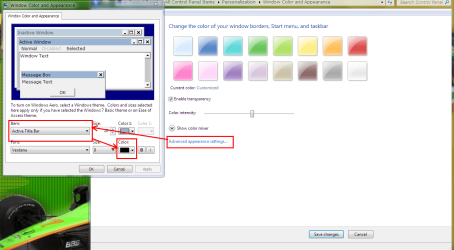
Howdy y'all! Right click an empty place on your Desktop, Personalization, Window Color, and finally Advanced appearance settings. In the drop-down menu (see snip) you will find settings for font color on most but not all items. By default it is black but maybe has been changed somehow.

Pastel print-capture.png
My System SpecsSystem Spec
.


02 Jul 2011   #4

windows 7 home premium 64
 
 
Britton 30,

I'm a newbie on this site and on Windows 7 so pleez be patient. I tried to do what you suggested. I went to Desktop -> Personalize -> Window Color (A popup for Window Color and Appearance came up with Item Desktop with Color 1 already selected. This was black. The option was only to click OK so I did but that was what it was set to before I did anything. The font color is not an option.) Now what?
I have Windows 7 Home Premium.
.
My System SpecsSystem Spec
02 Jul 2011   #5

Win 7 Pro x64
Council Bluffs, Iowa


Welcome to the Seven Forums
You could try Windows Classic theme and see if it helps.
Right click on desktop go to Personalize scroll down to it.
Pastel print-personalization.png
Jerry
My System SpecsSystem Spec
02 Jul 2011   #6

Win 7 Pro x64
Council Bluffs, Iowa


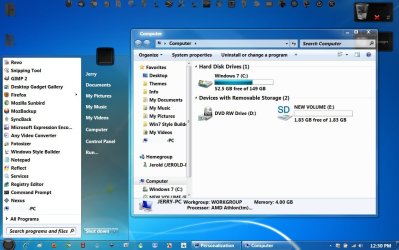
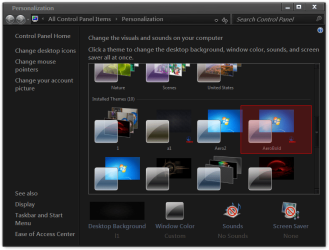
If you are using the default aero theme I changed it to 99% Black Bold 11pt text & named it AeroBold in a zip at the bottom.
Pastel print-untitled.jpg
& will show up in Personalization
Pastel print-personalization.png
&
You will need to do 1 of these 2 ways of Enabling custom themes for it to work.
Enabling Custom Themes - Windows 7
Or
Theme - How to Apply Custom Themes
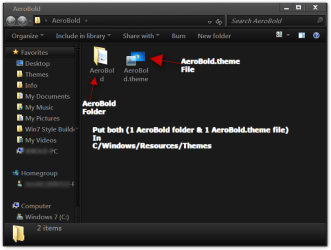
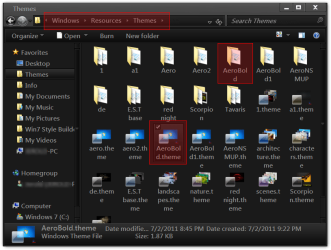
Put both (1AeroBoldFolder & 1 AeroBold.theme file)
Pastel print-aerobold.png
In
C/Windows/Resources/Themes
Pastel print-themes.png
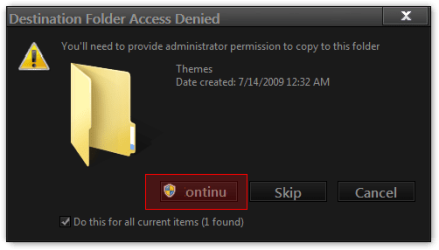
Click Continue
Pastel print-destination-folder-access-denied.png
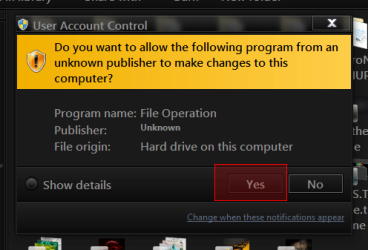
Click Yes
Pastel print-user-account-control.png
Jerry
Attached Files
File Type: zip AeroBold.zip (888.9 KB, 2 views)

Last edited by Bongo; 04 Jul 2011 at 12:40 PM..
My System SpecsSystem Spec
03 Jul 2011   #7

Windows 7 Ultimate X64 SP1
Mt. Crumpit/Whoville


Maybe this is clearer....

Pastel print-untitled.png
My System SpecsSystem Spec
Reply

 Pastel print problems?


Thread Tools


Similar help and support threads for: Pastel print
Thread Forum
All Print Drivers Disappeared, Print Spooler Quits (7 Pro, 64-bit) Drivers
Have to stop/start Print Spooler to get documents to print? Hardware & Devices
Pastel Wallpapers? Customization
Windows xp compatibility with Windows 7 Regarding Pastel Accounting Software
How to change the ugly pastel blue window look-feel? Customization


All times are GMT -5. The time now is 08:22 AM.


Seven Forums Android App Seven Forums IOS App Follow us on Facebook

Windows 7 Forums is an independent web site and has not been authorized,
sponsored, or otherwise approved by Microsoft Corporation.
"Windows 7" and related materials are trademarks of Microsoft Corp.
© Designer Media Ltd
  

1 2 3 4 5 6 7 8 9 10 11 12 13 14 15 16 17 18 19 20 21 22 23 24 25 26 27 28 29 30 31 32