Windows 7 Forums Search
Welcome to Windows 7 Forums. Our forum is dedicated to helping you find solutions with any problems, errors or issues you are experiencing with Windows 7. The Windows 7 forum also covers news and updates and has an extensive Windows 7 tutorial section that covers a wide range of tips and tricks.


Windows 7 - any way to minimize windows Live messenger to tray?


01-11-2009   #1


Win7 x64 NL


any way to minimize windows Live messenger to tray?

Hey all, I installed windows live messenger through the link included in Windows 7, where you can also opt to install the other windows live stuff (which I did not install). This means that it installs a new version, probably a beta also, as it's version 2009, build 14.0.8050.1202. I've already sent feedback to MS about this through their messenger feedback site, but perhaps someone here knows a quick solution, cos this is driving me nuts.

When messenger is running, the icon for windows messenger is always on the superbar. I don't like that. I don't want it there, I want messenger to be minimized to tray like in all previous windows versions. I have found no options to do this in messenger itself, but maybe I've overlooked something.
If anyone knows of a quick fix, please let me know!

My System SpecsSystem Spec
01-11-2009   #2


Windows 7 Ultimate Vista Ultimate x64


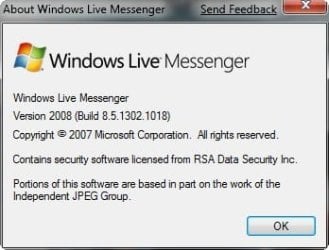
The only way I know of is to use the older messenger

any way to minimize windows Live messenger to tray?-2009-01-12_022116.jpg
My System SpecsSystem Spec
01-11-2009   #3


Win7 x64 NL


hmmmm .... I have uninstalled the version I had....downloaded install software from the dutch messenger site.... but when I installed that, it installed the exact same version I had just gotten rid of. Would you know of a way for me to install an older version?
My System SpecsSystem Spec
.


01-11-2009   #4


Windows 7 Build 7100 (x64)


All you need to do is find the exe, right click, and tell it to open in compatibility for Vista.
My System SpecsSystem Spec
01-11-2009   #5


Win7 x64 NL


Fabulous!!!!
Thank! This worked a treat!!!!!!
My System SpecsSystem Spec
01-11-2009   #6


Windows 7 Ultimate Vista Ultimate x64


Well I wish I had tried that, oh well I like the old messenger better anyway.

I tried the new messenger and I take it back, I prefer the new messenger and even more now I can put it in the system tray, thanks mSeliga!

Last edited by Mark; 01-18-2009 at 12:33 PM.. Reason: Changed my mind
My System SpecsSystem Spec
01-18-2009   #7


Windows 7 build 7000


thanx mr mSeliga
My System SpecsSystem Spec
01-23-2009   #8


Windows 7 Beta 1 b7000


Thank you! This was annoying me too. Stupid easy fix heh, don't know why I didn't try it. Thanks again mSeliga!
My System SpecsSystem Spec
01-31-2009   #9


Windows 7 Beta


Thanks mate i love it Lol
My System SpecsSystem Spec
01-31-2009   #10


Windows 7 RTM X64


Worked for me also but after changing the compatability to Vista I had to sign out and close the program down completly then reopen before the changes would take place. You can see it make the changes when it starts up again.
My System SpecsSystem Spec
Reply

any way to minimize windows Live messenger to tray? problems?


Thread Tools


Similar Threads for: any way to minimize windows Live messenger to tray?
Thread Forum
How to minimize WLM2011 to system tray? Software
Windows Live Mail - Minimize to System Tray in Windows 7 Tutorials
Minimize to Tray on Startup General Discussion
Windows Messenger pops up when I minimize another...... Software
any one know how to put live messenger to system tray ? Software


All times are GMT -5. The time now is 08:52 AM.


Windows 7 Forums is an independent web site and has not been authorized,
sponsored, or otherwise approved by Microsoft Corporation.
"Windows 7" and related materials are trademarks of Microsoft Corp.
© Designer Media Ltd
  

1 2 3 4 5 6 7 8 9 10 11 12 13 14 15 16 17 18 19 20 21 22 23 24 25 26 27 28 29 30