I am having problems when I try and apply my Printer to be shared in windows 7 I get error message saying that printer settings could not be saved. 0x000006d9. I have reinstalled the drivers and rebooted the pc and I am logged on as an Admin but it still wont work.
System Manufacturer/Model Number Compaq Desktop OS Windows 7 Ultimate x64 CPU AMD Sempron Dual Core Memory 3GB Graphics Card NVIDIA GeForce 6150SE nForce 430 Screen Resolution 1024x768
Hard Drives 150GB Sata
20 Jul 2009
wizkid
WINDOWS 7 HOME PREMIUM 64BIT
270 posts
Hi
I am using the one in Windows 7 so click on the printer select sharing. Then I select change share settings and put a name in and then click apply and then thats when the problem happens.
OS WINDOWS 7 HOME PREMIUM 64BIT CPU amd 1090t 3.20ghz Motherboard gigabyte 890fxa-ud5 Memory G-Skill 4GB (2x2GB) DDR3 1333MHz/PC3-12800 CL7(7-8-7-24) Graphics Card MSI ATI 5850 OC 1GB Sound Card CREATIVE SOUND BLASTER GAMER EDTION Monitor(s) Displays SAMSUNG T240 Screen Resolution 1920x1200
Keyboard LOGITECH G15 Mouse LOGITECH G5 PSU CORSAIR 620HX Case ANTEC 300 GAMING CASE Cooling CPU COOLER CORSAIR CWCH50-1 Hard Drives Samsung HD103SJ Spinpoint F3 1TB
SEAGATE 250GB, SAMSUNG 400GB, BOTH SATA 11 Internet Speed 15MB
.
20 Jul 2009
Orbital Shark
Windows 7 Ultimate x64
6,484 posts
Milton Keynes, United Kingdom
This might help
Quote:
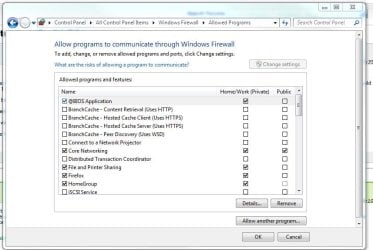
Solved the problem, but I am curious as to why this would cause the problem in the first place. I turned off the windows firewall service. When I started the service, it allowed me to share the printers again. I continued to start and stop the service, and duplicate the problem, so I'm sure that is the problem. I am unclear as to why the Windows firewall Service would cause this though.
System Manufacturer/Model Number Built Myself OS Windows 7 7600.16384 x64 CPU Intel Core i7 OC'd to 3.20 GHz Motherboard Gigabyte Memory 6GB GSkillz Triple Channel DDR3 OC'd to 1600 MHz Graphics Card Nvidia GTX 280 Sound Card X-Fi Platinum Monitor(s) Displays Dual 2001FWP Screen Resolution 1680x1050 x 2
Keyboard Saitek Mouse logitech MX 10000 PSU Gigawatt Antec Case Antec 900 Hard Drives System - Dual 150GB Raptors Raid0
Doc Storage - 1TB SATA 32MB cache Samsung
TV Recordings - 1TB SATA 32MB cache Samsung Internet Speed 30 mb/s
21 Jul 2009
wizkid
WINDOWS 7 HOME PREMIUM 64BIT
270 posts
Hi
Thanks for your reply
I have now got passed that error.
However on the PC that I am trying to share the printer with, each time I log of it looses the connection betweeen the printer and I need to re enter the user name and password of the computer that the printer is linked to. I have clicked on remeber password but for some reason it keeps loosing the information.
System Manufacturer/Model Number Built Myself OS Windows 7 7600.16384 x64 CPU Intel Core i7 OC'd to 3.20 GHz Motherboard Gigabyte Memory 6GB GSkillz Triple Channel DDR3 OC'd to 1600 MHz Graphics Card Nvidia GTX 280 Sound Card X-Fi Platinum Monitor(s) Displays Dual 2001FWP Screen Resolution 1680x1050 x 2
Keyboard Saitek Mouse logitech MX 10000 PSU Gigawatt Antec Case Antec 900 Hard Drives System - Dual 150GB Raptors Raid0
Doc Storage - 1TB SATA 32MB cache Samsung
TV Recordings - 1TB SATA 32MB cache Samsung Internet Speed 30 mb/s
21 Jul 2009
7echno7im
Windows 7 7600.16384 x64
629 posts
If this is already set, then for some reason the other machine isn't being seen as having rights on the network. It could be lack of user account password or other things.
Just browse for the printer like
\\PCNAME(name of PC sharing printer)\
then you will see the printer.
Right click and connect ad it will prompt you for credentials. You can save them there, then it shouldn't prompt you any more. But only do this as a last resort.
You may, then, have 2 of the same printers installed, delete one of them that didn't just get created.
OS WINDOWS 7 HOME PREMIUM 64BIT CPU amd 1090t 3.20ghz Motherboard gigabyte 890fxa-ud5 Memory G-Skill 4GB (2x2GB) DDR3 1333MHz/PC3-12800 CL7(7-8-7-24) Graphics Card MSI ATI 5850 OC 1GB Sound Card CREATIVE SOUND BLASTER GAMER EDTION Monitor(s) Displays SAMSUNG T240 Screen Resolution 1920x1200
Keyboard LOGITECH G15 Mouse LOGITECH G5 PSU CORSAIR 620HX Case ANTEC 300 GAMING CASE Cooling CPU COOLER CORSAIR CWCH50-1 Hard Drives Samsung HD103SJ Spinpoint F3 1TB
SEAGATE 250GB, SAMSUNG 400GB, BOTH SATA 11 Internet Speed 15MB
21 Jul 2009
wizkid
WINDOWS 7 HOME PREMIUM 64BIT
270 posts
Hi
Thanks for your reply.
I have checked and this is the only printer installed.
I have right clicked on the user name of the PC that has the printer then added the user name and password then selected save password I then get a message saying that it has installed fine. I can then print and see the link levels and all is fine. However when I reboot the computer I have to do the same process all over again to get it to work again.
I am at a lost as to why it is losing it settings once either logging off or rebooting the pc.
The error that it displays is:
Operation could not be completed (error 0x0000005 access is denied)