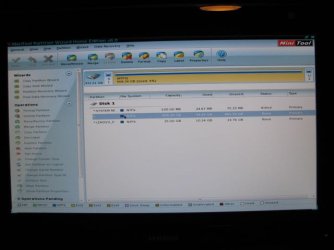
I have a new computer with a 1TB HD. I want to create new partitions for my various data.
Disk Management shows: SYSTEM RESERVED 100 MB NTFS Healthy, (C 906.34 GB NTFS
Healthy (Boot, Page File, Crash Dump, Primary Partition) 857.48 GB free space, 25.07 GB Healthy (OEM Partition)
In the past I have used 3rd party partitioning programs to create new partitions. I am not familiar with the situation where there is an unmovable file located in the middle
of the hard drive preventing me from using all of the available free space. Also, I have never had to temporarily relocate a page file, etc. I would appreciate some assistance
in determining what course of action I should take.
Disk Manager says:
Total size before shrink in MB: 928093
Size of available shrink space in MB: 449795
Enter amount of space to shrink in MB:
Total size after shrink in MB: 478298* *this amount if you enter 449795 in amount of space to shrink
!You cannot shrink a volume beyond the point where any unmovable files are located. See the "defrag" event in the Application log for detailed information about the
operation when it has completed.
See 'Shrink a Basic Volume' in Disk Management help for more information.
Help in Disk Management says:
When you shrink a partition, certain files (for example, the paging file or the shadow copy storage area) cannot be automatically relocated and you cannot decrease the
allocated space beyond the point where the unmovable files are located. If the shrink operation fails, check the Application Log for Event 259, which will identify the
unmovable file. If you know the cluster or clusters associated with the file that is preventing the shrink operation, you can also use the fsutil command at a command
prompt (type fsutil volume querycluster/? for usage). When you provide the querycluster parameter, the command output will identify the unmovable file that is preventing
the shrink operation from succeeding.
In some cases, you can relocate the file temporarily. For example, if the unmovable file is the paging file, you can use Control Panel to move it to another disk, shrink
the volume, and then move the page file back to the disk.
Disk Management shows: SYSTEM RESERVED 100 MB NTFS Healthy, (C
906.34 GB NTFSHealthy (Boot, Page File, Crash Dump, Primary Partition) 857.48 GB free space, 25.07 GB Healthy (OEM Partition)
In the past I have used 3rd party partitioning programs to create new partitions. I am not familiar with the situation where there is an unmovable file located in the middle
of the hard drive preventing me from using all of the available free space. Also, I have never had to temporarily relocate a page file, etc. I would appreciate some assistance
in determining what course of action I should take.
Disk Manager says:
Total size before shrink in MB: 928093
Size of available shrink space in MB: 449795
Enter amount of space to shrink in MB:
Total size after shrink in MB: 478298* *this amount if you enter 449795 in amount of space to shrink
!You cannot shrink a volume beyond the point where any unmovable files are located. See the "defrag" event in the Application log for detailed information about the
operation when it has completed.
See 'Shrink a Basic Volume' in Disk Management help for more information.
Help in Disk Management says:
When you shrink a partition, certain files (for example, the paging file or the shadow copy storage area) cannot be automatically relocated and you cannot decrease the
allocated space beyond the point where the unmovable files are located. If the shrink operation fails, check the Application Log for Event 259, which will identify the
unmovable file. If you know the cluster or clusters associated with the file that is preventing the shrink operation, you can also use the fsutil command at a command
prompt (type fsutil volume querycluster/? for usage). When you provide the querycluster parameter, the command output will identify the unmovable file that is preventing
the shrink operation from succeeding.
In some cases, you can relocate the file temporarily. For example, if the unmovable file is the paging file, you can use Control Panel to move it to another disk, shrink
the volume, and then move the page file back to the disk.
My Computer
At a glance
Windows 7 Professional 64 bitIntel i7 26008GBNividia Gforce GT 420
- Computer Manufacturer/Model Number
- Lenovo IdeaCentre K330 Series
- OS
- Windows 7 Professional 64 bit
- CPU
- Intel i7 2600
- Memory
- 8GB
- Graphics Card(s)
- Nividia Gforce GT 420
- Sound Card
- Nvidia High Definition Audio
- Monitor(s) Displays
- ViewSonic VX2433
- Screen Resolution
- 1920x1080
- Hard Drives
- 1 TB Hitachi