| Windows 7: How do you change search parameters? |
10 Jul 2011
|
#1 | | |
How do you change search parameters? Dell Intel Core 2 Duo Processor E7500 Computer
Inspirion 545s 00
Windows 7 Home Premium 64-bit
6GB Memory
750GB Hard Drive
How do I change the parameters for the SEARCH feature of Windows7 ot include a flash drive that I have in a USB hub?
Thank you,
Windsorlady | My System Specs |
| System Manufacturer/Model Number Dell Intel Core 2 Duo Processor E7500 Computer OS Windows 7 Memory 6GB |
10 Jul 2011
|
#2 | | Win 7 Home Premium 64bit Ver 6.1.7600 Build 7601 - SP1 Central Pa. |
Sorry that is not possible, see note: Index Locations - Add or Remove
Edit:
But, according to this it is possible, just make sure it is in the hub when you click on modify: Quote: To add a new location to the index, click on the Modify button. Any network drive or external hard drive will show up in the list of possible locations. You can check off any drive or folder that you would like to include in the index. Source: http://helpdeskgeek.com/windows-7/wi...exing-options/ | My System Specs | | Computer type PC/Desktop System Manufacturer/Model Number Gateway DX4831e (Mid-Tower Desktop) OS Win 7 Home Premium 64bit Ver 6.1.7600 Build 7601 - SP1 CPU Intel i3 530 2.93GHz, 2933MHz 2 Cores 4 Logical Processors Motherboard Gateway H57M01 133 megahertz Memory 6GB of 1,333MHz DDR3 SDRAM Graphics Card 32MB Intel Graphics Media Accelerator HD IGChip Sound Card Realtek High Definition Audio Monitor(s) Displays Gateway HX2000 20inch TFT active matrix TN Screen Resolution 1600 x 900 x 59 hertz Keyboard MS 'Natural' Standard PS/2 Enhanced 101-102 Key Mouse Gateway USB wired optical PSU 300watts. Case Mid-Tower Desktop Cooling Stock from Gateway Hard Drives WDC WD10EADS-00M2B0 [HDD] (1000.20 GB) -- drive 0,
HL-DT-ST DVDRAM GH41N [CD-ROM dr]
HP Photosmart Plus B210a e_series AIO Printer
Four card readers, and Four USB 2.0 Internet Speed Verizon FIOS 24.57Mbps Down - 5.68Mbps up Antivirus MSE Browser IE9.0.8112.16421-Upd ver 9.0.13, FireFox 19.2, Opera 12.14 Other Info BIOS: American Megatrends Inc. P01-A0 11/17/2009
System Specs by Belarc.
Join Date March 27th 2010 at 10:44:15 AM. |
10 Jul 2011
|
#3 | | Windows 7 Ultimate X64 SP1 Mt. Crumpit/Whoville |
Or you can open the drive and type your search query in the Explorer window too. | My System Specs | | Computer type PC/Desktop System Manufacturer/Model Number Home Built Desktop By DataTech OS Windows 7 Ultimate X64 SP1 CPU Intel i5-2550K, Differing ~4.4-4.8GHz No built in GPU Motherboard ASUS P8Z68-V PRO/GEN3 Memory 16GB G.Skill Sniper 2133MHz 4x4GB Graphics Card ASUS ENGTX460 DirectCU/2DI/1GD5 GeForce GTX 460 Sound Card Onboard Realtek 5-1 Monitor(s) Displays Samsung P2570HD Screen Resolution 1920x1080 Keyboard Old, beat-up Dell USB From 10 yrs Ago Mouse Gigabyte m6900 wired PSU Corsair HX650W Case Inwin Dragon Rider Cooling Hyper 212 EVO w/two Noctua fans, push-pull, @1300 RPM Hard Drives Crucial M4 128GB for OS, 750GB Seagate MomentusXT for data, 500GB Seagate Constellation for storage Internet Speed 8-19 Mbs down, 3-4 Mbs up Comcast Cable Antivirus Norton Internet Security Browser IE 9, Opera when needed Other Info 4 case fans, LG BluRay-RE, ASUS DVD-RW, Mr. Fusion power generator with flux capacitor, 1.21 gigawatts. |
10 Jul 2011
|
#4 | | |
Hum, this sounds great and I found where you reference, however, it only shows the C drive - no "I" drive or USB Disk. Where do I find that? | My System Specs | | System Manufacturer/Model Number Dell Intel Core 2 Duo Processor E7500 Computer OS Windows 7 Memory 6GB |
11 Jul 2011
|
#5 | | Win 7 Home Premium 64bit Ver 6.1.7600 Build 7601 - SP1 Central Pa. |

Quote: Originally Posted by windsorlady Hum, this sounds great and I found where you reference, however, it only shows the C drive - no "I" drive or USB Disk. Where do I find that? My apologies for not simplifying my information. Lets see if I can make it easier to understand.
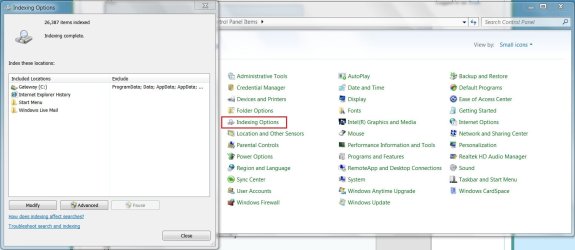
1.) You can go to Control Panel\All Control Panel Items, and open Indexing Options to get ready, but make sure your 'I' drive is in the USB hub before you click on modify.
1a.) Or you can place your 'I' drive in the USB hub, then go to Control Panel\All Control Panel Items, and open Indexing Options.
2.) Click on Modify #1 shown in picture attachment. 
3.) Click on 'Show all Locations' #2.
Your 'I' drive should show in the 'Change selected locations' box above. See Red arrow.
4.) Click on OK #3.
5.) Click on Close #4, to save changes. ***************** *** ***************** In Britton30's example: 
Quote: Originally Posted by Britton30 Or you can open the drive and type your search query in the Explorer window too. 1.) Make sure your 'I' drive is in the USB hub.
2.) Open Windows Explorer.
If is not already pinned to your 'Taskbar' to the right of the 'Start Orb'. Click on the 'Start' Orb, and type or copy/paste this into the search box; Windows Explorer Click on Windows Explorer under Programs (1)
3.) Then type I: into the Windows Explorer Search box.
And the contents of 'I' should automatically show in the right hand viewing pane below the search box. ***************** *** *****************
In either case you must make sure your 'I' drive is in your USB hub, but Britton30's example may be better because in my example, once you plug in your 'I' drive 'Search' will try to index it, and I am not sure how long that would take or if you would be willing to wait that long.
In his you just plug in your 'I' drive, enter I: in the explorer search box, and the results would show much quicker.
You would have to experiment with either one to see which suits you best.
For more on 'Search' see: Search in Windows 7
Don't forget to check the related tutorials below this tutorial. | My System Specs | | Computer type PC/Desktop System Manufacturer/Model Number Gateway DX4831e (Mid-Tower Desktop) OS Win 7 Home Premium 64bit Ver 6.1.7600 Build 7601 - SP1 CPU Intel i3 530 2.93GHz, 2933MHz 2 Cores 4 Logical Processors Motherboard Gateway H57M01 133 megahertz Memory 6GB of 1,333MHz DDR3 SDRAM Graphics Card 32MB Intel Graphics Media Accelerator HD IGChip Sound Card Realtek High Definition Audio Monitor(s) Displays Gateway HX2000 20inch TFT active matrix TN Screen Resolution 1600 x 900 x 59 hertz Keyboard MS 'Natural' Standard PS/2 Enhanced 101-102 Key Mouse Gateway USB wired optical PSU 300watts. Case Mid-Tower Desktop Cooling Stock from Gateway Hard Drives WDC WD10EADS-00M2B0 [HDD] (1000.20 GB) -- drive 0,
HL-DT-ST DVDRAM GH41N [CD-ROM dr]
HP Photosmart Plus B210a e_series AIO Printer
Four card readers, and Four USB 2.0 Internet Speed Verizon FIOS 24.57Mbps Down - 5.68Mbps up Antivirus MSE Browser IE9.0.8112.16421-Upd ver 9.0.13, FireFox 19.2, Opera 12.14 Other Info BIOS: American Megatrends Inc. P01-A0 11/17/2009
System Specs by Belarc.
Join Date March 27th 2010 at 10:44:15 AM. |
11 Jul 2011
|
#6 | | |
Thanks for the explanation Anak --- this does help a lot. The first method is what I had tried originally and only the C: drive shows up -- this still is the case. I also tried Britton's method, and once again, only the C: drive shows up.
Perhaps it's not showing up because of something in the bootup ---- when I bootup, I cannot have the flash drive in the hub or it will not boot up. Once I boot up without it plugged in, it's fine and I then plug it in. Someone told me how to change it so it would boot up with the flash drive in the hub, but it's sort of above and beyond me, so I've opted to not do that.
Guess I'll keep search on the "I" drive like I have been -- rather than hunt ad peck, it's hunt and search. It's worked pretty good, just thought there might be an easier way.
Thanks again for your information and help. I appreciate you.
windsorlady | My System Specs | | System Manufacturer/Model Number Dell Intel Core 2 Duo Processor E7500 Computer OS Windows 7 Memory 6GB |
11 Jul 2011
|
#7 | | Win 7 Home Premium 64bit Ver 6.1.7600 Build 7601 - SP1 Central Pa. |
Your welcome windsorlady, my apologies that it did not work out for you, but if I come across anything that might help I will post back. | My System Specs | | Computer type PC/Desktop System Manufacturer/Model Number Gateway DX4831e (Mid-Tower Desktop) OS Win 7 Home Premium 64bit Ver 6.1.7600 Build 7601 - SP1 CPU Intel i3 530 2.93GHz, 2933MHz 2 Cores 4 Logical Processors Motherboard Gateway H57M01 133 megahertz Memory 6GB of 1,333MHz DDR3 SDRAM Graphics Card 32MB Intel Graphics Media Accelerator HD IGChip Sound Card Realtek High Definition Audio Monitor(s) Displays Gateway HX2000 20inch TFT active matrix TN Screen Resolution 1600 x 900 x 59 hertz Keyboard MS 'Natural' Standard PS/2 Enhanced 101-102 Key Mouse Gateway USB wired optical PSU 300watts. Case Mid-Tower Desktop Cooling Stock from Gateway Hard Drives WDC WD10EADS-00M2B0 [HDD] (1000.20 GB) -- drive 0,
HL-DT-ST DVDRAM GH41N [CD-ROM dr]
HP Photosmart Plus B210a e_series AIO Printer
Four card readers, and Four USB 2.0 Internet Speed Verizon FIOS 24.57Mbps Down - 5.68Mbps up Antivirus MSE Browser IE9.0.8112.16421-Upd ver 9.0.13, FireFox 19.2, Opera 12.14 Other Info BIOS: American Megatrends Inc. P01-A0 11/17/2009
System Specs by Belarc.
Join Date March 27th 2010 at 10:44:15 AM. |
11 Jul 2011
|
#8 | | Windows 7 Ultimate X64 SP1 Mt. Crumpit/Whoville |
You may have USB devices set 1st in the boot sequence, but with no bootmgr on the drive, it'll get "stuck".
If the I drive doesn't show when you click Computer, go to Control Panel|Folder Options. In the window that opens go to the View tab, scroll down a bit and tick the button to "Show hidden files folders and drives". Click Apply and exit.
Now with the I drive plugged in, click Computer from the Start button and it should show there now. Just double-click it and you'll find the search box in upper right as in Anak's example. | My System Specs | | Computer type PC/Desktop System Manufacturer/Model Number Home Built Desktop By DataTech OS Windows 7 Ultimate X64 SP1 CPU Intel i5-2550K, Differing ~4.4-4.8GHz No built in GPU Motherboard ASUS P8Z68-V PRO/GEN3 Memory 16GB G.Skill Sniper 2133MHz 4x4GB Graphics Card ASUS ENGTX460 DirectCU/2DI/1GD5 GeForce GTX 460 Sound Card Onboard Realtek 5-1 Monitor(s) Displays Samsung P2570HD Screen Resolution 1920x1080 Keyboard Old, beat-up Dell USB From 10 yrs Ago Mouse Gigabyte m6900 wired PSU Corsair HX650W Case Inwin Dragon Rider Cooling Hyper 212 EVO w/two Noctua fans, push-pull, @1300 RPM Hard Drives Crucial M4 128GB for OS, 750GB Seagate MomentusXT for data, 500GB Seagate Constellation for storage Internet Speed 8-19 Mbs down, 3-4 Mbs up Comcast Cable Antivirus Norton Internet Security Browser IE 9, Opera when needed Other Info 4 case fans, LG BluRay-RE, ASUS DVD-RW, Mr. Fusion power generator with flux capacitor, 1.21 gigawatts. How do you change search parameters? problems? All times are GMT -5. The time now is 01:56 AM. | |