Windows 7 Forums Search
Welcome to Windows 7 Forums. Our forum is dedicated to helping you find solutions with any problems, errors or issues you are experiencing with Windows 7. The Windows 7 forum also covers news and updates and has an extensive Windows 7 tutorial section that covers a wide range of tips and tricks.


Windows 7 - Start Menu Office Icon

 
07-14-2011   #1


Win 7 Pro x64


Start Menu Office Icon

Hi,

Firstly let me apologise if I'm posting this in the wrong place, and also if it has already been asked/answered.

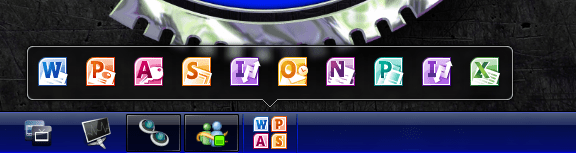
I want Office to be an icon on the taskbar (which I've managed), but when I right-click on the icon, I want it to open as Win Explorer does into that nice table thing where the contents are shown, allowing me to choose which program to run.

Is this possible?

My System SpecsSystem Spec
07-14-2011   #2


My System SpecsSystem Spec
07-14-2011   #3


Microsoft Windows 7 Home Premium 64-bit 7600


I had a mess around ,unfortunately i cannot get the microsoft office folder in the start menu to pin to the taskbar,
the best i could do was in start menu ,right click Ms office folder/ copy to folder , i selected my users folder then in your users folder drag the Ms office folder to the favourites list on the left of the explorer window.
perhaps someone else can figure it out for us.
edit : actually its simpler than that ,if you just drag the Ms office folder in start menu to the favourites list in explorer window,no need to copy to folder
My System SpecsSystem Spec
.


07-14-2011   #4


Win 7 Pro x64


Thanks for the quick reply.

Having had a look through the links, I'm not sure they are going to help with this problem, but again, thanks.

It's not that I want to right-click any folder and get new options, I specifically want to right-click the new icon I have on the desktop and have it show the contents above, such as the Win Ex icon does.

Currently when I click the new office icon, it takes me to the folder, and this might seem incredibly laxy, but ideally I want to have that nice box appear above the icon when it is right-clicked.
My System SpecsSystem Spec
07-14-2011   #5


Win 7 Pro x64


I've managed to make a folder on the taskbar (created a txt file, changed the extension to EXE, dragged it to taskbar, changed the properties to make the folder hidden in documents the location), it's just wanting to have the Win Ex icon effect...
My System SpecsSystem Spec
07-14-2011   #6


Windows 7 Ultimate x64 + x86 + Windows 8 x64


One method may be to copy the office folder to a suitable location, (makes it easier to access and protects the original),

Right click on the taskbar select toolbar - New Toolbar - and navigate to the copy of the office folder. unlock the taskbar and adjust the new toolbar to a position (Next to the start orb??), and size it to show just a single entry.

Lock the taskbar and you will now have a pop-up toolbar that contains all the items in the folder,(Text may be adjusted to show titles or not as you prefer)
My System SpecsSystem Spec
07-14-2011   #7


Win 7 Pro x64


I'd looked at that way but for some reason couldn't get the new toolbar to display as a folder, just text. Any clue on where I'm goin wrong on this?

It also seems that a program called 7stacks could be another answer...
My System SpecsSystem Spec
07-14-2011   #8


Windows 7 Ultimate x64


I think you mean a toolbar...?

Right-click on your taskbar, go to Toolbars > New toolbar. Browse to the MS Office folder in the Start Menu, which is usually in C:\ProgramData\Microsoft\Windows\Start Menu\Programs. Select the folder and click Select Folder.

You should now have the toolbar on your taskbar. With the taskbar unlocked you can modify the appearance a bit, but it's fairly limited.

(sorry about the brief tutorial! )

EDIT: arrgh, darn my slowness!
My System SpecsSystem Spec
07-14-2011   #9


win 7 X64 Ultimate SP1


Is this what you mean?

I have an icon that when clicked opens explorer to a documents folder where I store all of my docs (office docs). From there I can open any office program by clicking a document and It's ready to go.

I am not sure that is what you are after.

Start Menu Office Icon-docs.png
My System SpecsSystem Spec
07-14-2011   #10


Win 7 Pro x64


Again, thanks for the replies.

I've had a think as to how to word my request better, here we go:

I'm looking to put an icon on the taskbar, which in turn can have programs pinned to it. The result being that when said icon is right-clicked, the box above it opens and the program can be selected.

I've already attached an icon/folder that will open up a window with the programs in, but I don't want the "hassle" of having another window opening.

I also create a lot of new office documents and so I want the programs to be listed, not my documents.
My System SpecsSystem Spec
Reply

 Start Menu Office Icon problems?


Thread Tools


Similar Threads for: Start Menu Office Icon
Thread Forum
Change Start menu icon Customization
why i have not icon of photoshop cs5 in start menu? Software
Start Menu Icon Never Load General Discussion
Notepad++ Start menu icon issue General Discussion
office and start menu? Microsoft Office


All times are GMT -5. The time now is 12:29 AM.


Windows 7 Forums is an independent web site and has not been authorized,
sponsored, or otherwise approved by Microsoft Corporation.
"Windows 7" and related materials are trademarks of Microsoft Corp.
© Designer Media Ltd
  

1 2 3 4 5 6 7 8 9 10 11 12 13 14 15 16 17 18 19 20 21 22 23 24 25 26 27 28 29 30