| Windows 7: Remove W7 drop shadows? |
19 Jul 2011
|
#1 | | Windows 7, Home Pre4mium, 64 bit |
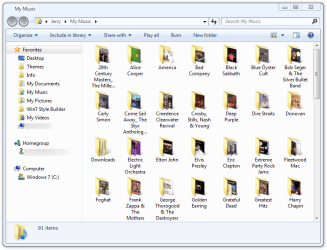
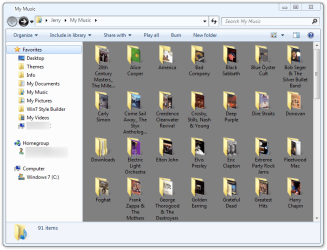
Remove W7 drop shadows? Hello all. This is just an annoyance, but a irritating annoyance nonetheless. Windows7, Home Premium, 64bit, pre-loaded on e-Machines EL 1333G. Is there any way within Windows 7 to remove the drop shadows from images of folders, images and document icons? Examples: When opening a folder of jpeg’s or document icons, each image has a drop shadow to the right and below. When opening a folder of other folders, each folder has a shadow to the right. I’m sure this is a wonderful improvement by the guys at Microsoft but the shadows are confusing to my eyes. I suspect though that a third party solution (free) will be needed. If anyone has a suggestion I’d appreciate it. Thanks much.
Last edited by theskyeye; 19 Jul 2011 at 02:16 PM..
Reason: fix formatting
| My System Specs |
| System Manufacturer/Model Number e-machines EL 1333G OS Windows 7, Home Pre4mium, 64 bit CPU AMD 2850e 1.8GHz (Neo MV-28) Motherboard eMachines WMCP61M (Socket AM2 ) Memory 2.0GB Dual-Channel DDR2 @ 361MHz (6-6-6-18) Graphics Card 256MB GeForce 6150SE nForce 430 (Acer Incorporated [ALI]) Sound Card Realtek High Definition Audio (on motherboard, I think) Monitor(s) Displays HP 2009 @ 1600x900 PSU ? Case ? Cooling ? Hard Drives 313GB Seagate ST332041 8AS SCSI Disk Device (SCSI) Internet Speed 1.3 down load, .34 upload Antivirus AVG free |
19 Jul 2011
|
#2 | | Windows 7 Ultimate SP1 64-Bit Peterborough, England |
Welcome to Window Seven Forums.
Navigate to Start>Computer and right-click Computer. Click Properties then Advanced System Settings. Click the Advanced tab and click Settings in the Performance section where you can choose which options you want, including removing drop shadows. | My System Specs | | System Manufacturer/Model Number HP Pavilion Elite 495UK OS Windows 7 Ultimate SP1 64-Bit CPU Intel Core i7 870 @ 2.93GHz Motherboard MSI 2A9C (CPU1) Memory 8Gb Dual-Channel DDR3 @ 664MHz Graphics Card nVidia GeForce GTX 460 1024MB dedicated RAM Sound Card Realtek HD Audio Monitor(s) Displays HP2310i Screen Resolution 1920 x 1080 Keyboard Logitech K750 solar-powered keyboard Mouse Logitech Wireless M180 mouse PSU 460W Case HP Elite Cooling Air cooled Hard Drives 1x1954GB Hitachi HDS22020ALA 330 (RAID), 1x1954GB Hitachi External for backup and storage Internet Speed 2Mb Other Info Pure Avanti Flow Internet Radio with iPod Dock, 64Gb iPod, HP USB Speakers, Sony MDR-V500 Headphones, Sony Vaio F-Series Laptop |
19 Jul 2011
|
#3 | | Win 7 Pro 64-bit South Central Texas |
Hello theskyeye and welcome to Seven Forums.
Have you tried changing the visual effects? Visual Effects Settings - Change | My System Specs | | Computer type Laptop System Manufacturer/Model Number Sony Vaio VPCEB47GM Laptop OS Win 7 Pro 64-bit CPU Intel i5 2.4 Ghz Memory 8GB DDR3 Graphics Card Intel HD 3000 Sound Card IDT High Definition Monitor(s) Displays 15.6 WGXA Anti-Glare LED Screen Resolution 1280x800 Hard Drives 640Gb 7200rpm Antivirus MSE Browser Opera (primary) with IE9 backup |
19 Jul 2011
|
#4 | | Windows 7, Home Pre4mium, 64 bit |
Thanks seavixen32 and marsimar for the quick replies.
I already have the visual effects checked “adjust for best performance” so every option is unchecked. I’ve looked in every nook and cranny I can find in Windows 7 and am now thinking the shadows are at the registry level as they appear everywhere. | My System Specs | | System Manufacturer/Model Number e-machines EL 1333G OS Windows 7, Home Pre4mium, 64 bit CPU AMD 2850e 1.8GHz (Neo MV-28) Motherboard eMachines WMCP61M (Socket AM2 ) Memory 2.0GB Dual-Channel DDR2 @ 361MHz (6-6-6-18) Graphics Card 256MB GeForce 6150SE nForce 430 (Acer Incorporated [ALI]) Sound Card Realtek High Definition Audio (on motherboard, I think) Monitor(s) Displays HP 2009 @ 1600x900 PSU ? Case ? Cooling ? Hard Drives 313GB Seagate ST332041 8AS SCSI Disk Device (SCSI) Internet Speed 1.3 down load, .34 upload Antivirus AVG free |
20 Jul 2011
|
#5 | | Win 7 Pro 64-bit South Central Texas |

Quote: Originally Posted by theskyeye Thanks seavixen32 and marsimar for the quick replies.
I already have the visual effects checked “adjust for best performance” so every option is unchecked. I’ve looked in every nook and cranny I can find in Windows 7 and am now thinking the shadows are at the registry level as they appear everywhere. You may be right. I found this older thread that might apply to your situation. How To Remove Win 7 Desktop Icon Shadows
The only other thought that comes to mind is perhaps trying out different 3rd party themes. Browsing deviantART 26 Awesome Windows 7 Themes | My System Specs | | Computer type Laptop System Manufacturer/Model Number Sony Vaio VPCEB47GM Laptop OS Win 7 Pro 64-bit CPU Intel i5 2.4 Ghz Memory 8GB DDR3 Graphics Card Intel HD 3000 Sound Card IDT High Definition Monitor(s) Displays 15.6 WGXA Anti-Glare LED Screen Resolution 1280x800 Hard Drives 640Gb 7200rpm Antivirus MSE Browser Opera (primary) with IE9 backup |
20 Jul 2011
|
#6 | | Windows 7, Home Pre4mium, 64 bit |
Hi marsmimar,
Thanks for the leads.
The lead to “How To Remove Win 7 Desktop Icon Shadows” does work, just not inside other folders.
Just for laughs & giggles, I tried the “Ease Of Access Center, turn on or off High Contrast when left ALT + left SHIFT + PRINT SCREEN is pressed”. That turned the background black but even that did not completely eliminate the shadows.
I’ll take a look at “deviantART” and “26 Awesome Windows 7 Themes” and get back when I finish perusing them | My System Specs | | System Manufacturer/Model Number e-machines EL 1333G OS Windows 7, Home Pre4mium, 64 bit CPU AMD 2850e 1.8GHz (Neo MV-28) Motherboard eMachines WMCP61M (Socket AM2 ) Memory 2.0GB Dual-Channel DDR2 @ 361MHz (6-6-6-18) Graphics Card 256MB GeForce 6150SE nForce 430 (Acer Incorporated [ALI]) Sound Card Realtek High Definition Audio (on motherboard, I think) Monitor(s) Displays HP 2009 @ 1600x900 PSU ? Case ? Cooling ? Hard Drives 313GB Seagate ST332041 8AS SCSI Disk Device (SCSI) Internet Speed 1.3 down load, .34 upload Antivirus AVG free |
20 Jul 2011
|
#7 | | |
If I had to guess you are talking about the shadows on the folder icons...Those shadows are part of the image, the icons themselves. In other words, its as if you took a picture of a shadow then want the camera to remove the shadow after the fact. | My System Specs | | Computer type PC/Desktop System Manufacturer/Model Number Alienware Aurora ALX R4 OS Windows 7 x64 (SP1) CPU Intel Core i7-3930K (3.2GHz, Turbo 4GHz) Motherboard Alienware Aurora-R4 x79 Memory 4x Samsung 4GB PC3-12800 DDR3 (16GB 1600MHz) Graphics Card Nvidia Geforce GTX 690 (Stock) Sound Card RealTek Integrated Audio Monitor(s) Displays Dell UltraSharp U3011 Screen Resolution 2560x1600 PSU 875W Some Dell PSU <.< Hard Drives Samsung P830 256 GB, WD Raptor 150GB, 2x 1TB HDDs Other Info Dell Inspiron Mini 10v (Intel Atom N270 1.6 GHz; 1GB; Windows 7 Ultimate) |
20 Jul 2011
|
#8 | | Win 7 Pro x64 Council Bluffs, Iowa |
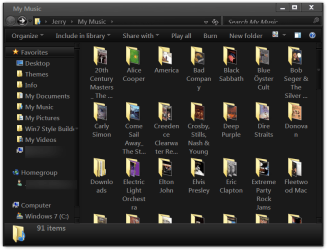
logicearth is right the shadows are part of the icon image. The darker the window color = no shadows.
Jerry | My System Specs | | Computer type Laptop System Manufacturer/Model Number Sager NP9170 OS Win 7 Pro x64 CPU Intel(R) Core(TM) i7-3630QM CPU @ 2.40GHz Motherboard CLEVO P170EM Memory 12 GB Graphics Card (1) Intel(R) HD Graphics 4000 (2) NVIDIA GeForce GTX 675M Sound Card (1) Realtek High Definition Audio (2) Intel(R) Display Aud Monitor(s) Displays 17.3 Screen Resolution 1920x1080 Keyboard Backlite Hard Drives (1) M4-CT256M4SSD2 ATA Device 256 GB (2) ST9500424AS ATA Device 500 GB Antivirus MSE, Malwarebytes Pro Browser Firefox |
21 Jul 2011
|
#9 | | Windows 7, Home Pre4mium, 64 bit |
Hi marsmimar,
I looked around at those themes & they are based on nice artwork, but I keep my desktop a plain medium grey with no screen savers. I’ll pass on downloading any as it looks like they are pre-packaged themes that may or may not be modifiable. And the screenshots all show icon shadows.
logicearth: Yes, and the drop shadows under & to the right of jpg images.
Bongo: I tried the high contrast screen but the black backround is harder on my old eyes than the shadows.
Looks like the old XP thumbnails view with it’s uncluttered square frame format is gone forever.
Progress ?
Thanks all for your time and consideration.
Cheers
Last edited by theskyeye; 21 Jul 2011 at 01:01 PM..
Reason: splling
| My System Specs | | System Manufacturer/Model Number e-machines EL 1333G OS Windows 7, Home Pre4mium, 64 bit CPU AMD 2850e 1.8GHz (Neo MV-28) Motherboard eMachines WMCP61M (Socket AM2 ) Memory 2.0GB Dual-Channel DDR2 @ 361MHz (6-6-6-18) Graphics Card 256MB GeForce 6150SE nForce 430 (Acer Incorporated [ALI]) Sound Card Realtek High Definition Audio (on motherboard, I think) Monitor(s) Displays HP 2009 @ 1600x900 PSU ? Case ? Cooling ? Hard Drives 313GB Seagate ST332041 8AS SCSI Disk Device (SCSI) Internet Speed 1.3 down load, .34 upload Antivirus AVG free |
21 Jul 2011
|
#10 | | |
Are you Mr. Monk? Well a version of Monk that uses a computer that is. | My System Specs | | Computer type PC/Desktop System Manufacturer/Model Number Alienware Aurora ALX R4 OS Windows 7 x64 (SP1) CPU Intel Core i7-3930K (3.2GHz, Turbo 4GHz) Motherboard Alienware Aurora-R4 x79 Memory 4x Samsung 4GB PC3-12800 DDR3 (16GB 1600MHz) Graphics Card Nvidia Geforce GTX 690 (Stock) Sound Card RealTek Integrated Audio Monitor(s) Displays Dell UltraSharp U3011 Screen Resolution 2560x1600 PSU 875W Some Dell PSU <.< Hard Drives Samsung P830 256 GB, WD Raptor 150GB, 2x 1TB HDDs Other Info Dell Inspiron Mini 10v (Intel Atom N270 1.6 GHz; 1GB; Windows 7 Ultimate) Remove W7 drop shadows? problems? All times are GMT -5. The time now is 08:03 AM. | |