Windows 7 Forums


Windows 7: Laptop boots up in safe mode and shuts down automatically

19 Jul 2011  
cmnunis

Windows 7 Professional 32bit
9 posts
 
 
Laptop boots up in safe mode and shuts down automatically

Hi guys,

I'm new here and so, a big hello to all you "veterans" on this site. I hope to learn from you guys as I go along.


So here is my problem:-

My laptop started up in safe mode randomly and just went along. I tried to do a System Restore but then it shut down suddenly. I booted it up again and this time, the laptop lasted shorter than usual. I have also tried other options, like "Last Known Good Configuration" and "Startup Repair".

When I click on "Startup Windows Normally", it still goes into safe mode. I've tried doing a few things in safe mode and even that does not work. I tried going into Device Manager etc and there is no time to do anything as the laptop just dies off.

Methinks that it could be a hardware problem but has anyone had this problem before? If so, how did you guys get around to solving it?

All help will be much appreciated. Thanks for your time guys.
My System SpecsSystem Spec

19 Jul 2011  
davehc

Vista and now 7 in 32 and 64 bit.
756 posts
Denmark


On battery, main power, or both?
My System SpecsSystem Spec
19 Jul 2011  
cmnunis

Windows 7 Professional 32bit
9 posts


Quote   Quote: Originally Posted by davehc View Post
On battery, main power, or both?
Hi mate, on both.
My System SpecsSystem Spec
.


19 Jul 2011  
t-4-2

Windows 7 Home Premium 64-bit, SP1
1,002 posts


Quote   Quote: Originally Posted by cmnunis View Post
Hi guys,

I'm new here and so, a big hello to all you "veterans" on this site. I hope to learn from you guys as I go along.

So here is my problem:-

My laptop started up in safe mode randomly and just went along. I tried to do a System Restore but then it shut down suddenly. I booted it up again and this time, the laptop lasted shorter than usual. I have also tried other options, like "Last Known Good Configuration" and "Startup Repair".

When I click on "Startup Windows Normally", it still goes into safe mode. I've tried doing a few things in safe mode and even that does not work. I tried going into Device Manager etc and there is no time to do anything as the laptop just dies off.

Methinks that it could be a hardware problem but has anyone had this problem before? If so, how did you guys get around to solving it?

All help will be much appreciated. Thanks for your time guys.
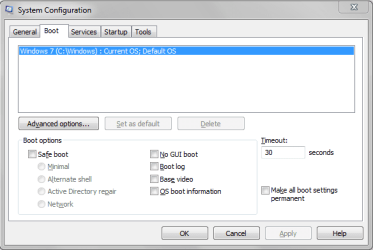
See if your computer is somehow set to boot in safe mode.....

Start > in the search box, type msconfig > press Enter key > click Boot tab at the top > under Boot options, make sure there is no check mark in front of Safe Boot > in fact, make sure there are no checkmarks anywhere > click OK when done.

see screenshot :
Laptop boots up in safe mode and shuts down automatically-boot-options.png
My System SpecsSystem Spec
20 Jul 2011  
MacGyvr

Windows 7 Ultimate RTM (Technet)
137 posts
Charlotte, NC


Press F8 during the boot up process and when you get the long menu of options, choose the one that says "Disable Automatic Restart.........."

Now you'll be able to see the blue screen error that is happening when the system restarts and possibly use the information to correct the problem.
My System SpecsSystem Spec
20 Jul 2011  
cmnunis

Windows 7 Professional 32bit
9 posts


Hi guys,

thanks so much for the assistance. I've already fixed the problem. Thanks again.
My System SpecsSystem Spec
20 Jul 2011  
MacGyvr

Windows 7 Ultimate RTM (Technet)
137 posts
Charlotte, NC


Please make a post showing how it was fixed so that others can benefit from it and also mark the thread as solved. Otherwise people will continue to respond to it.
My System SpecsSystem Spec
20 Jul 2011  
cmnunis

Windows 7 Professional 32bit
9 posts


Ok, so what happened was, I did what Dave (see 4th post) suggested. Once that happened, I restarted the laptop and it started working fine.

I did a virus scan shortly after and guess what, there were 2 backdoors in my system that allowed for remote access. I cleared those 2 and now, its working well.

So, thanks again.
My System SpecsSystem Spec
20 Jul 2011  
marsmimar

Win 7 Pro 64-bit
6,693 posts
South Central Texas


Glad to hear things are working again. Just one suggestion, though. Since not every antivirus or antspyware is 100% effective 100% of the time, I'd strongly recommend using a couple of free tools for additional scans - just to make sure there isn't something else hidden.

Malwarebytes : Malwarebytes Anti-Malware is a free download that removes viruses and malware from your computer

Hitman Pro 3 - SurfRight

http://www.sevenforums.com/tutorials...m-sweeper.html
My System SpecsSystem Spec
20 Jul 2011  
cmnunis

Windows 7 Professional 32bit
9 posts


Hi guys, it looks like its happening again. This time, it doesn't go beyond the "Starting Microsoft" screen. It shows that screen and then it just dies off.

It all started with the disk check. I had wanted to do a disk check, and I ticked on both options. How do I get in to undo that now? :S
My System SpecsSystem Spec
Reply

 Laptop boots up in safe mode and shuts down automatically problems?


Thread Tools


Similar help and support threads for: Laptop boots up in safe mode and shuts down automatically
Thread Forum
Windows 7 Hard drive failure - Only Boots in Safe Mode General Discussion
Unable to boot off safe mode and the machine shuts down abruptly. General Discussion
PC restarts automatically but in safe mode it working fine Performance & Maintenance
My laptop only boots in safe mode Help! BSOD Help and Support
after installing win 7 only boots in vga or safe mode Installation & Setup


All times are GMT -5. The time now is 02:05 PM.


Windows 7 Forums is an independent web site and has not been authorized,
sponsored, or otherwise approved by Microsoft Corporation.
"Windows 7" and related materials are trademarks of Microsoft Corp.
© Designer Media Ltd