Windows 7 Forums


Windows 7: Battery Icon Gone

29 Jul 2011   #1

Windows 7 64 Bit
 
 
Battery Icon Gone

At the beginning of the summer, I got some kind of virus or bug that crashed my computer for a few weeks. I finally fixed the virus problem and noticed my battery icon was missing. I have just now gotten around to this problem, but I have had to keep my computer plugged into the wall for it to work, so now it's pretty much a desktop. I am going to be heading back to school in a few weeks and I want to get this problem fixed. Hopefully someone can help me!!? I've tried all that I can.

My System SpecsSystem Spec

29 Jul 2011   #2

Win 7 Ultimate x64


It helps a great deal if you elaborate on 'I've tried all that I can.'.

No you haven't tried all that you can.

1. Which laptop?
2. Which OS?
3. Have you gone to Power options in the control panel?

You didn't tell us anything, and you expect us to give a hand.

How about you tell us what you got, so that the rest of us might be able to make an educated guess.
My System SpecsSystem Spec
29 Jul 2011   #3

64-bit Windows 7 Ultimate SP1 & Windows 8 Enterprise
Texas


Hello Smith, and welcome to Seven Forums.

You might see if the tutorial below for the battery icon may be able to help. Be sure to check the items in yellow TIP box at the top of the tutorial first.

System Icons - Enable or Disable

Hope this helps,
Shawn
My System SpecsSystem Spec
.


29 Jul 2011   #4

Windows 7 64 Bit


I have a HP Pavilion Dv7 Notebook PC, AMD Turion II Ultra Dual Core Mobile M600 2.40 GHZ, I have Windows 7 64 Bit OS, and I have looked through all my options throughout the control panel that I feel would be connected, also I've looked through out the internet at a bunch of sites, along with friends that have tried helping me solve the problem.

Windows 7 Home Premium**

Last edited by Brink; 29 Jul 2011 at 03:55 PM.. Reason: merged
My System SpecsSystem Spec
29 Jul 2011   #5

Windows 7 Home Premium x64 SP1
England


Hello Smith55j

If your having to keep your notebook plugged in for it to work its not a battery icon issue as much as its a battery issue. Check to make sure the battery is inserted correctly and charging.There is usually a led light on the notebook to indicate this. Try a third party battery meter like Battery Meter: A small but full featured battery meter for your laptop and UMPC. | Mioplanet this may help diagnose if the battery is available or not.

Danny
My System SpecsSystem Spec
29 Jul 2011   #6

Windows 7 64 Bit


Quote   Quote: Originally Posted by xxxdannyxxx View Post
Hello Smith55j

If your having to keep your notebook plugged in for it to work its not a battery icon issue as much as its a battery issue. Check to make sure the battery is inserted correctly and charging.There is usually a led light on the notebook to indicate this. Try a third party battery meter like Battery Meter: A small but full featured battery meter for your laptop and UMPC. | Mioplanet this may help diagnose if the battery is available or not.

Danny

Danny using your battery meter it says full and is at 255% charge it reads, so I'm guessing that my battery is fine but it just doesn't work when it is unplugged.
My System SpecsSystem Spec
29 Jul 2011   #7

Windows 7 Ultimate 64-Bit


Quote:
Danny using your battery meter it says full and is at 255% charge it reads, so I'm guessing that my battery is fine but it just doesn't work when it is unplugged.
I think that could mean its broken, if its over 100%
My System SpecsSystem Spec
29 Jul 2011   #8

Windows 7 Home Premium x64 SP1
England


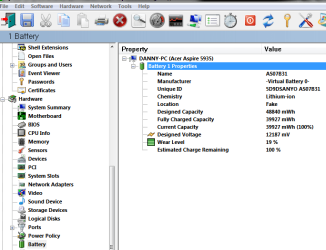
Firstly try and turn on the notebook with the ac adapter disconnected.If it wont start up then reconnect the adapter boot up and download this- http://www.gtopala.com/siw-download.html
The free version is at the bottom
Under battery on the left hand side it will give you a wear level on the battery.This may help to decide if its the battery that has gone.

Battery Icon Gone-capture.png

Danny
My System SpecsSystem Spec
29 Jul 2011   #9

Windows 7 Pro X64
Space Coast of Florida


Even if the battery is bad, that should not prevent the icon from showing in the System tray. Try the fix Brink posted, see if it helps.
My System SpecsSystem Spec
Reply

 Battery Icon Gone problems?


Thread Tools


Similar help and support threads for: Battery Icon Gone
Thread Forum
Battery Icon Dissapeared? Performance & Maintenance
Lost battery icon General Discussion
laptop battery icon Hardware & Devices
Battery icon is on one second...off the next Performance & Maintenance
red cross on battery icon General Discussion


All times are GMT -5. The time now is 09:21 AM.


Seven Forums Android App Seven Forums IOS App Follow us on Facebook

Windows 7 Forums is an independent web site and has not been authorized,
sponsored, or otherwise approved by Microsoft Corporation.
"Windows 7" and related materials are trademarks of Microsoft Corp.
© Designer Media Ltd
  

1 2 3 4 5 6 7 8 9 10 11 12 13 14 15 16 17 18 19 20 21 22 23 24 25 26 27 28 29 30 31 32