Windows 7 Forums Search
Welcome to Windows 7 Forums. Our forum is dedicated to helping you find solutions with any problems, errors or issues you are experiencing with Windows 7. The Windows 7 forum also covers news and updates and has an extensive Windows 7 tutorial section that covers a wide range of tips and tricks.


Windows 7 - SuperBar Vs Normal Taskbar

 
07-24-2009   #1


Windows 7 RTM X64


SuperBar Vs Normal Taskbar

Just a thought:

Who uses the old style taskbar still? Like the one in vista, thin strip...

And who uses the new 'Superbar'

Advantages of one over another?

My System SpecsSystem Spec
07-24-2009   #2


Windows 7 RTM X64


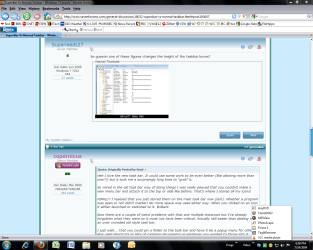
This is my only annoyance.

The gap from the bottom of the box, and the bottom of the taskbar. It annoying when you click it accidently when trying to click a box.

Can this be changed?
Attached Thumbnails
SuperBar Vs Normal Taskbar-untitled.png  
My System SpecsSystem Spec
07-24-2009   #3


Windows 7 x64 Ultimate


Heh I love the new task bar. It could use some work to be even better (like allowing more than one!!!) but it took me a surprisingly long time to "grok" it.

So mired in the old task bar way of doing things I was really peeved that you couldn't make a new menu bar and attach it to the top or side like before. That's where I stored all my icons!

FINALLY I realized that you just stored them on the main task bar now (duh). Whether a program was open or not didn't matter! No more space was used either way. When you clicked on an icon it either launched or switched to it. Brilliant.

Now there are a couple of weird problems with that and multiple instances but I've already forgotten what they were so it must not have been critical. Actually still easier than dealing with an over crowded old style task bar.

I just wish... that you could pin a folder to the task bar and have it be a popup menu for other less used shortcuts or lists of common documents or whatever you wanted to throw into it...
My System SpecsSystem Spec
.


07-24-2009   #4


Windows 7 RC


Quote   Quote: Originally Posted by Superleeds27 View Post
This is my only annoyance.

The gap from the bottom of the box, and the bottom of the taskbar. It annoying when you click it accidently when trying to click a box.

Can this be changed?
I think if you right click on taskbar and go to properties and choose use small icons, it should fix this.
My System SpecsSystem Spec
07-24-2009   #5


Windows 7 RTM X64


That halfs the size of the box.

If anything i would like the box to touch the bottom of the taskbar, fill that little ciupple of mm gap that there is.
My System SpecsSystem Spec
07-24-2009   #6


Windows 7 RTM X64


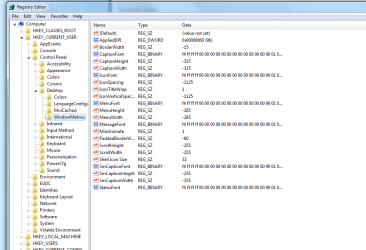
Im guessin one of these figures changes the height of the taskbar boxes?
Attached Thumbnails
SuperBar Vs Normal Taskbar-untitled.png  
My System SpecsSystem Spec
07-24-2009   #7


7264x64/7260x86


Quote   Quote: Originally Posted by fseal View Post
Heh I love the new task bar. It could use some work to be even better (like allowing more than one!!!) but it took me a surprisingly long time to "grok" it.

So mired in the old task bar way of doing things I was really peeved that you couldn't make a new menu bar and attach it to the top or side like before. That's where I stored all my icons!

FINALLY I realized that you just stored them on the main task bar now (duh). Whether a program was open or not didn't matter! No more space was used either way. When you clicked on an icon it either launched or switched to it. Brilliant.

Now there are a couple of weird problems with that and multiple instances but I've already forgotten what they were so it must not have been critical. Actually still easier than dealing with an over crowded old style task bar.

I just wish... that you could pin a folder to the task bar and have it be a popup menu for other less used shortcuts or lists of common documents or whatever you wanted to throw into it...
Look for 7 stacks here on the forum.
My System SpecsSystem Spec
07-24-2009   #8


Windows 7 x64 Ultimate


I actually tried 7 stacks but it wasn't quite right, it sort of half worked for what I wanted. (though I forget the details of what didn't work the way I expected atm)

I'm thinking I might make it a programming project, but it should work basically just like the program menu with multi level flyouts for any sub folders in the pinned folder and work justlike a launch menu. Super simple fast and easy.
My System SpecsSystem Spec
07-24-2009   #9


Windows Vista 64bit


I like the new taskbar. It used to have alot of quick launch icons so they would take alot of space.
My System SpecsSystem Spec
07-24-2009   #10


7600x64 RTM


I use the regular bar, looks cool and I don't need to have GIANT icons.
My System SpecsSystem Spec
Reply

 SuperBar Vs Normal Taskbar problems?


Thread Tools


Similar Threads for: SuperBar Vs Normal Taskbar
Thread Forum
Desktop Icons Freeze but Start menu/Taskbar work normal Crashes and Debugging
adjust padding/spacing in taskbar/superbar Customization
Return Taskbar to Normal Customization
Superbar Previews... Customization
superbar can I turn off taskbar grouping? Customization


All times are GMT -5. The time now is 12:42 AM.


Windows 7 Forums is an independent web site and has not been authorized,
sponsored, or otherwise approved by Microsoft Corporation.
"Windows 7" and related materials are trademarks of Microsoft Corp.
© Designer Media Ltd
  

1 2 3 4 5 6 7 8 9 10 11 12 13 14 15 16 17 18 19 20 21 22 23 24 25 26 27 28 29 30