Windows 7 Forums


Windows 7: UPS monitoring in 7.

12 Aug 2011   #1

Windows 7 Home Premium 64-bit
ohio
 
 
UPS monitoring in 7.

Does Windows 7 have a built in UPS monitor, like XP did, which would allow me to configure shutdown times as well as notifications? If so, how would I get to that please?

Thanks again

My System SpecsSystem Spec

12 Aug 2011   #2

Windows 7 Ultimate 64bit (Build 7600)
Wales


Have a looky here pal Freeware UPS Assistant monitor
My System SpecsSystem Spec
12 Aug 2011   #3

Windows 7 Home Premium 64-bit
ohio


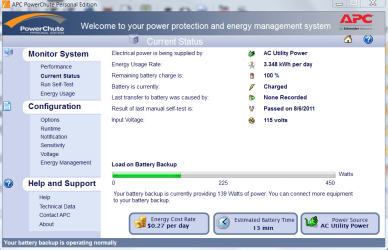
Thanks for the recommendation, however, it did not auto detect information about the UPS such as wattage and no options for much, so I scrapped it and went back to using APC powerchute. I just don't like the fact that I have to allow a program to make changes, when I already verified it, every time I log-on. It's these things that make me cringe for Microsoft.

Thanks again, I appreciate it
My System SpecsSystem Spec
.


12 Aug 2011   #4

Windows 7 Ultimate X64 SP1
Mt. Crumpit/Whoville


I have APC Power Chute. what changes is it making for you without your permission?
My System SpecsSystem Spec
12 Aug 2011   #5

Windows 7 Home Premium 64-bit
ohio


It doesn't specify what needs changed, only that it needs approval to start. Unfortunately, Windows won't allow me to make a screenshot of the message, as when it dims it appears to be locking the system, until the acknowledgment. It's weird that if your using the same software, but not having the same issue.

thank you

GRB70
My System SpecsSystem Spec
12 Aug 2011   #6

Windows 7 Professional 64 Bit SP1
St Thomas, Virgin Islands


That is unusual. I have been using APC UPSs for many years with Powerchute & never had a permission issue like that. Does it occur if you disable Windows firewall? If so, add the Powerchute program to the exclusion list.

OR

Try going to Control Panel>User Accounts>Change User Account Control Settings & put the slider control on never notify.
My System SpecsSystem Spec
12 Aug 2011   #7

Windows 7 Ultimate X64 SP1
Mt. Crumpit/Whoville


Repeat the error and press PrntScn, open Paint, Edit and Paste, that should get a shot for us.
It sounds like the UAC asking you for permission to run.
My System SpecsSystem Spec
12 Aug 2011   #8

Windows 7 HP 64bit, Windows 8 Pro w/Media Center 64bit
Covington, La


Its a UAC prompt and is only with PowerChute 3.0. They made some changes in the software with this version.

Jim
My System SpecsSystem Spec
12 Aug 2011   #9

Windows 7 Home Premium 64-bit
ohio


@TBoyd I use Comodo firewall, which does have it as a trusted application. If I were to slide the bar down to never notify, that works. However, isn't that defeating the purpose, wouldn't I want to be notified. As a firewall allows certain things be added to the trusted apps or exclusion list, so to should this case scenario, I would think??

@Britton30 that is what I did, and it would not give me the option to paste from the clipboard. You are however correct, the UAC is asking for permission.

Thank you guys for helping,

: )

grb70
My System SpecsSystem Spec
12 Aug 2011   #10

Windows 7 Professional 64 Bit SP1
St Thomas, Virgin Islands


Quote   Quote: Originally Posted by GRB70 View Post
@TBoyd I use Comodo firewall, which does have it as a trusted application. If I were to slide the bar down to never notify, that works. However, isn't that defeating the purpose, wouldn't I want to be notified. As a firewall allows certain things be added to the trusted apps or exclusion list, so to should this case scenario, I would think??
I changed my UAC to "never notify" quite some time ago & haven't suffered any consequences as a result. I got tired of having to "give permission" to run, open, or install something most of the time. Until I mess up because Windows didn't notify me, I'm keeping the setting as is.
My System SpecsSystem Spec
Reply

 UPS monitoring in 7. problems?


Thread Tools


Similar help and support threads for: UPS monitoring in 7.
Thread Forum
boot performanc monitoring and shutdown performance monitoring issues Performance & Maintenance
Bandwidth Monitoring Network & Sharing
data monitoring Software
Solved Dual Monitoring Graphic Cards
Monitoring FPS Gaming


All times are GMT -5. The time now is 11:09 AM.


Seven Forums Android App Seven Forums IOS App Follow us on Facebook

Windows 7 Forums is an independent web site and has not been authorized,
sponsored, or otherwise approved by Microsoft Corporation.
"Windows 7" and related materials are trademarks of Microsoft Corp.
© Designer Media Ltd
  

1 2 3 4 5 6 7 8 9 10 11 12 13 14 15 16 17 18 19 20 21 22 23 24 25 26 27 28 29 30 31 32