| Windows 7: resizing new partition |
12 Jan 2009
|
#1 | | |
resizing new partition I installed Windows 7 on a new partition I created in Vista, but want to increase the size of it now....the below article say's I can, but the selection to expand is greyed out? I guess I might need to be running whole computer as administrator, I am only user, or should this be done in safe mode, or do I need a third party program? A lot of questions I know! Thanks... Resize a Partition for Free in Windows Vista :: the How-To Geek | My System Specs |
| System Manufacturer/Model Number HP OS Windows Seven 64 bit CPU AMD Phenom 9150e Quad-core 1.80 GHz Memory 5 gigs Graphics Card GeForce 9600 GT Sound Card stock Monitor(s) Displays HP w2207h Screen Resolution 1680x1050 Keyboard HP Mouse MS Lasermouse 5000 Hard Drives external Maxtor 250 gig
2nd internal 225 gig Internet Speed 5 MB |
12 Jan 2009
|
#2 | | Vista Ult 64 bit Seven Ult RTM x64 Maine, USA |
I had this problem also. Unfortunately I gubber things up and ended up reinstalling so I just resized the partitions when I reinstalled (no files on the other partition). I do see that extend partition is still greyed out though. Anyone else?
Gary | My System Specs | | System Manufacturer/Model Number Dell XPS420 OS Vista Ult 64 bit Seven Ult RTM x64 CPU Intel Core2 Quad Q6600 2.40 gigahertz Memory Crucial Ballistix 4x2GB PC2 6400 Graphics Card NVIDIA GeForce 8600 GTS 256 MB Sound Card Creative SB X-Fi audio Monitor(s) Displays HP w2207 + HPvs15 Screen Resolution 1680x1050 + 1024x768 Keyboard Microsoft Comfort Curve Mouse MX Revolution Hard Drives 2-WD5000AAKS-500 GB
WD5000AAV-500 GB external Other Info Wacom Intuos 2 Graphics Tablet
Experience Index=5.5 |
13 Jan 2009
|
#3 | | |
Reinstall? Reinstalling your OS is an option, but the worst option to resize partitions. At least, I don't want to waste time reinstalling my computer. What I use to increase the size of my partition is Easeus Partition Manager. It can help resize partitions without destroying any data. Three basic editions are available: home edition that is free to PC users, professional edition and server edition for enterprise users. | My System Specs | | |
13 Jan 2009
|
#4 | | Windows 7 RC 7100 32bit/64bit |
One possible reason that the extend option is greyed out is that probably you don't have enough space left (meaning that your primary partition is used to consume all the space available).
Have you tried to shrink the primary partition first, and then create a new partition on the unused space left?
The steps are as below:
1. Shrink the other partition so that you have free space left.
2. When you have free space left, then try to extend the desired partition. | My System Specs | | System Manufacturer/Model Number ENIAC OS Windows 7 RC 7100 32bit/64bit CPU Intel Core2Duo E4500 2.20 GHz Motherboard ASUS P5LD2-X/1333 Memory 2x1GB Kinsgston DDR2 800MHz Graphics Card Nvidia 8500GT Sound Card Onboard High Definition Audio Device Monitor(s) Displays Sony Bravia 42" Keyboard Some cheap one Mouse Microsoft Intellimouse something Case LINKW 2222 Cooling Standard Intel Internet Speed 24MBps ADSL |
13 Jan 2009
|
#5 | | Vista Ult 64 bit Seven Ult RTM x64 Maine, USA |
I have had 166GB of space and it was still greyed out. Don't think that's it. Reason I did it when I reinstalled is 'cause I had to reinstall anyways and had no data on the partition I wanted to remove.
Gary | My System Specs | | System Manufacturer/Model Number Dell XPS420 OS Vista Ult 64 bit Seven Ult RTM x64 CPU Intel Core2 Quad Q6600 2.40 gigahertz Memory Crucial Ballistix 4x2GB PC2 6400 Graphics Card NVIDIA GeForce 8600 GTS 256 MB Sound Card Creative SB X-Fi audio Monitor(s) Displays HP w2207 + HPvs15 Screen Resolution 1680x1050 + 1024x768 Keyboard Microsoft Comfort Curve Mouse MX Revolution Hard Drives 2-WD5000AAKS-500 GB
WD5000AAV-500 GB external Other Info Wacom Intuos 2 Graphics Tablet
Experience Index=5.5 |
13 Jan 2009
|
#6 | | Windows 7 Ultimate 64-bit Chicago |
Please note that the partition resizer n 7 can only add or remove space at the end of a partition. It does not move partitions like third party tools. If you have adjacent partitions and shrink the first, you cannot grow the second into the space just freed. That would require moving data which the 7 partition resizer doesn't do. | My System Specs | | System Manufacturer/Model Number baarod/MCP OS Windows 7 Ultimate 64-bit CPU Core2 Quad Q6600 @ 3.6GHz 9x400FSB Motherboard Gigabyte G33M-S2H Memory 4GB DDR2 1066 Graphics Card ATI Radeon HD 4670 Sound Card Integrated Azalia Monitor(s) Displays Acer AL1711 Screen Resolution 1280x1024 Keyboard Microsoft Wireless Comfort Keyboard 4000 Mouse Microsoft Wireless Lasr Mouse 5000 PSU 240W TFX Case InWin BT566 Cooling Intel Retail Stock Hard Drives OCZ Vertex SATAII w/ 1.5FW 30,528MB system and apps
Maxtor 6L300R0 PATA 286,188MB page file, data and user profiles Internet Speed 3Mbps Verizon DSL over 802.11g Other Info Hauppauge WinTV PVR II Tuner, Generic $13 SoC Webcam, RT61 WiFi with remote antenna, Media Center Remote and Receiver |
13 Jan 2009
|
#7 | | Vista Ult 64 bit Seven Ult RTM x64 Maine, USA |
I had 2 partitions side by side. I know the extention can only go to the right and that's what I tried. Tried it with both formatted, first one formatted second one not, first one formatted second one deleted, first one formatted second one as a simple volume. Only thing I didn't try was with both unformatted. I did have files on the first of the partitions so formatting that was not an option. I believe I am just doing something wrong, this is the first I've played with it, but the help files don't show anything and I can only guess at this point. I need to boot into Vista and see if those help files can help me any. Will do that later today.
Gary | My System Specs | | System Manufacturer/Model Number Dell XPS420 OS Vista Ult 64 bit Seven Ult RTM x64 CPU Intel Core2 Quad Q6600 2.40 gigahertz Memory Crucial Ballistix 4x2GB PC2 6400 Graphics Card NVIDIA GeForce 8600 GTS 256 MB Sound Card Creative SB X-Fi audio Monitor(s) Displays HP w2207 + HPvs15 Screen Resolution 1680x1050 + 1024x768 Keyboard Microsoft Comfort Curve Mouse MX Revolution Hard Drives 2-WD5000AAKS-500 GB
WD5000AAV-500 GB external Other Info Wacom Intuos 2 Graphics Tablet
Experience Index=5.5 |
13 Jan 2009
|
#8 | | Windows 7 RC 7100 32bit/64bit |
can you post a screenshot of your disk management screen? | My System Specs | | System Manufacturer/Model Number ENIAC OS Windows 7 RC 7100 32bit/64bit CPU Intel Core2Duo E4500 2.20 GHz Motherboard ASUS P5LD2-X/1333 Memory 2x1GB Kinsgston DDR2 800MHz Graphics Card Nvidia 8500GT Sound Card Onboard High Definition Audio Device Monitor(s) Displays Sony Bravia 42" Keyboard Some cheap one Mouse Microsoft Intellimouse something Case LINKW 2222 Cooling Standard Intel Internet Speed 24MBps ADSL |
13 Jan 2009
|
#9 | | Vista Ult 64 bit Seven Ult RTM x64 Maine, USA |
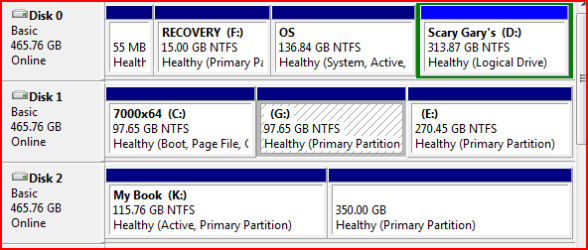
Here is the picture, but keep in mind it's not what it used to be.
Gary
Edit: Does it needs to be unallocated space? It was formatted using NTFS. | My System Specs | | System Manufacturer/Model Number Dell XPS420 OS Vista Ult 64 bit Seven Ult RTM x64 CPU Intel Core2 Quad Q6600 2.40 gigahertz Memory Crucial Ballistix 4x2GB PC2 6400 Graphics Card NVIDIA GeForce 8600 GTS 256 MB Sound Card Creative SB X-Fi audio Monitor(s) Displays HP w2207 + HPvs15 Screen Resolution 1680x1050 + 1024x768 Keyboard Microsoft Comfort Curve Mouse MX Revolution Hard Drives 2-WD5000AAKS-500 GB
WD5000AAV-500 GB external Other Info Wacom Intuos 2 Graphics Tablet
Experience Index=5.5 |
13 Jan 2009
|
#10 | | Windows 7 Ultimate 64-bit Chicago |
OK, now. What do you want to resize there? | My System Specs | | System Manufacturer/Model Number baarod/MCP OS Windows 7 Ultimate 64-bit CPU Core2 Quad Q6600 @ 3.6GHz 9x400FSB Motherboard Gigabyte G33M-S2H Memory 4GB DDR2 1066 Graphics Card ATI Radeon HD 4670 Sound Card Integrated Azalia Monitor(s) Displays Acer AL1711 Screen Resolution 1280x1024 Keyboard Microsoft Wireless Comfort Keyboard 4000 Mouse Microsoft Wireless Lasr Mouse 5000 PSU 240W TFX Case InWin BT566 Cooling Intel Retail Stock Hard Drives OCZ Vertex SATAII w/ 1.5FW 30,528MB system and apps
Maxtor 6L300R0 PATA 286,188MB page file, data and user profiles Internet Speed 3Mbps Verizon DSL over 802.11g Other Info Hauppauge WinTV PVR II Tuner, Generic $13 SoC Webcam, RT61 WiFi with remote antenna, Media Center Remote and Receiver resizing new partition problems? All times are GMT -5. The time now is 05:40 PM. | |