Hi all,
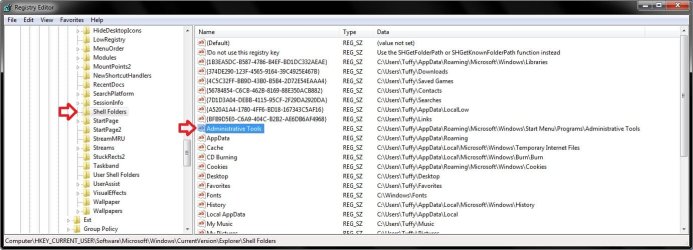
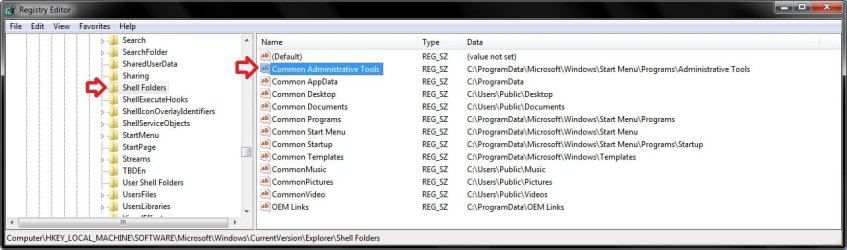
wait a minute. The reason I made this post is because all of the methods I tried in the posted Threads/forums did not help me in fixing my Administrative tools.
The problem: I am able to access my Administrative tools in its default location
by right click>All Programs>Open All Users, but not able to open it from the startup
shortcut or through control Panel. A message pops up and says its missing like the one shown here: http://www.sevenforums.com/tutorials/29965-administrative-tools-restore-shortcuts.html
But it is not missing. Every tool is there. The folder is there. What is wrong? I replaced it with the one I found through the forums here, but that didn't help.
What I did: Install Windows 7>Solid State Drive (E >Create New user onto HHD (F drive. I was missing the startup programs So I Copied the startup program folder from drive (E onto drive (F. And tried to access Administrative tools and says it's missing, but the file is there where the directory suggest it is missing.
Any help is appreciated thanks.
wait a minute. The reason I made this post is because all of the methods I tried in the posted Threads/forums did not help me in fixing my Administrative tools.
The problem: I am able to access my Administrative tools in its default location
by right click>All Programs>Open All Users, but not able to open it from the startup
shortcut or through control Panel. A message pops up and says its missing like the one shown here: http://www.sevenforums.com/tutorials/29965-administrative-tools-restore-shortcuts.html
But it is not missing. Every tool is there. The folder is there. What is wrong? I replaced it with the one I found through the forums here, but that didn't help.
What I did: Install Windows 7>Solid State Drive (E
>Create New user onto HHD (F drive. I was missing the startup programs So I Copied the startup program folder from drive (E onto drive (F. And tried to access Administrative tools and says it's missing, but the file is there where the directory suggest it is missing. Any help is appreciated thanks.
My Computer
At a glance
Windows 7 64 bit
- OS
- Windows 7 64 bit