|
Welcome to Windows 7 Forums. Our forum is dedicated to helping you find solutions with any problems, errors or issues you are experiencing with Windows 7. The Windows 7 forum also covers news and updates and has an extensive Windows 7 tutorial section that covers a wide range of tips and tricks.
Windows 7 - Recover Windows 7 boot on dual boot system with GRUB masterboot |
08-25-2011
|
#1 | | |
Recover Windows 7 boot on dual boot system with GRUB masterboot Hi,
I have a dual-boot system Ubuntu/Windows 7. The Master boot loader is GRUB.
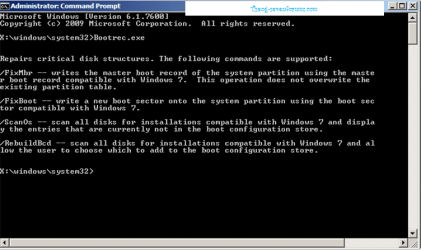
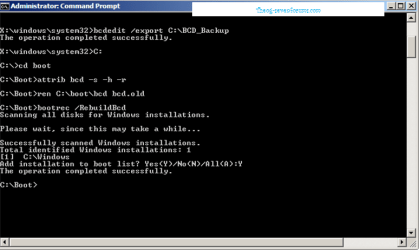
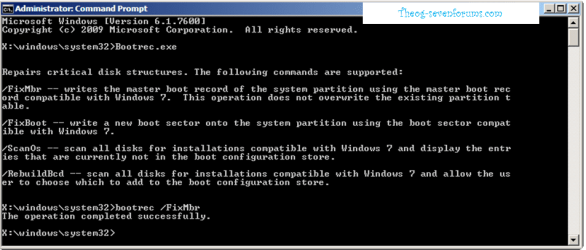
It worked fine until yesterday when, for some reason, Windows 7 refused to load anymore. I tried to repair with chkdsk, found and repaired some disk errors, but now the boot loader is damaged. The problem I have is that after selecting Windows from the GRUB list I get the installed version entry but I can't have access to Repair through F8 and thus I am not able to continue on the installation DVD. The problem I think would be simple, by writing a new boot using bootrec, but I don't have access to the console.
I've seen a solution/tutorial on this forum except that it requires to remove Linux, which is not at all my scope.
Thanks
| My System Specs | | |
08-25-2011
|
#3 | | Vista and Windows7, sometimes Ubuntu and Fedora |
| My System Specs | | System Manufacturer/Model Number HP, Dell, Gateway - 2 laptops and 2 desktops OS Vista and Windows7, sometimes Ubuntu and Fedora CPU from 1.6GHz Duo to 2.5GHz Quad Monitor(s) Displays 2x HP w2207 Keyboard with trackball - no mices Mouse terrible devices, who wants them Hard Drives 5x HDD, 2x SSD, 6x Externals Internet Speed DSL 6000 |
08-25-2011
|
#4 | | |
Interesting, I've just learned that Microsoft wants me to pay to fix their bug. Good to know guys, but business is business.
Thanks to all who answered, seems like there's no solution | My System Specs | | |
08-25-2011
|
#6 | | Vista and Windows7, sometimes Ubuntu and Fedora |
Grub can be a pain in the neck. That is why I always install Linux on a seperate physical disk and disconnect the Windows disk during the Linux installation. The Grub cannot clobber the Windows bootmgr - and that works also the same the other way around (Linux first, Windows second). I then switch between the 2 systems with the BIOS boot sequence.
On another system (a laptop where I have only 1 disk) I run Ububuntu in Virtual Box. That is an even more elegant solution because you can switch seemlessly between Windows and Linux (requires the "Guest Additions" which are easy to install from the vBox "Devices tab"). There is quasi no performance impact running Ubuntu or Mint in vBox.
A third solution is to run Linux from a USB stick. I do that with Fedora - but that is just for playing around. | My System Specs | | System Manufacturer/Model Number HP, Dell, Gateway - 2 laptops and 2 desktops OS Vista and Windows7, sometimes Ubuntu and Fedora CPU from 1.6GHz Duo to 2.5GHz Quad Monitor(s) Displays 2x HP w2207 Keyboard with trackball - no mices Mouse terrible devices, who wants them Hard Drives 5x HDD, 2x SSD, 6x Externals Internet Speed DSL 6000 |
08-25-2011
|
#8 | | Windows 7 Ultimate 32-bit & 64-bit both SP1 |
Well stated, Wolfgang. A separate HDD for Linux and Windows avoids all of these problems by keeping their relevant boot managers completely separate. | My System Specs | | System Manufacturer/Model Number Home Built, N/A OS Windows 7 Ultimate 32-bit & 64-bit both SP1 CPU AMD Athlon (tm) 64 X2 Dual Core Processor 7550 @2.5GHz Motherboard Gigabyte GA-MA770-ES3 Memory 2 x 2GB PC2-6400 (DDR2-800), Ganged Mode, (4GB total) Graphics Card Nvidia GeForce GTX 550 Ti 1GB Sound Card Realtek High Definition on board solution (ALC 892) Monitor(s) Displays ViewSonic VA1912w Widescreen (VGA) Screen Resolution 1440x900 Keyboard Microsoft Digital Media Pro Keyboard (USB) Mouse Microsoft Comfort Optical Mouse 3000 (USB) PSU XFX Pro Series 850W Semi-Modular Case Antec NSK 4000B II Cooling 1 x 80mm Front Inlet (with filter) 1 x 120mm Rear Exhaust Hard Drives OCZ Petrol SSD 64GB SATA III
OCZ Petrol SSD 128GB SATA III
Samsung HD501LJ 500GB SATA II x2
Hitachi HDS721010CLA332 1TB SATA II
1 x Iomega 1.5TB Ext USB 2.0 Internet Speed NetGear DG834Gv3 ADSL Modem/Router (Ethernet) ~4.0 Mb/s (O2) Other Info PCI-Express SATA III controller (Marvell 88SE9128 chipset)
Optical Drive: HL-DT-ST BD-RE BH10LS30 SATA Bluray
Lexmark S305 Printer/Scanner/Copier (USB)
CTF-430 Tablet & Pen
WEI Score: |
08-25-2011
|
#9 | | |
Guys,
I'm sorry I was not clear.
My problem is INSIDE Windows boot menu. I simply can't get to the repair option by pressing F8 as all the manuals state.
Leave aside GRUB, it did its job and launched Win 7. Only that the disk zone of its OS loader was damaged (don't know how, but detected by chkdsk and supposedly repaired, by the log) and I can't get the Repair menu. That's all. So, the question is how can I get that menu, because now I get the message "Please insert the installation disk and reboot"; but when I reboot I pass through GRUB and Microsoft didn't think they can share the system with other OS!
Also, I can't update to Win 7 SP1 on a dual-boot system because Windows doesn't find the partition. You still blame GRUB?
Anyway, any idea how to get that Repair menu? | My System Specs | | Recover Windows 7 boot on dual boot system with GRUB masterboot problems? All times are GMT -5. The time now is 12:51 AM. |  |