Disk Read Error - Can you Spot Anything Wrong with this Sceencap?
Well it has been a fun couple of days!
Trying to restore a mistake on my Windows 7 ultimate x64 hard drive that Ubuntu started to overwrite.
So far I have
1. Backed-up / Copied all my files so whatever is done to this HD is ok.
2. Restored the partitions
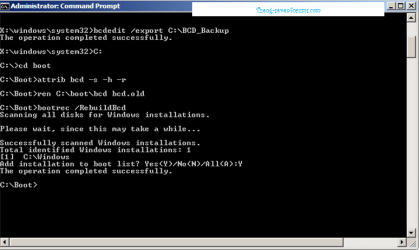
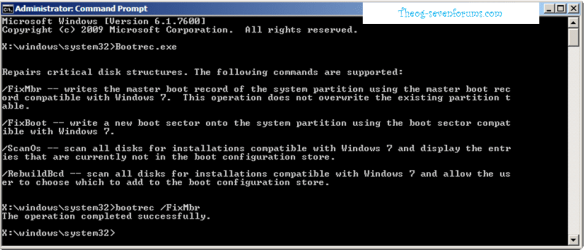
3. Tried FixMBR / FixBoot / Chkdsk / Rebuildbcd
In the recovery console it sees my OS just fine
But when I boot my Dell XPS desktop after post it says 'Disk Read Error' press ctrl+alt+del to restart.
I don't think it has anything to do with the bios - I've put the hard drive in another dell and it did the same thing (tried different Sata cables too).
I think there is a peice I'm missing somewhere with these partitions (see attached). I currently have my non-booting drive in another dell and you can see it as Disk 1 in the screen shot.
Any suggestions for getting this thing back to booting? I can access all the files from it fine when I have on this computer (as the 2nd hdd) which leads me to believe there is just a boot issue somewhere.
Can I repair install Windows 7 on this hd even though it is the 2nd hard drive on the computer?
I'm trying to avoiding a wipe and reinstalling all the programs so I'm hoping I can somehow fix this last peice.
Your help is greatly appreciated - thank you!
Well it has been a fun couple of days!
Trying to restore a mistake on my Windows 7 ultimate x64 hard drive that Ubuntu started to overwrite.
So far I have
1. Backed-up / Copied all my files so whatever is done to this HD is ok.
2. Restored the partitions
3. Tried FixMBR / FixBoot / Chkdsk / Rebuildbcd
In the recovery console it sees my OS just fine
But when I boot my Dell XPS desktop after post it says 'Disk Read Error' press ctrl+alt+del to restart.
I don't think it has anything to do with the bios - I've put the hard drive in another dell and it did the same thing (tried different Sata cables too).
I think there is a peice I'm missing somewhere with these partitions (see attached). I currently have my non-booting drive in another dell and you can see it as Disk 1 in the screen shot.
Any suggestions for getting this thing back to booting? I can access all the files from it fine when I have on this computer (as the 2nd hdd) which leads me to believe there is just a boot issue somewhere.
Can I repair install Windows 7 on this hd even though it is the 2nd hard drive on the computer?
I'm trying to avoiding a wipe and reinstalling all the programs so I'm hoping I can somehow fix this last peice.
Your help is greatly appreciated - thank you!
Attachments

My Computer
At a glance
Windows 7 Ultimate 64
- OS
- Windows 7 Ultimate 64