
Regedit wont run, and grant admin full control context menu wont work

ElliottGenocide

New member
For some reason, my logon background image isnt showing up anymore, and when I try to change back to the way I had done it, regedit wont run, I've searched the forums for an answer, with no luck. And when I go to click grant admin full control, it brings up an open with menu, so I need a command script to grant admin to certain files again.

Windows 7 home premium 64 bit.

Please help, and thanks. And no, I dont have any viruses or malware, I take good care of my computer.
 

My Computer

OS
64 bit - Microsoft Windows 7 Home Premium
Hello ElliottGenocide

Firstly do you have a system restore point available from before these problems occurred - http://www.sevenforums.com/tutorials/700-system-restore.html
Can you remember what it was you changed in the registry.
Have a look through this,it has a copy of the default background and an application to change the logon background without having to touch the registry - http://www.sevenforums.com/tutorials/5382-log-screen-change.html
I would also run this - http://www.sevenforums.com/tutorials/1538-sfc-scannow-command-system-file-checker.html see if that helps.

Danny
 

My Computer

Computer Manufacturer/Model Number
acer aspire 5935g
OS
Windows 7 Home Premium x64 SP1
CPU
intel(R)core(TM)2 duo CPU T6600 @ 2.20GHz
Motherboard
intel gm45/gm47 revision 07
Memory
3 gb ddr3
Graphics Card(s)
ati radeon hd4570/512mb
Monitor(s) Displays
lop156wh2-tle1 15.3 flat
Screen Resolution
1366x768
Hard Drives
OCZ-Agility3 60gig ssd
320gig external hdd
500gig external hdd
Mouse
Optical
Internet Speed
30Mbps Down/30Mbps Up
Unfortunetly I don't have a restore point, I made the changes to the registry more than a month ago, it just today reverted back to the default logon screen; and I would like to avoid adding software for something like this; I'd rather do it from the registry with a script; and I'd like to fix the registry so it'll open, I do still need it for other things. And I also need a script to add grant admin full control to my right context menu;
 

My Computer

OS
64 bit - Microsoft Windows 7 Home Premium
This will add take ownership to the context menu and show you how to gain full control of an item - http://www.sevenforums.com/tutorials/1911-take-ownership-shortcut.html

What error message are you getting when you open regedit.Is it from a shortcut.Try opening it from C:\Windows\regedit see if that makes any difference.

Did you try running SFC /SCANNOW were there any errors

Danny
 

My Computer

Computer Manufacturer/Model Number
acer aspire 5935g
OS
Windows 7 Home Premium x64 SP1
CPU
intel(R)core(TM)2 duo CPU T6600 @ 2.20GHz
Motherboard
intel gm45/gm47 revision 07
Memory
3 gb ddr3
Graphics Card(s)
ati radeon hd4570/512mb
Monitor(s) Displays
lop156wh2-tle1 15.3 flat
Screen Resolution
1366x768
Hard Drives
OCZ-Agility3 60gig ssd
320gig external hdd
500gig external hdd
Mouse
Optical
Internet Speed
30Mbps Down/30Mbps Up
ok regedit is fixed, thank you very much, but do you know where a different admin script is, rather than take owner ship I'd like to Grant Admin Full control, for some reason the take owner ship script only works on a select few of my programs.
 

My Computer

OS
64 bit - Microsoft Windows 7 Home Premium
Thats good news
I am not aware of a script but that's not to say there isn't a way although its not to much extra work to do it manually.

Danny
 

My Computer

Computer Manufacturer/Model Number
acer aspire 5935g
OS
Windows 7 Home Premium x64 SP1
CPU
intel(R)core(TM)2 duo CPU T6600 @ 2.20GHz
Motherboard
intel gm45/gm47 revision 07
Memory
3 gb ddr3
Graphics Card(s)
ati radeon hd4570/512mb
Monitor(s) Displays
lop156wh2-tle1 15.3 flat
Screen Resolution
1366x768
Hard Drives
OCZ-Agility3 60gig ssd
320gig external hdd
500gig external hdd
Mouse
Optical
Internet Speed
30Mbps Down/30Mbps Up
Ok now I cant open reg edit again, this time I'm getting an Error Message:

This Version of this file is not compatible with the version of windows you're running. Check your computers system information to see whether you need an x86 (32-bit) or x64 (64-bit) version of the program, and then contact the software publisher.

I'm running 64-bit.
 

My Computer

OS
64 bit - Microsoft Windows 7 Home Premium
Can not access regedit

I can't seem to access regedit, I get this error:

This version of this file is not compatible with the version of Windows you're running. Check your computer's system information to see whether you need an x86 (32-bit) or x64 (64-bit) version of the program, and then contact the software publisher.

I am Windows 7 Home Premium 64-bit SP1

I just used regedit the other day, not sure why this happened and I need to access the registry ASAP. And it appears as though it got put on windows 95 and not Windows 7.
 

Attachments

  • Untitled.jpg
    Untitled.jpg
    58.5 KB · Views: 17
Last edited:

My Computer

OS
64 bit - Microsoft Windows 7 Home Premium
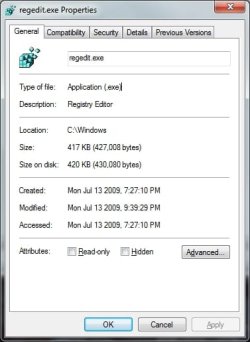
Where is regedit.exe running from, should be C:\Windows. This is what it looks like on my Win 7 Pro X64 system:

RegeditWin7X64.jpg

Open a Command Prompt and enter where regedit. Response should be

>where regedit
C:\Windows\regedit.exe
 

My Computer

Computer type
PC/Desktop
Computer Manufacturer/Model Number
Lenovo IdeaCenter 450
OS
Windows 10 Pro X64
CPU
Intel Quad Core i7-4770 @ 3.4Ghz
Memory
16.0GB PC3-12800 DDR3 SDRAM 1600 MHz
Graphics Card(s)
Intel Integrated HD Graphics
Sound Card
Realtek HD Audio
Monitor(s) Displays
HP 22" LCD
Screen Resolution
1680 x 1050
Hard Drives
250GB Samsung EVO SATA-3 SSD
2TB Seagate ST2000DM001 SATA-2
1.5TB Seagate ST3150041AS SATA
Keyboard
Dell USB
Mouse
Lenovo USB
Internet Speed
Cable via Road Runner 3MB Upload, 30MB Download
Antivirus
Windows Defender, MBAM Pro, MBAE
Browser
Seamonkey
Other Info
UEFI/GPT
PLDS DVD-RW DH16AERSH
It's where it should be, in C:\windows

The problem is, is that it somehow changed its compatibility from Windows 7 to Windows 95, it wont allow me to change it back to windows 7 because the software was made by them and came with Windows 7
 

Attachments

  • Untitled.jpg
    Untitled.jpg
    58.5 KB · Views: 13

My Computer

OS
64 bit - Microsoft Windows 7 Home Premium
This looks like a file permissions problem. You should be logged in as Administrator to correct this.

Open C:\Windows, locate regedit.exe file and right click on the file and select properties.

Go to Security tab and check the administrator's rights for this program. If it is not full control, click on Advanced, go to Owner tab and change owner to Administrator. Close the dialog box and change the Administrator's rights to "Full Control". Now hopefully you should be able to change the compatibility mode from Win 95 to Win 7 and execute the program.
Or alternatively you may search on Google and download one of the free registry editors like

Registrar Registry Manager 6.52
or
O&O RegEditor
or
any other freely downloadable registry editors for window 7 and use.
 
Last edited by a moderator:

My Computer

Computer Manufacturer/Model Number
Toshiba Satellite P775-S7232
OS
MS Windows 7 Ultimate 64-bit SP1
CPU
i5-2410M 2.3GHz (2.9GHz Turbo-Boost) Sandy Bridge 32nm
Motherboard
Toshiba PHRAA ver. PSBY1U-00F003
Memory
4GB+4GB Samsung DDR3 PC3-10700 (1333 MHz)
Graphics Card(s)
Video Intel(R) HD Graphics Family, 1696MB available memory
Sound Card
Realtek High Definition Audio version=6.0.1.6323
Monitor(s) Displays
17.3 " Trubrite TFT LCD, LED Backlit
Screen Resolution
1600x900 32 bit, Native support for 720P content
Hard Drives
TOSHIBA MK6476GSXN
580.614 [GB] partitioned C: 80GB and D: 500GB with hidden recovery partitons.

Spare bay for 2nd HDD but no SATA connector :-(
PSU
Toshiba AC/DC Adapter
Case
Notebook
Cooling
Built-in Fan
Keyboard
Premium Raised Tile keyboard
Mouse
Logitech M215 wireless mouse
Internet Speed
Not fast enough
Other Info
Built-in Harman Kardon speakers with Dolby Advanced Audio, Waves MaxxAudio® 3. HDMI, 1xUSB3+3xUSB2 ports, WebCam, Battery life 4hrs 11mins, 4GB Readyboost SDHC card, WD My Book Essential Ext HDDs 2 TB, 2x1TB, My Passport SE 1TB and WDTV 1st Gen for Multimedia playing on a Sony Wega 32" LCD.
Recent addition to my toys are Asus Transformer Pad TF300T with 32GB onboard sd card + 32GB microsd card.
I am logged on as an administrator, I've checked and double checked all of that, I take good care of my computer and I have no malware of any kind.
 

My Computer

OS
64 bit - Microsoft Windows 7 Home Premium
What happens if you boot to Safe Mode and login as Administrator.

Note that you have to enable the hidden Administrator account first.
Open a Command Prompt
To enable: Enter net user administrator /active:yes
To disable: Enter net user administrator /active:no
 

My Computer

Computer type
PC/Desktop
Computer Manufacturer/Model Number
Lenovo IdeaCenter 450
OS
Windows 10 Pro X64
CPU
Intel Quad Core i7-4770 @ 3.4Ghz
Memory
16.0GB PC3-12800 DDR3 SDRAM 1600 MHz
Graphics Card(s)
Intel Integrated HD Graphics
Sound Card
Realtek HD Audio
Monitor(s) Displays
HP 22" LCD
Screen Resolution
1680 x 1050
Hard Drives
250GB Samsung EVO SATA-3 SSD
2TB Seagate ST2000DM001 SATA-2
1.5TB Seagate ST3150041AS SATA
Keyboard
Dell USB
Mouse
Lenovo USB
Internet Speed
Cable via Road Runner 3MB Upload, 30MB Download
Antivirus
Windows Defender, MBAM Pro, MBAE
Browser
Seamonkey
Other Info
UEFI/GPT
PLDS DVD-RW DH16AERSH
Your Compatibility tab is ok, that's the way it should be. Show me 3 pictures of your Security tab ( Administrators and Users highlighted, and also the Advanced tab).
 

My Computers

System One System Two

  • Computer type
    Laptop
    Computer Manufacturer/Model Number
    Dell Precision 7510
    OS
    W7PRO
    CPU
    Intel i7-6820HQ @ 2.7GHz
    Memory
    16GB
  • Computer type
    Laptop
    OS
    W7Pro
In regedit Properties, click on Help me choose the settings, see if that gets you any where.
 

My Computer

Computer type
PC/Desktop
Computer Manufacturer/Model Number
Lenovo IdeaCenter 450
OS
Windows 10 Pro X64
CPU
Intel Quad Core i7-4770 @ 3.4Ghz
Memory
16.0GB PC3-12800 DDR3 SDRAM 1600 MHz
Graphics Card(s)
Intel Integrated HD Graphics
Sound Card
Realtek HD Audio
Monitor(s) Displays
HP 22" LCD
Screen Resolution
1680 x 1050
Hard Drives
250GB Samsung EVO SATA-3 SSD
2TB Seagate ST2000DM001 SATA-2
1.5TB Seagate ST3150041AS SATA
Keyboard
Dell USB
Mouse
Lenovo USB
Internet Speed
Cable via Road Runner 3MB Upload, 30MB Download
Antivirus
Windows Defender, MBAM Pro, MBAE
Browser
Seamonkey
Other Info
UEFI/GPT
PLDS DVD-RW DH16AERSH
Here's the three you asked for I believe. And I've already checked that, that doesnt seem to apply to my issue for some reason.
 

Attachments

  • Administrators.jpg
    Administrators.jpg
    63.5 KB · Views: 6
  • Users.jpg
    Users.jpg
    58.2 KB · Views: 5
  • Advanced.jpg
    Advanced.jpg
    70.1 KB · Views: 4

My Computer

OS
64 bit - Microsoft Windows 7 Home Premium
Thanks for pictures. Looks ok, you have the permissions ok. Have you tried booting into Safe Mode and trying to run regedit?
 

My Computers

System One System Two

  • Computer type
    Laptop
    Computer Manufacturer/Model Number
    Dell Precision 7510
    OS
    W7PRO
    CPU
    Intel i7-6820HQ @ 2.7GHz
    Memory
    16GB
  • Computer type
    Laptop
    OS
    W7Pro

My Computers

System One System Two

  • Computer type
    Laptop
    Computer Manufacturer/Model Number
    Dell Precision 7510
    OS
    W7PRO
    CPU
    Intel i7-6820HQ @ 2.7GHz
    Memory
    16GB
  • Computer type
    Laptop
    OS
    W7Pro
No it doesn't work in safemode either, and I already tried the SFC Scan, no such luck.
 

My Computer

OS
64 bit - Microsoft Windows 7 Home Premium
Back
Top