Windows 7 Forums Search
Welcome to Windows 7 Forums. Our forum is dedicated to helping you find solutions with any problems, errors or issues you are experiencing with Windows 7. The Windows 7 forum also covers news and updates and has an extensive Windows 7 tutorial section that covers a wide range of tips and tricks.


Windows 7 - Is there a way to disable the default "copy" when you highlight items?

 
02-13-2012   #11


Windows 7 Ultimate SP1 (64 bit), Windows XP SP3, Ubuntu 10.04


Options

Quote   Quote: Originally Posted by ParrotSlave View Post
I merely want to select them.
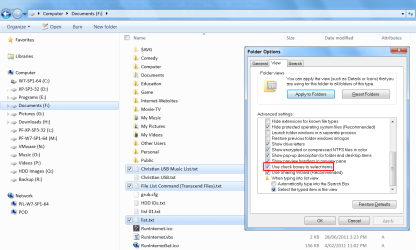
Have you tried "Use check boxes to select items"?
Is there a way to disable the default "copy" when you highlight items?-select-check-boxes-.png
Quote   Quote: Originally Posted by ParrotSlave View Post
I may be selecting files to do something to the id tags, if they're music files, or there are a number of other things I might want to do that have no relationship to copying. I merely want to select them. I'm talking about folders that have hundreds of files in them, in which the files I want to select cannot be arranged any way to make the files I want contiguous. If I were looking for all of one file type, or all files created on one particular day, it would be easy to order them to select them without using CTRL.
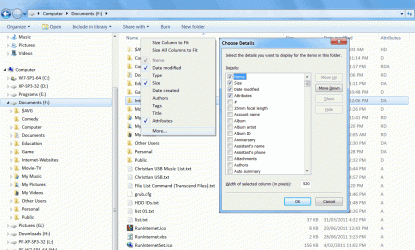
Do you use "Details" view?
You can "Sort" and "Group" based on the "Details" you have chosen.
Click on thumbnail for animation
Is there a way to disable the default "copy" when you highlight items?-details-sort-group.gif


Last edited by lehnerus2000; 02-13-2012 at 01:09 AM.. Reason: Fixed Quotes
My System SpecsSystem Spec
02-13-2012   #12


Win7 Ultimate 64 bit non-oem


Yes, I do use details view, but most of the time I'm selecting files based on nothing that is sortable by Windows. I had never noticed the "use check boxes to select items" before. I just switched to that option, and it appears to be exactly what I want. Now I can take my time and not have to worry about whether or not the CTRL key is pressed and what the mouse is doing. Thanks.

After using the check box method just now, I see that it has its own similar nightmare, though: you do not dare click outside the box, or everything gets unchecked, like selecting messages in Hotmail. And if, before you begin, you decide to click inside the window you are working on, which, after many years, you would probably be in the habit of doing, to activate the window, you may accidentally check a file before you begin without realizing it.

Last edited by ParrotSlave; 02-13-2012 at 08:08 AM..
My System SpecsSystem Spec
02-13-2012   #13


Windows 7 Ultimate SP1 (64 bit), Windows XP SP3, Ubuntu 10.04


Windows Explorer Elements

Quote   Quote: Originally Posted by ParrotSlave View Post
... you do not dare click outside the box, or everything gets unchecked, ...
It's not perfect.
MS didn't really think that option through properly.

If you don't click inside of the main window, the check boxes stay ticked.


You can swap between the various Windows Explorer elements using "F6" (or "Shift + F6" to reverse direction):
  • "Address Bar"
  • "Command Bar"
  • "Navigation Pane"
  • "File & Folder window"
  • "Column Headers" (in "Details" view)
  • Editable fields in the "Details pane" (if you select a file and the file has editable details and isn't set to "Read only").
It can be difficult to see which element is active.
My System SpecsSystem Spec
.


02-13-2012   #14


XP / Win7 x64 Pro


This is why I always select with the left mouse button but drag with the right mouse button so it always asks for confirmation of which action you'd like to perform (move or copy) before it performs it in the destination area.
My System SpecsSystem Spec
Reply

 Is there a way to disable the default "copy" when you highlight items? problems?


Thread Tools


Similar Threads for: Is there a way to disable the default "copy" when you highlight items?
Thread Forum
Solved How to change the default "Sort By" items for a music folder? Customization
Solved Make folders default to "general items" optimization General Discussion
How to add "Copy path" and "Copy name" to context menu? General Discussion
Help me disable the taskbar button color highlight "feature". Customization
Win7 "workstation" to WinXP "server" file copy FAIL Network & Sharing


All times are GMT -5. The time now is 12:55 AM.


Windows 7 Forums is an independent web site and has not been authorized,
sponsored, or otherwise approved by Microsoft Corporation.
"Windows 7" and related materials are trademarks of Microsoft Corp.
© Designer Media Ltd
  

1 2 3 4 5 6 7 8 9 10 11 12 13 14 15 16 17 18 19 20 21 22 23 24 25 26 27 28 29 30