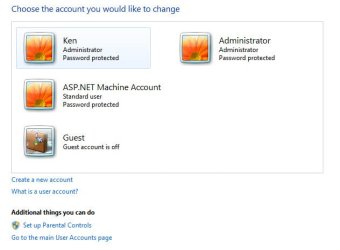
I've read the tutorial here on enabling/disabling built-in user accounts, but I'm still in a bit of a jam here. Here's the situation... My computer is two weeks old and the operating system (Windows 7 Professional 64-bit) was installed by the retailer where I purchased the computer. Since my computer arrived, I've always been logging in to an Administrator user account. Three days ago I received a warning that the password would soon expire. Yesterday the password expired and I entered a new one. Then the fun started...
The next time I logged in, I noticed there were two icons on the login screen, "Administrator" and "Other User" (or something very similar). In addition there was a message in red that the Administrator account has been disabled and to contact the administrator. Well, I am the only one who uses the computer, so I need some outside help, lol.
With the Administrator account disabled, everytime I log in, I either get a message saying that the Administrator account has been disabled, a bit of a nuisance or that "the username or password is incorrect" (if I set a password for the account). Now if I enable the account, when I restart my computer I automatically log in to the built-in Administrator account, and none of my files are there (all my files, desktop, etc. are under my named user account). In addition, in order to access my account, I need to click on Other User and type my name and password (not very convenient).
Ideally I'd like to (all three):
A: stop seeing the message about the Administrator account being disabled.
B: stop Windows from automatically logging in to the built-in Administrator account.
C: see an icon with my name on the login screen that I can click on (as opposed to having to click on the Other User icon and typing my name and password).
(not that I don't really care whether the Administrator user account option is available or not). As far as I can tell there is no documentation on making a certain user account the default, is that correct? Needless to say it's quite unnerving to have these kinds of issues on a 2-week old computer! I realize this is a bit of a specialized problem, but I'm praying that someone here can help.
PS: I tried deleting the Administrator built-in user account but at the last dialog box, Windows stopped me saying that you cannot delete built-in user accounts (in any case I later read that this is not suggested).
PPS: On a side note, I'm really curious how all this happened!!!
The next time I logged in, I noticed there were two icons on the login screen, "Administrator" and "Other User" (or something very similar). In addition there was a message in red that the Administrator account has been disabled and to contact the administrator. Well, I am the only one who uses the computer, so I need some outside help, lol.
With the Administrator account disabled, everytime I log in, I either get a message saying that the Administrator account has been disabled, a bit of a nuisance or that "the username or password is incorrect" (if I set a password for the account). Now if I enable the account, when I restart my computer I automatically log in to the built-in Administrator account, and none of my files are there (all my files, desktop, etc. are under my named user account). In addition, in order to access my account, I need to click on Other User and type my name and password (not very convenient).
Ideally I'd like to (all three):
A: stop seeing the message about the Administrator account being disabled.
B: stop Windows from automatically logging in to the built-in Administrator account.
C: see an icon with my name on the login screen that I can click on (as opposed to having to click on the Other User icon and typing my name and password).
(not that I don't really care whether the Administrator user account option is available or not). As far as I can tell there is no documentation on making a certain user account the default, is that correct? Needless to say it's quite unnerving to have these kinds of issues on a 2-week old computer! I realize this is a bit of a specialized problem, but I'm praying that someone here can help.
PS: I tried deleting the Administrator built-in user account but at the last dialog box, Windows stopped me saying that you cannot delete built-in user accounts (in any case I later read that this is not suggested).
PPS: On a side note, I'm really curious how all this happened!!!
Last edited:
My Computer
At a glance
Windows 7 Professional x64Intel Core i7 970 3.2 GHz6GB DDR3 1600 MHz1x NVIDIA GeForce GTX 570 1.2GB
- Computer Manufacturer/Model Number
- Digital Storm Desktop 286251
- OS
- Windows 7 Professional x64
- CPU
- Intel Core i7 970 3.2 GHz
- Motherboard
- ASUS Rampage III Extreme (Intel X58 Chipset)
- Memory
- 6GB DDR3 1600 MHz
- Graphics Card(s)
- 1x NVIDIA GeForce GTX 570 1.2GB
- Sound Card
- Creative Labs X-Fi Titanium Fatal1ty Professional
- Monitor(s) Displays
- Dell 2001FP
- Screen Resolution
- 1152x864
- Hard Drives
- 250 GB Solid State Intel (Model: 510 Series)
- PSU
- 1200W Corsair Pro Gold Series
- Case
- Black OPS HailStorm Edition
- Cooling
- Extreme Cooling H2O Stage 6
- Keyboard
- Dell Multimedia Keyboard
- Mouse
- Logitech MX 1000
- Internet Speed
- Cable
 rb: | type LUSRMGR.MSC | ENTER