hp notebook: primary partition

amankedia92

Banned
Local time
11:20 PM
Messages
23
Location
INDIA
In my HP Pavilion dv6 notebook, i want to create a primary partition (not simply a new volume).
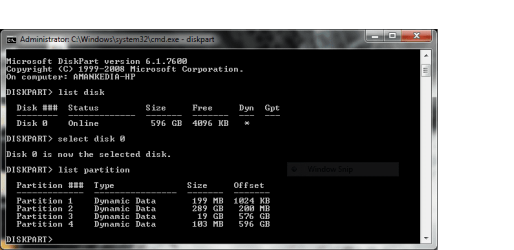
on checking the partition type of the partitions i already have using diskpart in cmd, it showed dynamic data partition.
please help...
 

My Computer My Computer

At a glance

Windows 7 Home Premium 64bit.
OS
Windows 7 Home Premium 64bit.
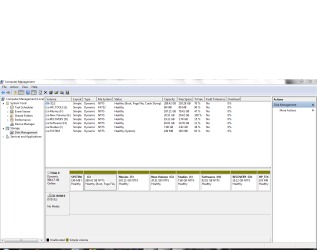
Please post back a screenshot of your full Disk Mgmt drive map with listings, using Snipping Tool in Start menu.

Did you attempt to add a partition and ignore the warning that a Dynamic disk would be created? if so we can help you undo it.
 
here it is:
dsk.PNG

cmd.PNG
 

My Computer My Computer

At a glance

Windows 7 Home Premium 64bit.
OS
Windows 7 Home Premium 64bit.
Actually, i need a free space in my HDD, but all i'm getting is an unallocated space, that's it...
 

My Computer My Computer

At a glance

Windows 7 Home Premium 64bit.
OS
Windows 7 Home Premium 64bit.
If you try to add more than four partitions which already exist on most HP preinstalls, Windows warns that it will convert the Disk to Dynamic which is used for bridging partitions on separate HD's. This has occurred here and needs to be undone as follows:

Move the data off the extra partitions you created and delete them,

Download, burn to CD and boot Partition Wizard bootable CD version 4.2 (linked below) which offers conversion to Basic disk as a free feature on its Disk tab. PW4.2ISO

After conversion of Disk to Basic, boot back in to PW CD to rightclick C>Modify>convert to Logical partition, which will allow as many Logical sub-partitions as you want to then create in adjacent space which can be achieved using PW Resize function. Partition Wizard Use the Bootable CD

Post back another screenshot if you have any questions or need additional help.
 
Last edited:
sir, i downloaded the PW from the link u gave..
and ran the application, and chose the option to convert into basic partition..
now i'm facing a serious problem...
it asked me to reboot, and when i chose to reboot, my system is not booting at all...
all i'm getting is a cursor on top left hand side of the screen which keeps on blinking... :cry:
please help..
thanx in advance....
 

My Computer My Computer

At a glance

Windows 7 Home Premium 64bit.
OS
Windows 7 Home Premium 64bit.
Did you download PW to your hard drive and run it from there or did you burn PW to a CD, and then boot into it?

Providing you burned PW to a disc you need to insert it in your optical drive and boot into it.
 

My Computer My Computer

At a glance

Windows 7 Ultimate SP1 64-BitIntel Core i7 870 @ 2.93GHz8Gb Dual-Channel DDR3 @ 664MHznVidia GeForce GTX 460 1024MB dedicated RAM
Computer Manufacturer/Model Number
HP Pavilion Elite 495UK
OS
Windows 7 Ultimate SP1 64-Bit
CPU
Intel Core i7 870 @ 2.93GHz
Motherboard
MSI 2A9C (CPU1)
Memory
8Gb Dual-Channel DDR3 @ 664MHz
Graphics Card(s)
nVidia GeForce GTX 460 1024MB dedicated RAM
Sound Card
Realtek HD Audio
Monitor(s) Displays
HP2310i
Screen Resolution
1920 x 1080
Hard Drives
1x1954GB Hitachi HDS22020ALA 330 (RAID), 1x1954GB Hitachi External for backup and storage
PSU
460W
Case
HP Elite
Cooling
Air cooled
Keyboard
Logitech K750 solar-powered keyboard
Mouse
Logitech Wireless M180 mouse
Internet Speed
2Mb
Other Info
Pure Avanti Flow Internet Radio with iPod Dock, 64Gb iPod, HP USB Speakers, Sony MDR-V500 Headphones, Sony Vaio F-Series Laptop
Seavixen,
the thread starter stated that the link provided by Greg was used.

the link provided by Greg is for the iso file with instructions on burning and use.
 

My Computer My Computer

At a glance

MS Windows 7 Ultimate SP1 64-bitAMD A10-4600M6.00 GB Dual-Channel DDR3 @ 798MHz (11-11-12-28)AMD Radeon HD 7660G
Computer Manufacturer/Model Number
Toshiba Satellite S875D-S7239 laptop
OS
MS Windows 7 Ultimate SP1 64-bit
CPU
AMD A10-4600M
Motherboard
AMD Pumori (Socket FT1)
Memory
6.00 GB Dual-Channel DDR3 @ 798MHz (11-11-12-28)
Graphics Card(s)
AMD Radeon HD 7660G
Sound Card
High Definition Audio Device
Monitor(s) Displays
Generic PnP Monitor (1600x900@60Hz)
Screen Resolution
1600x900@60Hz
Hard Drives
SSD 119GB Corsair CSSD-V128GB2 ATA Device
Keyboard
Standard PS/2 Keyboard
Mouse
HP Wireless Optical Mobile Mouse Model FHA-3410
Internet Speed
What the local pub, local coffee shop offers.
Other Info
Optical Drive:MATSHITA BD-CMB UJ160B ATA Device


Also have an Asus ha1002xp netbook with Win 7 Ultimate installed.
Thanks Karl, I didn't see that.
 

My Computer My Computer

At a glance

Windows 7 Ultimate SP1 64-BitIntel Core i7 870 @ 2.93GHz8Gb Dual-Channel DDR3 @ 664MHznVidia GeForce GTX 460 1024MB dedicated RAM
Computer Manufacturer/Model Number
HP Pavilion Elite 495UK
OS
Windows 7 Ultimate SP1 64-Bit
CPU
Intel Core i7 870 @ 2.93GHz
Motherboard
MSI 2A9C (CPU1)
Memory
8Gb Dual-Channel DDR3 @ 664MHz
Graphics Card(s)
nVidia GeForce GTX 460 1024MB dedicated RAM
Sound Card
Realtek HD Audio
Monitor(s) Displays
HP2310i
Screen Resolution
1920 x 1080
Hard Drives
1x1954GB Hitachi HDS22020ALA 330 (RAID), 1x1954GB Hitachi External for backup and storage
PSU
460W
Case
HP Elite
Cooling
Air cooled
Keyboard
Logitech K750 solar-powered keyboard
Mouse
Logitech Wireless M180 mouse
Internet Speed
2Mb
Other Info
Pure Avanti Flow Internet Radio with iPod Dock, 64Gb iPod, HP USB Speakers, Sony MDR-V500 Headphones, Sony Vaio F-Series Laptop
PW 4.2 Home vers will free convert but CD is recommended exactly for cases like this needing rescue.

Burn ISO file download to Cd using ImgBurn at 4x speed. Boot CD, follow steps given.

But first: Did you delete the 3 extra partitions you added as instructed, as PW will not convert more than 4 primary partitions back to Basic?

If so, make sure System is still marked Active, click on HD to highlight it and from Disk tab choose Rebuild MBR, OK, Apply.

If Win7 still won't start boot the DVD repair console or Repair CD to run Startup Repair up to 3 separate times with reboots until Win7 starts.

If probs persist post back a camera snap of PW CD partition map with listings.
 
Last edited:
@Seavixen: I'm sorry sir, but i ran PW from the hard disk itself...
Whal shall i do now???
 

My Computer My Computer

At a glance

Windows 7 Home Premium 64bit.
OS
Windows 7 Home Premium 64bit.
@Seavixen: Sir, i'm sorry, but i ran it from hard disk only...
Now, what shall i do???:confused:
 

My Computer My Computer

At a glance

Windows 7 Home Premium 64bit.
OS
Windows 7 Home Premium 64bit.
@Seavixen: Sir, i'm sorry, but i ran it from hard disk only...
Now, what shall i do???:confused:
Its OK. Just burn a bootable CD now and follow Greg's instructions. Read carefully and proceed, dont rush, you can even print out the instructions.
 

My Computer My Computer

At a glance

Windows 7 x64 pro/ Windows 7 x86 Pro/ XP SP3 x86
Computer Manufacturer/Model Number
Too many to describe...
OS
Windows 7 x64 pro/ Windows 7 x86 Pro/ XP SP3 x86
Thanx Bill...:)
I however have certain querries...
1-> How to boot from the burned cd?
2->How to make sure System is still marked Active?
3->What's a DVD repair console or repair CD?
 

My Computer My Computer

At a glance

Windows 7 Home Premium 64bit.
OS
Windows 7 Home Premium 64bit.
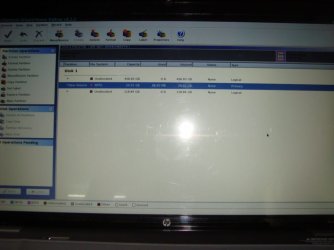
here's a snapshot of the PW disk page...
DSC04891.JPG

What shall i do next???
 

My Computer My Computer

At a glance

Windows 7 Home Premium 64bit.
OS
Windows 7 Home Premium 64bit.
The burnt CD is bootable, so either press F2 or del repeatedly (varies with the system) to get into the bios and change the boot order to CD first, then boot from the CD. Alternatively, insert the CD into the tray/slot, reboot, then press F12 (some HPs have F9) repeatedly to invoke the one time boot menu and select CD drive there.

In the PW window, check whether the system partition is active or not, otherwise right click and under Modify choose Set active or choose from the partition tab in the top menu and do the same.

Repair CD/ Console is a generic term but its often used for the system recovery options like startup repair, system restore etc. that you can run off the console (F8 at boot- repair your computer) or off a system repair disk (or install dvd). The system repair disk can be created within windows through an inbuilt facility.
 

My Computer My Computer

At a glance

Windows 7 x64 pro/ Windows 7 x86 Pro/ XP SP3 x86
Computer Manufacturer/Model Number
Too many to describe...
OS
Windows 7 x64 pro/ Windows 7 x86 Pro/ XP SP3 x86
Sir, as u can see in the snapshot posted, that most of the space is showing unallocated..
What does it mean?
 

My Computer My Computer

At a glance

Windows 7 Home Premium 64bit.
OS
Windows 7 Home Premium 64bit.
That snapshot is not very encouraging, the partitions seem completely messed up. I would say, click on the Wizards tab first, choose Partition recovery wizard, see if it finds any recoverable partition, check the box against that partition depending on whether you can identify it bu size and usage, then restore that partition.
 

My Computer My Computer

At a glance

Windows 7 x64 pro/ Windows 7 x86 Pro/ XP SP3 x86
Computer Manufacturer/Model Number
Too many to describe...
OS
Windows 7 x64 pro/ Windows 7 x86 Pro/ XP SP3 x86
Thanx a ton sir...
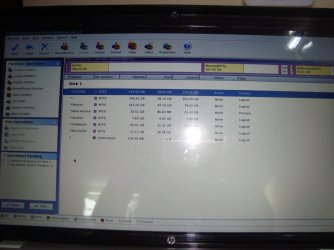
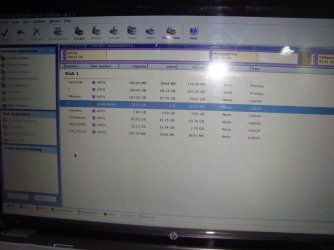
After the recovery, it looks somewhat like this:
DSC04894.JPG

And, i've set the System partition as active...
What next???
 

My Computer My Computer

At a glance

Windows 7 Home Premium 64bit.
OS
Windows 7 Home Premium 64bit.
After completing the pending operations i have:

DSC04896.JPG

What shall i do next???
Please reply....
Thank You...
 

My Computer My Computer

At a glance

Windows 7 Home Premium 64bit.
OS
Windows 7 Home Premium 64bit.
Back
Top