Windows 7 Forums


Windows 7: Windows 7 failing to boot after restoring peripherals

12 Sep 2011   #1

Windows Home Premium 64- bit(6.1,Build 7600) SP1
 
 
Windows 7 failing to boot after restoring peripherals

I disconnected all drives except the os hd and the dvd drive and all usb devices in order to boot to the start/repair disc. I successfully fixed the mbr and was able to boot into win 7.

However when I reconnected the other hds and usb devices, windows boot hangs at the "starting windows" stage. Upon rebooting a start repair program ran and show 7 errors.

Problem signature 01 6.1.7600.16385
Problem signature 02 6.1.7600.16385
Problem signature 03 unknown
Problem signature 04 43
Problem signature 05 AutoFailover
Problem signature 06 1
Problem signature 07 BadDriver
OS version 6.1.7600.2.0.0.256.1
Locale ID: 1033

It's all Greek to me. I'm unsure of how to proceed other than to restore the peripherals one at a time and see if the pc boots. I would like to correct the problems or at least find what they are.

My System SpecsSystem Spec

12 Sep 2011   #2

Windows 7 Ultimate SP1 64-Bit
Peterborough, England


You need to run the repair at least three times.
My System SpecsSystem Spec
12 Sep 2011   #3

ME/XP/Vista/Win7
uk Hampshire


Looks like the Hd Drive are in the wrong order. Did refit a IDE HD Drive.
My System SpecsSystem Spec
.


12 Sep 2011   #4

ME/XP/Vista/Win7
uk Hampshire


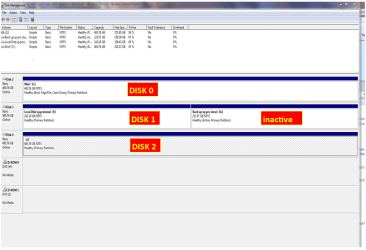
Is this your drive layout now.

Windows 7 failing to boot after restoring peripherals-dm002.png
My System SpecsSystem Spec
12 Sep 2011   #5

Windows Home Premium 64- bit(6.1,Build 7600) SP1


I reran the start/repair 3 times with no errors logged.

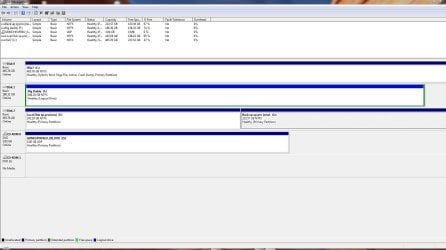
My present disk arrangement is;
Windows 7 failing to boot after restoring peripherals-present.disk.management.jpg

Disk 1 is an IDE drive.

The only active drive is C, the windows 7 one.

I have been successful booting with all the hard drives attached. Perhaps the problem is with some of the usb gear.

Last edited by Caramelo; 12 Sep 2011 at 08:27 PM.. Reason: additions
My System SpecsSystem Spec
12 Sep 2011   #6

ME/XP/Vista/Win7
uk Hampshire


May have been the HD drive order change or the replacement Hd Drive.
My System SpecsSystem Spec
12 Sep 2011   #7

MS Windows 7 Ultimate SP1 64-bit
Austin, Texas


Disconnect the disk labeled Disk #2 in your disk management snapshot.

Problem gone?
My System SpecsSystem Spec
13 Sep 2011   #8

Windows Home Premium 64- bit(6.1,Build 7600) SP1


I've reconnected all devices except my scanner. I'm able to boot ok still.
One mystery is this error from the event log:

The following boot-start or system-start driver(s) failed to load:
mbmiodrvr

Log Name: System
Source: Service Control Manager
Date: 9/13/2011 12:04:40 PM
Event ID: 7026
Task Category: None
Level: Error
Keywords: Classic
User: N/A
Computer: Dad-PC
Description:
The following boot-start or system-start driver(s) failed to load:
mbmiodrvr
Event Xml:
<Event xmlns="Error">
<System>
<Provider Name="Service Control Manager" Guid="{555908d1-a6d7-4695-8e1e-26931d2012f4}" EventSourceName="Service Control Manager" />
<EventID Qualifiers="49152">7026</EventID>
<Version>0</Version>
<Level>2</Level>
<Task>0</Task>
<Opcode>0</Opcode>
<Keywords>0x8080000000000000</Keywords>
<TimeCreated SystemTime="2011-09-13T16:04:40.826868000Z" />
<EventRecordID>311703</EventRecordID>
<Correlation />
<Execution ProcessID="616" ThreadID="620" />
<Channel>System</Channel>
<Computer>Dad-PC</Computer>
<Security />
</System>
<EventData>
<Data Name="param1">
mbmiodrvr</Data>
</EventData>
</Event>
My System SpecsSystem Spec
13 Sep 2011   #9

Windows Home Premium 64- bit(6.1,Build 7600) SP1


Quote   Quote: Originally Posted by karlsnooks View Post
Disconnect the disk labeled Disk #2 in your disk management snapshot.

Problem gone?
Disk 2 is still connected and apparently no causing boot problems.

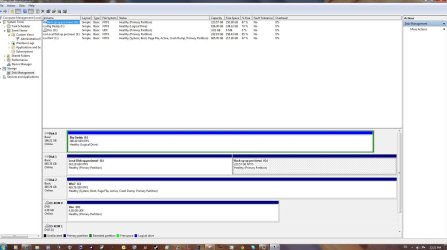
The amd bios keeps changing the order of the hds no matter what setting I give.Windows 7 failing to boot after restoring peripherals-dm.latest.jpg

There's the latest, with C, the Windows 7 listed as drive 2. It seems the bios has a mind of it's own and puts them where it will.
My System SpecsSystem Spec
13 Sep 2011   #10

ME/XP/Vista/Win7
uk Hampshire


Did you run Disk Check?

IDE Hd Drive, always boot first.
My System SpecsSystem Spec
Reply

 Windows 7 failing to boot after restoring peripherals problems?


Thread Tools


Similar help and support threads for: Windows 7 failing to boot after restoring peripherals
Thread Forum
Help My computer is Failing to Boot! Windows 7 ultimate x64 General Discussion
F1 at boot, CMOS batt replaced.Windows warning BU data, HDD failing General Discussion
Windows partition changed itself to D, failing to boot Installation & Setup
Windows Failing to Boot Boot\BCD BSOD Help and Support
no peripherals work after windows 7 reboot Hardware & Devices


All times are GMT -5. The time now is 03:23 PM.


Seven Forums Android App Seven Forums IOS App Follow us on Facebook

Windows 7 Forums is an independent web site and has not been authorized,
sponsored, or otherwise approved by Microsoft Corporation.
"Windows 7" and related materials are trademarks of Microsoft Corp.
© Designer Media Ltd
  

1 2 3 4 5 6 7 8 9 10 11 12 13 14 15 16 17 18 19 20 21 22 23 24 25 26 27 28 29 30 31 32