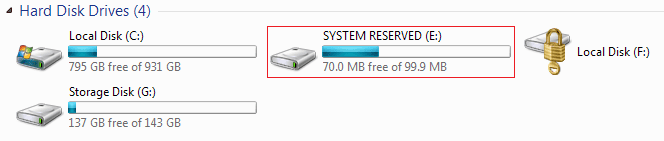
I have put up with this for a long time, and I decided it's getting in the way.
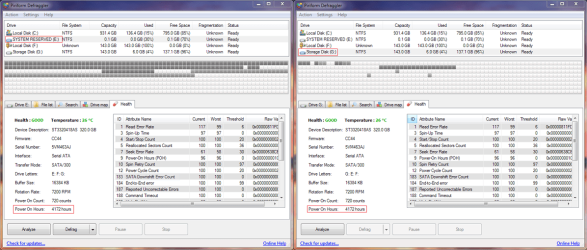
I found out in Defraggler that it belongs to my other Seagate hard drive, Local Disk F and Storage Disk G
So how would I remove it?
i have removed partions like this with no ill effects so why cant he just resize?
My Computer
At a glance
Windows 7 Ultimate 32 Bit SP 1Pentium 4, 3.00 GHz socket 7751GB DDR2Onboard
Computer Manufacturer/Model Number
Custom Built
OS
Windows 7 Ultimate 32 Bit SP 1
CPU
Pentium 4, 3.00 GHz socket 775
Motherboard
Foxconn
Memory
1GB DDR2
Graphics Card(s)
Onboard
Sound Card
Creative Labs (Soundblaster Live)
Monitor(s) Displays
UMC LCD
Screen Resolution
1024x768
Hard Drives
4 SATA
2 IDE
PSU
HEC-300AR-PTE
Case
Mesh
Cooling
Intel CPU fan, 3 generic case fans
Keyboard
Dell RT7D00
Mouse
Tiny
Internet Speed
Yawwwn
Other Info
my computer is rubbish, the only good thing about it is that it has cost me nothing to build as i have salvaged the components from freinds, everything including the monitor was free gratis!
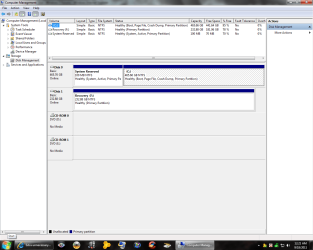
Windows uses that area to store recovery data. I wouldn't remove it. It shouldn't have a drive leter assigned. What does it show in Windows disk management. Perhaps your software is assigning a letter because it doesn't know any better.
My Computer
At a glance
Windows 7 Pro-x64i7-2600 3.4GHz - 3.8GHz Turbo8Gb - 2x4GB, Muskin 991770 PC3-1333Integrated Intel HD 2000
Computer type
PC/Desktop
Computer Manufacturer/Model Number
Built 2/11/2011
OS
Windows 7 Pro-x64
CPU
i7-2600 3.4GHz - 3.8GHz Turbo
Motherboard
Intel DH67BL-B3
Memory
8Gb - 2x4GB, Muskin 991770 PC3-1333
Graphics Card(s)
Integrated Intel HD 2000
Sound Card
Integrated Intel 10.1 HD, RealTek ALC892
Monitor(s) Displays
Asus LCD VH222H, Haier HL24XSL2a
Screen Resolution
1920x1080, 1920x1080
Hard Drives
Crucial SSD C300-128Gb,
Western Digital WD5002AALX - 500Gb,
Western Digital WD7501AALS - 750Gb
PSU
Seasonic 650W 80+ Gold Modular
Case
Rosewill Defender
Cooling
Stock CPU, Four 120mm case fans, PCH fan added
Keyboard
Logitech EX100 Y-RBH94 Wireless
Mouse
Logitech EX100 M-RCE95 Wireless
Internet Speed
3.0/1.5 Mbs
Antivirus
Microsoft Security Essentials
Browser
Microsoft Internet Explorer 11
Other Info
Antec Veris Premier-Multimedia IR Station,
Cyber Accoustics-3602 Speakers,
AFT XM-5U Card Reader,
Hauppauge TV-HVR-2250,
Sony LX300 USB Turntable
You do not want to delete the System Reserved. It should not have a drive letter assigned to it. Remove the driver letter and Windows will not see it. However, it will be seen by defrag utils and disk utils.
My Computer
At a glance
Windows 7 Enterprise (x64); Windows Server 20...16GB
Computer type
PC/Desktop
Computer Manufacturer/Model Number
Dell OP7010
OS
Windows 7 Enterprise (x64); Windows Server 2008 R2 (x64)
The system reserve partition has boot files on it. If you delete it the system will not boot. Read the tutorials here about how to hide it again or put the boot files on the C: drive. Unless you know what your doing, I recommend leaving it alone.
Here`s a shot of what it should look like.
Attachments
MyPC.png
49.9 KB
· Views: 21
My Computer
At a glance
Windows 7 Ultimate 64BitC2D E82008GB PNY PC2-6400BFG 9600GT x 2
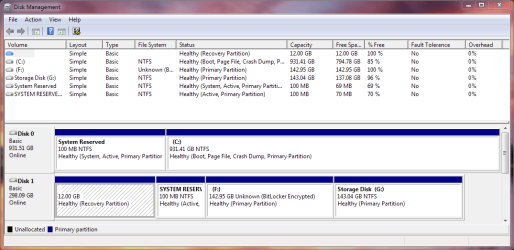
From the image I posted on the first post of the thread, I have a drive that is BitLocked. I'm not sure if 'SYSTEM RESERVED' drive was generated through doing so.
I think your third party software assigned the letters. They don't show letters in Windows Disk Management so you shouldn't remove any drive letters. The first is a recovery area. Not sure what the second might be unless it's part of Bitlocker. (I don't know--Don't use it.) In any case, best not to delete them.
My Computer
At a glance
Windows 7 Pro-x64i7-2600 3.4GHz - 3.8GHz Turbo8Gb - 2x4GB, Muskin 991770 PC3-1333Integrated Intel HD 2000
Computer type
PC/Desktop
Computer Manufacturer/Model Number
Built 2/11/2011
OS
Windows 7 Pro-x64
CPU
i7-2600 3.4GHz - 3.8GHz Turbo
Motherboard
Intel DH67BL-B3
Memory
8Gb - 2x4GB, Muskin 991770 PC3-1333
Graphics Card(s)
Integrated Intel HD 2000
Sound Card
Integrated Intel 10.1 HD, RealTek ALC892
Monitor(s) Displays
Asus LCD VH222H, Haier HL24XSL2a
Screen Resolution
1920x1080, 1920x1080
Hard Drives
Crucial SSD C300-128Gb,
Western Digital WD5002AALX - 500Gb,
Western Digital WD7501AALS - 750Gb
PSU
Seasonic 650W 80+ Gold Modular
Case
Rosewill Defender
Cooling
Stock CPU, Four 120mm case fans, PCH fan added
Keyboard
Logitech EX100 Y-RBH94 Wireless
Mouse
Logitech EX100 M-RCE95 Wireless
Internet Speed
3.0/1.5 Mbs
Antivirus
Microsoft Security Essentials
Browser
Microsoft Internet Explorer 11
Other Info
Antec Veris Premier-Multimedia IR Station,
Cyber Accoustics-3602 Speakers,
AFT XM-5U Card Reader,
Hauppauge TV-HVR-2250,
Sony LX300 USB Turntable
Video Intel(R) HD Graphics Family, 1696MB available memory
Sound Card
Realtek High Definition Audio version=6.0.1.6323
Monitor(s) Displays
17.3 " Trubrite TFT LCD, LED Backlit
Screen Resolution
1600x900 32 bit, Native support for 720P content
Hard Drives
TOSHIBA MK6476GSXN
580.614 [GB] partitioned C: 80GB and D: 500GB with hidden recovery partitons.
Spare bay for 2nd HDD but no SATA connector :-(
PSU
Toshiba AC/DC Adapter
Case
Notebook
Cooling
Built-in Fan
Keyboard
Premium Raised Tile keyboard
Mouse
Logitech M215 wireless mouse
Internet Speed
Not fast enough
Other Info
Built-in Harman Kardon speakers with Dolby Advanced Audio, Waves MaxxAudio® 3. HDMI, 1xUSB3+3xUSB2 ports, WebCam, Battery life 4hrs 11mins, 4GB Readyboost SDHC card, WD My Book Essential Ext HDDs 2 TB, 2x1TB, My Passport SE 1TB and WDTV 1st Gen for Multimedia playing on a Sony Wega 32" LCD.
Recent addition to my toys are Asus Transformer Pad TF300T with 32GB onboard sd card + 32GB microsd card.