Windows 7 Forums Search
Welcome to Windows 7 Forums. Our forum is dedicated to helping you find solutions with any problems, errors or issues you are experiencing with Windows 7. The Windows 7 forum also covers news and updates and has an extensive Windows 7 tutorial section that covers a wide range of tips and tricks.


Windows 7 - Desktop Toolbar Icons in Taskbar - How to Remove?

 
09-25-2011   #1


Windows 7 64 bit


Desktop Toolbar Icons in Taskbar - How to Remove?

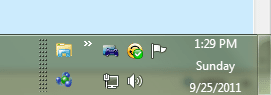
When I create the desktop toolbar in the taskbar, it creates a button with 2 chevron arrows, and it also creates a label calles "Desktop". I know how to remove that label, but then it displays all the objects on my desktop in the form of icons and the name of those objects. I know how to remove the name of those objects, but I can't figure out how to remove the icons (see image below).

The only thing I want to see is the show desktop button, and nothing else. Any idea how to do this?

Attached Images
 
My System SpecsSystem Spec
09-25-2011   #2


Windows 7 Ultimate SP1 64-Bit


Welcome to Windows Seven Forums.

Place your cursor over the dotted spacer bar to the left of the desktop toolbar icons and click and drag the dotted spacer bar to the right so that the icons become hidden.

Next, right-click the taskbar and enable "Lock the taskbar".

Name:  Taskbar.JPG
Views: 464
Size:  10.1 KB
My System SpecsSystem Spec
09-25-2011   #3


Windows 7 Ultimate x64 SP1


Hello PapaWhiskey, and welcome to Seven Forums.

Since you have your taskbar dragged up with two levels high instead of the single level, you will see the two icons (Explorer and Homegroup) displaying from the "Desktop" toolbar like that. If you only want to see the "explorer" icon, then you would need to shrink (drag) the taskbar back down to one level.

As for the chevron arrows menu, you can get rid of it by dragging the dotted separator line to the left until all the chevron arrow goes away. If you keep the chevron arrows, there's nothing that you can do to remove the menu names and icons when you click on the arrows. This is just part of the "Desktop" toolbar.

When finished, lock the taskbar.

You might find this to be helpful as well.

Toolbars - How to Use in Windows 7 and Vista

Hope this helps some,
Shawn
My System SpecsSystem Spec
.


Reply

 Desktop Toolbar Icons in Taskbar - How to Remove? problems?


Thread Tools


Similar Threads for: Desktop Toolbar Icons in Taskbar - How to Remove?
Thread Forum
Desktop Toolbar on Taskbar - Add or Remove Tutorials
Solved Shortcut icons on desktop & desktop toolbar Customization
Desktop toolbar on the Taskbar causing headache General Discussion
Size of Desktop Toolbar on locked taskbar General Discussion
Are there other ways to remove icons from the taskbar? Customization


All times are GMT -5. The time now is 01:02 AM.


Windows 7 Forums is an independent web site and has not been authorized,
sponsored, or otherwise approved by Microsoft Corporation.
"Windows 7" and related materials are trademarks of Microsoft Corp.
© Designer Media Ltd
  

1 2 3 4 5 6 7 8 9 10 11 12 13 14 15 16 17 18 19 20 21 22 23 24 25 26 27 28 29 30