|
Welcome to Windows 7 Forums. Our forum is dedicated to helping you find solutions with any problems, errors or issues you are experiencing with Windows 7. The Windows 7 forum also covers news and updates and has an extensive Windows 7 tutorial section that covers a wide range of tips and tricks.
Windows 7 - Hide/Unhide option unavailable in explorer |
10-07-2011
|
#1 | | Windows 7, Ultimate 64bit Version 6.1.7600 |
Hide/Unhide option unavailable in explorer First Hi,
Second, I'm not sure this is in the right section, my apologize if I made it wrong.
Third, my weird problem,
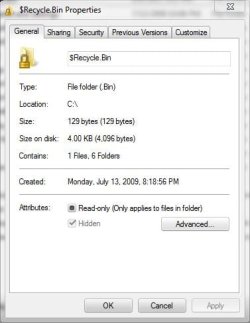
In Windows Explorer, I have set the option to see hidden files and system files and I do see them. The problem arise when I try to "unhide" a file. I right-click the file and choose "Properties", bottom I see Hide option box, it is checked but also greyed out so I can't "uncheck" it.
Anyone knows why and how can I fix this?
Thanks
| My System Specs | | System Manufacturer/Model Number My creation OS Windows 7, Ultimate 64bit Version 6.1.7600 CPU Intel E6400 Core2Duo 2.13 GHz Motherboard Gigabyte GA-965P-DS3 Memory 4 Go Graphics Card Nvidia GTX260 OC Sound Card OnBoard Monitor(s) Displays Samsung SyncMaster 226BW Screen Resolution 1680x1050 Keyboard Logitech Wave Mouse Logitech G9 PSU Antec 450 Case Antec ? Cooling FAN ;o) Hard Drives Western Digital WS250KS x2 (SATA)
Western Digital WD10EADS (SATA) Internet Speed Fast enough |
10-07-2011
|
#2 | | Windows 7, Ultimate 64bit Version 6.1.7600 |
I have found part of the solution.
Going through command line I found out that the files were marked as System along with Hidden. I used the command Attrib to remove both and now I can hide/unhide the file. Is there anyway to unflag "System" from Windows Explorer. I don't mind doing it from the command line but would be more "practical" from Windows Explorer.
Thanks | My System Specs | | System Manufacturer/Model Number My creation OS Windows 7, Ultimate 64bit Version 6.1.7600 CPU Intel E6400 Core2Duo 2.13 GHz Motherboard Gigabyte GA-965P-DS3 Memory 4 Go Graphics Card Nvidia GTX260 OC Sound Card OnBoard Monitor(s) Displays Samsung SyncMaster 226BW Screen Resolution 1680x1050 Keyboard Logitech Wave Mouse Logitech G9 PSU Antec 450 Case Antec ? Cooling FAN ;o) Hard Drives Western Digital WS250KS x2 (SATA)
Western Digital WD10EADS (SATA) Internet Speed Fast enough |
10-07-2011
|
#3 | | |

Quote: Originally Posted by Warluck First Hi,
Second, I'm not sure this is in the right section, my apologize if I made it wrong.
Third, my weird problem,
In Windows Explorer, I have set the option to see hidden files and system files and I do see them. The problem arise when I try to "unhide" a file. I right-click the file and choose "Properties", bottom I see Hide option box, it is checked but also greyed out so I can't "uncheck" it.
Anyone knows why and how can I fix this?
Thanks Are you just trying to hide a single file?
I use this Show - Hide Hidden Files - Add to Context Menu
and just Hide/Show files when needed. | My System Specs | | System Manufacturer/Model Number compaq sr5410f case OS Windows 7 Pro 64 SP1 CPU AMD X2 4450E @ 2.3 ghz Motherboard Biostar MCP6P M2+ Memory 4.0 g Graphics Card Nvidia GeForce 9600 GT , 512mb Sound Card onboard Monitor(s) Displays auria eq2367 Screen Resolution 1920 x 1080 Keyboard logitech wave cordless Mouse logitech LX8 cordless laser mouse PSU 250 watts Case compaq Cooling couple fans Hard Drives 1 tb Hitachi HDT721010SLA scsi, 500 gb external Internet Speed comcast hi speed 19 dn 8 up Other Info Laptop specs: HP g7-1365dx /
CPU: AMD A6-3420M APU with Radeon(tm) HD Graphics /
RAM: Crucial 8Gb (2x4Gb) /
SSD: Crucial M4-CT128M4SSD2 ATA Device/ FW 000F /
GFX: AMD Radeon HD 6520G /
OS: Microsoft Windows 7 Professional 64-bit 7601 Multiprocessor Free Service Pack 1 |
10-07-2011
|
#4 | | Windows 7, Ultimate 64bit Version 6.1.7600 |
Well, thanks Derekimo but if you read again, I am unable to hide/unhide the files and the reason is because those files are also flagged with the attribute "system". The fact is, I manage to remove all Hidden flag along with System flag : Code: cd mydir
attrib -s -h /S My next question is, is it possible, and how, to have the "System" flag inside Windows Explorer? Currently the only flag available are "Hidden" and "Read-Only". | My System Specs | | System Manufacturer/Model Number My creation OS Windows 7, Ultimate 64bit Version 6.1.7600 CPU Intel E6400 Core2Duo 2.13 GHz Motherboard Gigabyte GA-965P-DS3 Memory 4 Go Graphics Card Nvidia GTX260 OC Sound Card OnBoard Monitor(s) Displays Samsung SyncMaster 226BW Screen Resolution 1680x1050 Keyboard Logitech Wave Mouse Logitech G9 PSU Antec 450 Case Antec ? Cooling FAN ;o) Hard Drives Western Digital WS250KS x2 (SATA)
Western Digital WD10EADS (SATA) Internet Speed Fast enough |
10-07-2011
|
#5 | | |

Quote: Originally Posted by Warluck Well, thanks Derekimo but if you read again, I am unable to hide/unhide the files and the reason is because those files are also flagged with the attribute "system". The fact is, I manage to remove all Hidden flag along with System flag : Code: cd mydir
attrib -s -h /S My next question is, is it possible, and how, to have the "System" flag inside Windows Explorer? Currently the only flag available are "Hidden" and "Read-Only". I did read it, Quote: In Windows Explorer, I have set the option to see hidden files and system files and I do see them And this, Quote: The problem arise when I try to "unhide" a file Which is why I asked if you were trying to just unhide a single file.
I must have misunderstood, sorry, I don't have an answer for you. Quote: My next question is, is it possible, and how, to have the "System" flag inside Windows Explorer? Currently the only flag available are "Hidden" and "Read-Only". Is this where you are trying to add "System"? | My System Specs | | System Manufacturer/Model Number compaq sr5410f case OS Windows 7 Pro 64 SP1 CPU AMD X2 4450E @ 2.3 ghz Motherboard Biostar MCP6P M2+ Memory 4.0 g Graphics Card Nvidia GeForce 9600 GT , 512mb Sound Card onboard Monitor(s) Displays auria eq2367 Screen Resolution 1920 x 1080 Keyboard logitech wave cordless Mouse logitech LX8 cordless laser mouse PSU 250 watts Case compaq Cooling couple fans Hard Drives 1 tb Hitachi HDT721010SLA scsi, 500 gb external Internet Speed comcast hi speed 19 dn 8 up Other Info Laptop specs: HP g7-1365dx /
CPU: AMD A6-3420M APU with Radeon(tm) HD Graphics /
RAM: Crucial 8Gb (2x4Gb) /
SSD: Crucial M4-CT128M4SSD2 ATA Device/ FW 000F /
GFX: AMD Radeon HD 6520G /
OS: Microsoft Windows 7 Professional 64-bit 7601 Multiprocessor Free Service Pack 1 |
10-07-2011
|
#6 | | Windows 7, Ultimate 64bit Version 6.1.7600 |
@Derekimo
Whether I try one or many files at once I had the same problem and all relatet to the "System" attribute my files were flagged with.
An yes, the last image you posted is where I would expect to see "System" option that I can check or uncheck (as it was in Windows XP). So far the only way I found to manipulate the "System" flag is through Attrib in the command line. My understanding is that "System" flag is a deprecate option. | My System Specs | | System Manufacturer/Model Number My creation OS Windows 7, Ultimate 64bit Version 6.1.7600 CPU Intel E6400 Core2Duo 2.13 GHz Motherboard Gigabyte GA-965P-DS3 Memory 4 Go Graphics Card Nvidia GTX260 OC Sound Card OnBoard Monitor(s) Displays Samsung SyncMaster 226BW Screen Resolution 1680x1050 Keyboard Logitech Wave Mouse Logitech G9 PSU Antec 450 Case Antec ? Cooling FAN ;o) Hard Drives Western Digital WS250KS x2 (SATA)
Western Digital WD10EADS (SATA) Internet Speed Fast enough |
10-07-2011
|
#7 | | |

Quote: Originally Posted by Warluck @Derekimo
Whether I try one or many files at once I had the same problem and all relatet to the "System" attribute my files were flagged with.
An yes, the last image you posted is where I would expect to see "System" option that I can check or uncheck (as it was in Windows XP). So far the only way I found to manipulate the "System" flag is through Attrib in the command line. My understanding is that "System" flag is a deprecate option. Yeah, I am just guessing here, but since they are flagged as "System" files, there isn't supposed to be a simple way to manipulate their attributes, which is why they are hidden by default.
Maybe someone else has a better answer for you. | My System Specs | | System Manufacturer/Model Number compaq sr5410f case OS Windows 7 Pro 64 SP1 CPU AMD X2 4450E @ 2.3 ghz Motherboard Biostar MCP6P M2+ Memory 4.0 g Graphics Card Nvidia GeForce 9600 GT , 512mb Sound Card onboard Monitor(s) Displays auria eq2367 Screen Resolution 1920 x 1080 Keyboard logitech wave cordless Mouse logitech LX8 cordless laser mouse PSU 250 watts Case compaq Cooling couple fans Hard Drives 1 tb Hitachi HDT721010SLA scsi, 500 gb external Internet Speed comcast hi speed 19 dn 8 up Other Info Laptop specs: HP g7-1365dx /
CPU: AMD A6-3420M APU with Radeon(tm) HD Graphics /
RAM: Crucial 8Gb (2x4Gb) /
SSD: Crucial M4-CT128M4SSD2 ATA Device/ FW 000F /
GFX: AMD Radeon HD 6520G /
OS: Microsoft Windows 7 Professional 64-bit 7601 Multiprocessor Free Service Pack 1 |
10-07-2011
|
#8 | | Windows 7 Home Premium 64bit |
You might want to review this article. How to View Hidden Files and File Extensions in Windows | PCWorld
We are just trying to help! | My System Specs | | System Manufacturer/Model Number HP M9077c OS Windows 7 Home Premium 64bit CPU Intel(R)Core(TM)2 quad Q6600@2.4GHz 2.39GHz Motherboard ASUSeK Memory 6GB DDR2 6400 Graphics Card GeForce 8500/512MB Sound Card Realtek High Def Audio Monitor(s) Displays HP w2408 LCD 24" widescreen Screen Resolution 1920x1200 Keyboard MS wireless Inteli Mouse MS wireless Inteli Cooling 6 pack of Bud |
10-07-2011
|
#9 | | Windows 7, Ultimate 64bit Version 6.1.7600 |
Lol, Thanks M. Wolves, I know you are trying to help, this is why I'm here and I really appreciate the effort.
I have no problem viewing hidden files in the Explorer but some software are having difficulties like FlagSone Viewer. The problem comes when I try to "unhide" them as I can't because of the System flag attribute.
Anyway, the problem is fixed as I removed all hidden flag ans system flag from the directory using the command line attrib.
Thanks everyone, hope this thread could be of any help for anyone else experiencing the same issue. | My System Specs | | System Manufacturer/Model Number My creation OS Windows 7, Ultimate 64bit Version 6.1.7600 CPU Intel E6400 Core2Duo 2.13 GHz Motherboard Gigabyte GA-965P-DS3 Memory 4 Go Graphics Card Nvidia GTX260 OC Sound Card OnBoard Monitor(s) Displays Samsung SyncMaster 226BW Screen Resolution 1680x1050 Keyboard Logitech Wave Mouse Logitech G9 PSU Antec 450 Case Antec ? Cooling FAN ;o) Hard Drives Western Digital WS250KS x2 (SATA)
Western Digital WD10EADS (SATA) Internet Speed Fast enough |
10-07-2011
|
#10 | | Windows 7 Home Premium 64bit |

Quote: Originally Posted by Warluck Lol, Thanks M. Wolves, I know you are trying to help, this is why I'm here and I really appreciate the effort.
I have no problem viewing hidden files in the Explorer but some software are having difficulties like FlagSone Viewer. The problem comes when I try to "unhide" them as I can't because of the System flag attribute.
Anyway, the problem is fixed as I removed all hidden flag ans system flag from the directory using the command line attrib.
Thanks everyone, hope this thread could be of any help for anyone else experiencing the same issue. Thank you for getting back and sharing how you fixed your problem. It will help others experiencing the same issue...as I just learned something new!
Have a great week-end.
THW | My System Specs | | System Manufacturer/Model Number HP M9077c OS Windows 7 Home Premium 64bit CPU Intel(R)Core(TM)2 quad Q6600@2.4GHz 2.39GHz Motherboard ASUSeK Memory 6GB DDR2 6400 Graphics Card GeForce 8500/512MB Sound Card Realtek High Def Audio Monitor(s) Displays HP w2408 LCD 24" widescreen Screen Resolution 1920x1200 Keyboard MS wireless Inteli Mouse MS wireless Inteli Cooling 6 pack of Bud Hide/Unhide option unavailable in explorer problems? All times are GMT -5. The time now is 01:50 AM. |  |