Windows 7 Forums


Windows 7: How to recover a unallocated partition with bitlocker encryption

08 May 2012   #11

Windows 7 Ultimate


Quote   Quote: Originally Posted by Brink View Post
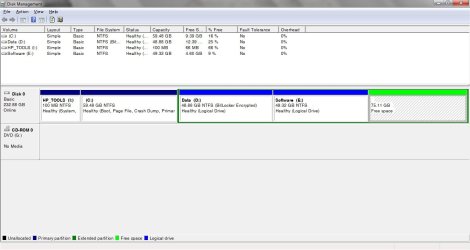
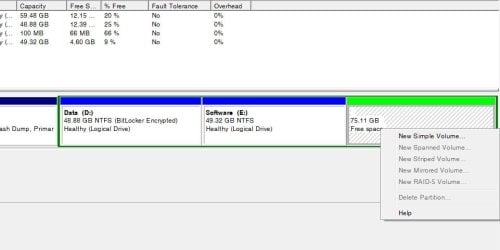
You could right click on the "Free space" partition, and click on the New Simple Volume option to restore the partition. Afterwards, you could use your Active Recovery Partition program or a program like Recuva to try and recover any data from it.
I'm sorry for too late reply. I already assign a letter for the volume, but it appear as a unformatted partion so I cannot recovery any thing. Some one said that I should edit some sector (or merge with another partion) on it but I dont know how to do. Please help me

My System SpecsSystem Spec

08 May 2012   #12

64-bit Windows 7 Ultimate SP1 & Windows 8 Enterprise
Texas


Sorry mate, but anything that was on that partition is most likely unrecoverable by now.
My System SpecsSystem Spec
Reply

 How to recover a unallocated partition with bitlocker encryption problems?


Thread Tools


Similar help and support threads for: How to recover a unallocated partition with bitlocker encryption
Thread Forum
Bitlocker drive encryption on a raid 0 partition, crashes windows. BSOD Help and Support
BitLocker Drive Encryption - BitLocker To Go - Turn On or Off Tutorials
How do I recover unallocated hd partition? Hardware & Devices
How do I recover an unallocated partition? General Discussion
BitLocker Drive Encryption - Change Encryption Method and Cipher Strength Tutorials


All times are GMT -5. The time now is 09:05 AM.


Windows 7 Forums is an independent web site and has not been authorized,
sponsored, or otherwise approved by Microsoft Corporation.
"Windows 7" and related materials are trademarks of Microsoft Corp.
© Designer Media Ltd