Windows 7 Forums Search
Welcome to Windows 7 Forums. Our forum is dedicated to helping you find solutions with any problems, errors or issues you are experiencing with Windows 7. The Windows 7 forum also covers news and updates and has an extensive Windows 7 tutorial section that covers a wide range of tips and tricks.


Windows 7 - How to delete please the restore points .......

 
10-12-2011   #1


How to delete please the restore points .......

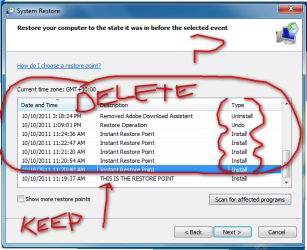
I have made a picture i am wanting to ONLY delete restore points that are in the red circle.
i have seen you can delete , but from what i gather only keep the latest restore point and the rest get deleted ...

any help thanks .....

Attached Thumbnails
How to delete please the restore points .......-2011-10-12_133732.png  
My System SpecsSystem Spec
10-12-2011   #2


Windows 7 Ultimate 64bit + xp,Vista,ubuntu in V-Box's


Start Menu>All Programs>Accessories>System Tools> Disk Cleanup> More Options Tab(top of window)>System Restore and Shadow Copies(Push Clean Up Button)

This Will Delete ALL but Last Restore Point!!!
My System SpecsSystem Spec
10-12-2011   #3


Microsoft Windows 7 Home Premium 64-bit 7601 Multiprocessor Free Service Pack 1


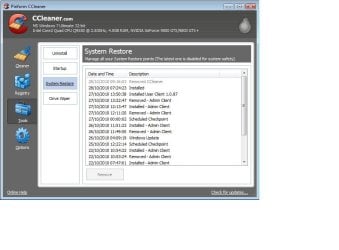
CCleaner has the ability to do that. It is in the tools menu. Link in my sig.
My System SpecsSystem Spec
.


10-12-2011   #4


Win 7 Pro 64-bit


Just my 2 cents worth but I find it a lot easier to control my restore points using a free product called CCleaner.

CCleaner - Optimization and Cleaning - Free Download

When you run CCleaner you have a Tools option on the left side of the dashboard. Click on Tools and you'll see a System Restore option. From there you can remove whatever restore points you want except for the most current.

How to delete please the restore points .......-ccleaner.jpg
My System SpecsSystem Spec
10-12-2011   #5


Quote   Quote: Originally Posted by jeepmann4x4 View Post
Start Menu>All Programs>Accessories>System Tools> Disk Cleanup> More Options Tab(top of window)>System Restore and Shadow Copies(Push Clean Up Button)

This Will Delete ALL but Last Restore Point!!!
this is were im not understanding, it has not got that tab , even after i ran that cleaner (options tab is there) but then im unable to (shadow) or anything that resembles this

AND now that restore point i want has gone rrrr
Attached Thumbnails
How to delete please the restore points .......-2011-10-12_191846.png  
My System SpecsSystem Spec
10-12-2011   #6


Windows 7 Ultimate 64bit + xp,Vista,ubuntu in V-Box's


Quote   Quote: Originally Posted by ohsocute69 View Post
Quote   Quote: Originally Posted by jeepmann4x4 View Post
Start Menu>All Programs>Accessories>System Tools> Disk Cleanup> More Options Tab(top of window)>System Restore and Shadow Copies(Push Clean Up Button)

This Will Delete ALL but Last Restore Point!!!
this is were im not understanding, it has not got that tab , even after i ran that cleaner (options tab is there) but then im unable to (shadow) or anything that resembles this
You might need to "Right Click" on "Disk Cleanup" and Run as Administrator. See if that gives you the option tab, mine is just there but I am the Admin. for my system.

Also check this Thread out.....
Disk Cleanup - Open and Use
or www.sevenforums.com/tutorials/818-disk-cleanup-open-use.html

You may also want to run that "Clean up System Files" (button in you pic) But read though the above link first it has a great step by step.

Last edited by jeepmann4x4; 10-12-2011 at 04:50 AM.. Reason: EDIT: First link was not working so I put the http as well
My System SpecsSystem Spec
10-12-2011   #7


Windows 7 Ultimate 64 bit SP1 x64


Please note that CCleaner on XP does NOT purge the entire Restore Points.
It only purges the Registry Hives within each R.P. because they become redundant when access for restoration is hidden.
Each R.P. holds a self contained set of Registry Hives that FULLY holds the entire state of the Registry as at that time.
Each R.P. also holds copies of all deleted and updated files as they were removed during the life of that Restore Point. Those MUST NOT be removed otherwise when Windows restores to an earlier available R.P. it will NOT have a copy of the original deleted/replaced file and your system is then totally corrupted.

I have no experience of Restore Points with Windows 7, but assume something similar.
Macrium Backups are more than adequate for me

CCleaner is good, but if you want to only retain the last R.P. then Disc Cleanup will remove all the previous file backups as well as the registry backups.
My System SpecsSystem Spec
10-12-2011   #8


Windows 7 Ultimate x64 SP1


Hello Ohsocute,

The tutorial below can help show you more on how to do what was posted above.

System Protection Restore Points - Delete

Hope this helps,
Shawn
My System SpecsSystem Spec
Reply

 How to delete please the restore points ....... problems?


Thread Tools


Similar Threads for: How to delete please the restore points .......
Thread Forum
System Protection Restore Points - Delete Tutorials
System Restore only shows limited restore points Backup and Restore
System Image restore points--How to delete Backup and Restore
Solved Can I delete individual "restore Points" and how ? Backup and Restore
System Restore not creating automatic restore points Backup and Restore


All times are GMT -5. The time now is 01:52 AM.


Windows 7 Forums is an independent web site and has not been authorized,
sponsored, or otherwise approved by Microsoft Corporation.
"Windows 7" and related materials are trademarks of Microsoft Corp.
© Designer Media Ltd
  

1 2 3 4 5 6 7 8 9 10 11 12 13 14 15 16 17 18 19 20 21 22 23 24 25 26 27 28 29 30