Hello,
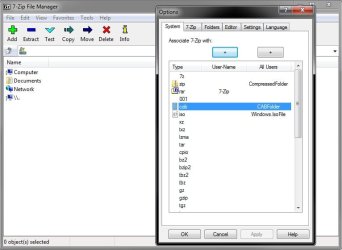
Maybe someone can help me understand and fix this issue. I use 7-zip for extracting .zip files. Occasionally I have come across a .zip file it would not open. I downloaded the trial Winzip and extracted it. I deleted winzip off the computer. Now I get CCleaner errors on .cab file extension. So I went into Default programs to assign 7-zip to that extension, but that extension does not show up in the file types. Lost, help.
Glenn
Maybe someone can help me understand and fix this issue. I use 7-zip for extracting .zip files. Occasionally I have come across a .zip file it would not open. I downloaded the trial Winzip and extracted it. I deleted winzip off the computer. Now I get CCleaner errors on .cab file extension. So I went into Default programs to assign 7-zip to that extension, but that extension does not show up in the file types. Lost, help.
Glenn
My Computer
- Computer type
- PC/Desktop
- Computer Manufacturer/Model Number
- Self-Built
- OS
- Windows 7 Ultimate
- CPU
- AMD Phenom-II X4 965
- Motherboard
- Gigabyte GA-MA785GM-US2H
- Memory
- 8192 MB DDR2-SDRAM
- Graphics Card(s)
- ATI Radeon HD 4200
- Sound Card
- ATI Radeon HD 4200 High Definition Audo
- Monitor(s) Displays
- LG Electronics W1943
- Screen Resolution
- 1360 X 768
- Hard Drives
- C: 500 GB Caviar Black SATA
E: 500 GB Caviar Black SATA
- PSU
- Ultra LSP 750
- Case
- Ultra XBlaster
- Cooling
- 2 Fans, CPU Fan, PS Fan
- Keyboard
- Acer
- Mouse
- Logitech
- Internet Speed
- 6 MB