 |
Welcome to Windows 7 Forums. Our forum is dedicated to helping you find solutions with any problems, errors or issues you are experiencing with Windows 7. The Windows 7 forum also covers news and updates and has an extensive Windows 7 tutorial section that covers a wide range of tips and tricks.
Windows 7 - I couldn't delete Windows.old folder. |
10-17-2011
|
#1 | | |
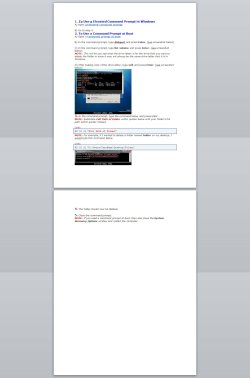
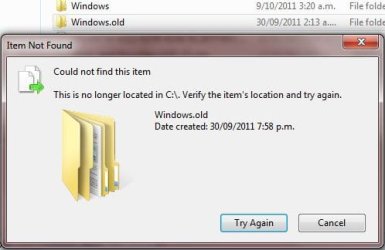
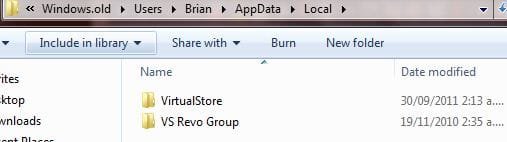
I couldn't delete Windows.old folder. I just notice I still have this Windows.old and couldn't delete it. I used disk cleanup already but that didn't do it. I have attached two images to help you guys understand what's going on. Thank you.
| My System Specs | | |
10-17-2011
|
#2 | | MS Windows 7 Ultimate 64-bit SP1 |
You need to checkup the ownership of this folder. Usually the ownership will be with "System" and even as an administrator you can not delete this folder and its contents.
To delete this folder with all it's contents, You have to take ownership of this folder, subfolders and files within as an administrator. Then you have to assign full permissions to "Administrators" to all the items inside this folder.
Then only you can delete this folder. | My System Specs | | System Manufacturer/Model Number Toshiba Satellite P775-S7232 OS MS Windows 7 Ultimate 64-bit SP1 CPU i5-2410M 2.3GHz (2.9GHz Turbo-Boost) Sandy Bridge 32nm Motherboard Toshiba PHRAA ver. PSBY1U-00F003 Memory 4GB+4GB Samsung DDR3 PC3-10700 (1333 MHz) Graphics Card Video Intel(R) HD Graphics Family, 1696MB available memory Sound Card Realtek High Definition Audio version=6.0.1.6323 Monitor(s) Displays 17.3 " Trubrite TFT LCD, LED Backlit Screen Resolution 1600x900 32 bit, Native support for 720P content Keyboard Premium Raised Tile keyboard Mouse Logitech M215 wireless mouse PSU Toshiba AC/DC Adapter Case Notebook Cooling Built-in Fan Hard Drives TOSHIBA MK6476GSXN
580.614 [GB] partitioned C: 80GB and D: 500GB with hidden recovery partitons.
Spare bay for 2nd HDD but no SATA connector :-( Internet Speed Not fast enough Other Info Built-in Harman Kardon speakers with Dolby Advanced Audio, Waves MaxxAudio® 3. HDMI, 1xUSB3+3xUSB2 ports, WebCam, Battery life 4hrs 11mins, 4GB Readyboost SDHC card, WD My Book Essential Ext HDDs 2 TB, 2x1TB, My Passport SE 1TB and WDTV 1st Gen for Multimedia playing on a Sony Wega 32" LCD. |
10-17-2011
|
#3 | | Windows 7 Home Premium 32bits |
The image above said no longer located , might need to reboot.
TJG | My System Specs | | System Manufacturer/Model Number Dell Dimension E510 OS Windows 7 Home Premium 32bits CPU Intel Pentium 4 521 Motherboard Dell Inc. ORD203 Memory DDR2 4096MBytes Graphics Card ATI Radeon HD 2400 Series Sound Card On-Board Sigma Tel High Definition Audio Monitor(s) Displays Dell ST2210 1920x1080x60 hertz PSU Antec 430 Watts Case Dell Cooling Standard Fans Hard Drives 320 SATA
500 SATA |
10-17-2011
|
#4 | | windows 7 Home Premium 64 Bit SP 1 |
| My System Specs | | System Manufacturer/Model Number Self Assembled OS windows 7 Home Premium 64 Bit SP 1 CPU Intel Core i3 Motherboard Intel DH55TC Media Series Memory Corsair 2GB x2 Graphics Card Onboard Sound Card Onboard Monitor(s) Displays LG Flatron E2040T Screen Resolution 1600x900 Keyboard iBall Mouse Logitech Case iBall Hard Drives Western Digital 1 TB
Seagate 500 GB Internet Speed BSNL Broadband Other Info Dell Studio 15" Laptop |
10-17-2011
|
#5 | | |

Quote: Originally Posted by rraod You need to checkup the ownership of this folder. Usually the ownership will be with "System" and even as an administrator you can not delete this folder and its contents.
To delete this folder with all it's contents, You have to take ownership of this folder, subfolders and files within as an administrator. Then you have to assign full permissions to "Administrators" to all the items inside this folder.
Then only you can delete this folder. i will try this later mate, will get back to you about it. 
Quote: Originally Posted by TJG The image above said no longer located , might need to reboot.
TJG   not a reboot mate,, it's been there for a month now. 
Quote: Originally Posted by Arc i will try the option 2 and three later,, thanks guys will keep you posted. | My System Specs | | |
10-17-2011
|
#6 | | windows 7 home premium 64/SP1 |
No go in disk cleanup, I'm not really sure what that means. Is it listed in disk cleanup and is it checked? The warning does not say you don't have access it says it's not on c:\
I'm I discombobulated or does this make sense. | My System Specs | | System Manufacturer/Model Number Home made OS windows 7 home premium 64/SP1 CPU Intel i7-960-3.2 @ 4.25 Motherboard ASUS P6X58D-E Memory KINGSTON KHX2000C9, Hyper X,12 GIGS with Corsair cooler Graphics Card MSI/Nvidia/460GTX-Cyclone 1GD5/OC Monitor(s) Displays DYNEX 40 IN. Screen Resolution 1920-1080 Keyboard M/S 3000 v 2.0 wireless Mouse M/S 5000 wireless PSU Corsair AX-850 Plus Gold Case Corsair 600T (Black) + side panel with 2 140 mm Noctua fans Cooling Corsair H50/2 Noctua NF-P12 (120 mm) Push/Pull Hard Drives INTEL SSD 120GB-SER 510
Seagate 1TB SATA 600 7200 rpm Hard Drive Internet Speed 3.0 mb Other Info LG BluRay-Read/Write
Sound system
KLipsch-THX
Asus Router RTN-12 |
10-17-2011
|
#7 | | Windows 7 Ultimate x64 SP1 |

Quote: Originally Posted by Arc Actually Arc's suggestion is the correct way (option 1) to delete the Windows.old folder. | My System Specs | | System Manufacturer/Model Number Built by me OS Windows 7 Ultimate x64 SP1 CPU Intel Core i7-950 (3.06GHz) OC to 3.8GHz Motherboard Gigabyte GA-X58A-UD5 rev 1, F6 Bios Memory Corsair Dominator -TR3X6G1600C8D (6GB - 3X2GB) Graphics Card AMD Radeon HD6950 2gig (Sapphire) Sound Card X-Fi Titanium Fatality Pro Monitor(s) Displays HP ZR22w 22" LCD Monitor Screen Resolution 1920 x 1080 Keyboard Logitech Wireless Wave Mouse Logitech Performance MX PSU Antec Signature - SG-850 Case Cooler Master HAF X Cooling Noctua NH-C12P SE14 Hard Drives Primary - OCZ Vertex 2 SSD (120GB). Storage - One 1TB WD Caviar Black, One 750 WD Caviar Black. Internet Speed High Speed Cable Other Info Memory Timings - 1600MHz @ 8-8-8-20-1T @ 1.640 volts |
10-17-2011
|
#8 | | |
hi guys, i've used disk clean up already,, and didn't do a thing,, and yes,, i cleaned up the system files.. it's strange because i reformat my laptop every 6 months and I always use disk cleanup to delete the windows.old folder, nothing like this happened before. | My System Specs | | |
10-17-2011
|
#9 | | Windows 7 Ultimate x64 SP1 |
Have you looked at the other two options in that link? Option 3? Quote: NOTE: This would be a good option to do if OPTION ONE or OPTION TWO was unable to delete your C:\Windows.old folder. | My System Specs | | System Manufacturer/Model Number Built by me OS Windows 7 Ultimate x64 SP1 CPU Intel Core i7-950 (3.06GHz) OC to 3.8GHz Motherboard Gigabyte GA-X58A-UD5 rev 1, F6 Bios Memory Corsair Dominator -TR3X6G1600C8D (6GB - 3X2GB) Graphics Card AMD Radeon HD6950 2gig (Sapphire) Sound Card X-Fi Titanium Fatality Pro Monitor(s) Displays HP ZR22w 22" LCD Monitor Screen Resolution 1920 x 1080 Keyboard Logitech Wireless Wave Mouse Logitech Performance MX PSU Antec Signature - SG-850 Case Cooler Master HAF X Cooling Noctua NH-C12P SE14 Hard Drives Primary - OCZ Vertex 2 SSD (120GB). Storage - One 1TB WD Caviar Black, One 750 WD Caviar Black. Internet Speed High Speed Cable Other Info Memory Timings - 1600MHz @ 8-8-8-20-1T @ 1.640 volts |
10-17-2011
|
#10 | | |
what you have done is the just the quick fix solution to getting rid of your problem.
However if you premanantly want to remove the specific drive allocated for the particular OS, then you will need to format the drive and to make it available to your current OS, you will need to consolidate the free available space after format.
Please right click on your My Computer and click on "Manage", go to "Storage" and then choose "Disk Management(LOCAL)". Choose the drive and click format.
You could also do this during start up.
Last edited by finamd; 10-19-2011 at 02:48 AM..
| My System Specs | | I couldn't delete Windows.old folder. problems? All times are GMT -5. The time now is 01:53 AM. |  |