
You are using an out of date browser. It may not display this or other websites correctly.
You should upgrade or use an alternative browser.
You should upgrade or use an alternative browser.
White pixels in boxes everywhere one screen and moving? Please help!
- Thread starter Status
- Start date

zigzag3143
New member
- Local time
- 9:43 PM
- Messages
- 27,140
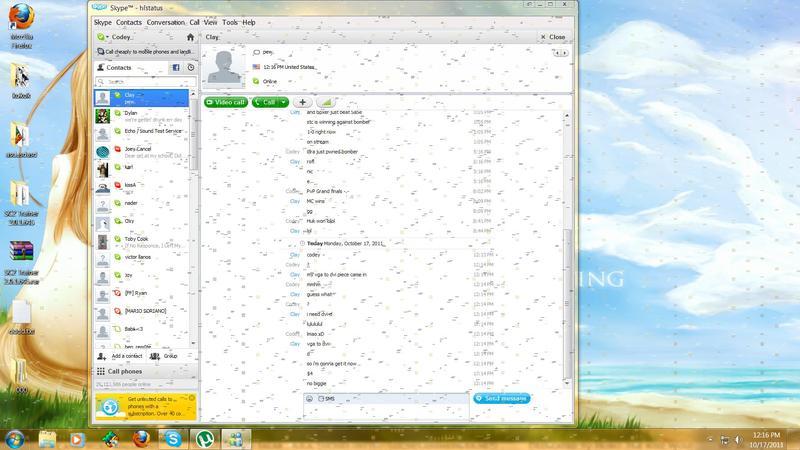
Please help, I don't know why it's doing this!
I've tried restarting and making sure my gfx card wasn't loose!
I even updated the drivers for it but nothing is working!
Any chance we could get your system specs, my crystal ball is in being repaired.
Does it do the same when you boot into safe mode (F8)?
My Computer
At a glance
- Computer Manufacturer/Model Number
- HP Pavillion dv-7 1005 Tx
- OS
- Win 8 Release candidate 8400
- Memory
- 4 gigs
- Graphics Card(s)
- Nvidia 9600M
- Sound Card
- HD built-in
- Monitor(s) Displays
- 17" Wxga
- Screen Resolution
- 1440x900
- Cooling
- none
- Internet Speed
- 45Mb down 5Mb up

How old is the monitor ?
Can you connect it to another pc to test it ?
Can you connect it to another pc to test it ?
My Computer
At a glance
Windows 7 Ultimate 64BitC2D E82008GB PNY PC2-6400BFG 9600GT x 2
- Computer Manufacturer/Model Number
- Myself
- OS
- Windows 7 Ultimate 64Bit
- CPU
- C2D E8200
- Motherboard
- XFX 750i
- Memory
- 8GB PNY PC2-6400
- Graphics Card(s)
- BFG 9600GT x 2
- Sound Card
- Stock XFX Optical
- Monitor(s) Displays
- Gateway 22" HD Display
- Hard Drives
- C: 1 TB G: 500 GB H: 500 GB
- PSU
- Ultra LSP 550 Pro Lifetime Series
- Case
- Xion2
- Cooling
- ThermalTake
raffivegas
New member
- Local time
- 6:43 PM
- Messages
- 3
I've had similar issues like this when the memory on my gaming vid cards was going bad due to overheating. Artifacts on the screen can be a failing vid card issue. Do you have a warranty on the card? Generally the manufacturer offers anywhere from a 1-3 year warranty depending on the manufacturer. In my case, I called the manufacturer 1 year and 1 month after I bought the card. Technically they only offered a year warranty, but they honored mine even though I was a month over and acknowledged the memory was starting to go (the video ram). Can you install the card in another system and test it out there?
My Computer
At a glance
Windows 7 Home Premium 64bit
- OS
- Windows 7 Home Premium 64bit

I'm thinking the same thing...video RAM corruption. This can easily happen if you overclocked the card without being careful, however if no OC'ing was done it's simply a hardware failure that falls under warranty. Otherwise, if you reduce the overclock the artifacts should hopefully go away.
My Computer
At a glance
Windows 7 Professional SP1 32-bitIntel Core 2 Duo E6600 2.4GHz4GB DDR2-667 (4x1GB in dual-channel config)nVidia GeForce 9800 GT
- Computer type
- PC/Desktop
- Computer Manufacturer/Model Number
- Custom-built
- OS
- Windows 7 Professional SP1 32-bit
- CPU
- Intel Core 2 Duo E6600 2.4GHz
- Motherboard
- Asus PL5D2
- Memory
- 4GB DDR2-667 (4x1GB in dual-channel config)
- Graphics Card(s)
- nVidia GeForce 9800 GT
- Sound Card
- Creative X-Fi XtremeMusic
- Monitor(s) Displays
- Acer P236H
- Screen Resolution
- 1920x1200 (DVI)
- Hard Drives
- OCZ SSD Vertex Plus 60GB SATA (Firmware 3.55), 64MB cache
Hitachi HD321KJ SATA, 320GB, 7200rpm, 16MB cache
- PSU
- Antec TruePower 2.0
- Case
- Cooler Master Centurion
- Cooling
- Too many fans
- Keyboard
- Standard
- Mouse
- Microsoft wireless optical mouse
- Internet Speed
- AT&T U-verse (18mbit/sec)
- Antivirus
- Microsoft Security Essentials
- Browser
- Firefox
- Other Info
- Other devices:
Compaq CQ-60 laptop
Google Nexus 7 (2012) tablet
Nvidia SHIELD tablet (US/LTE)
Hardkernel ODROID-XU single-board computer (Samsung Exynos 5420)

If you've had the card for a while, it's fairly likely it's Vram dying. my old 9800gt die after 2 years of working with very similar effects. If it's under warranty you may want to try and get it replaced or perhaps test to see if it is the card itself (put a new Gfx card into your system.)
My Computer
At a glance
Windows 7 64 Home PremiumIntel Core I5 2500k Overclocked to 4.5ghz.G.Skill 8gb 2x4 1600mhz sniper CL9 1.25w2x Gigabyte GTX560 OC TI 1G 900Mhz GDDR5 PCIE...
- Computer Manufacturer/Model Number
- Cosmos II Gaming Rig
- OS
- Windows 7 64 Home Premium
- CPU
- Intel Core I5 2500k Overclocked to 4.5ghz.
- Motherboard
- ASUS z68 pro gen3 1155
- Memory
- G.Skill 8gb 2x4 1600mhz sniper CL9 1.25w
- Graphics Card(s)
- 2x Gigabyte GTX560 OC TI 1G 900Mhz GDDR5 PCIE HDMI DVI sli
- Sound Card
- Realtek HD audio
- Monitor(s) Displays
- Samsung S27A950 27inch 3D LED
- Screen Resolution
- 1920x1080
- Hard Drives
- Samsung 2TB Spinpoint F3/4EG EcoGreen HDD 32M
OCZ Agility 3 120gb
- PSU
- CoolerMaster 1000W Silent Pro Gold Modular
- Case
- Coolermaster Cosmos II
- Cooling
- 6x 120mm 1x200m, Noctua D14.
- Keyboard
- G19 Logitech Keyboard
- Mouse
- Razer Naga mouse
- Other Info
- Logitech G930 Wireless 7.1 Headset
Razer Vespula speed mat
Logitech Z906 5.1 surround sound system
Razer Nostromo
Orange Led lighting kit