Windows 7 Forums


Windows 7: General help Win Explorer - Attaching a comment

17 Oct 2011   #1
BAZ

Windows 7 Ultimate x86
 
 
General help Win Explorer - Attaching a comment

Hi,


Is it possible to attach a comment to a folder? My end goal is to write a brief description to reflect what exactly are the contents of folders. Is there a software which can help make it possible/easy?
I do use OneNote and use it for general notetaking of all sorts but if it could be possible within Explorer that'll be great.

Thanks
Baz
My System SpecsSystem Spec

17 Oct 2011   #2

Windows 7 Ultimate SP1 64-Bit
Peterborough, England


Check this link for a possible solution.

Re: Folder Comments in Windows Explorer - Resolved - General
My System SpecsSystem Spec
17 Oct 2011   #3
BAZ

Windows 7 Ultimate x86


Thanks for the reply, seavixen32.
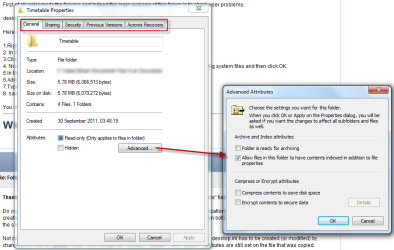
When I go to Properties windows I am unable to see any tab called Customize...
http://www.sevenforums.com/attachmen...1&d=1318893452
Attached Thumbnails
General help Win Explorer - Attaching a comment-w7f-help.png  
My System SpecsSystem Spec
.


17 Oct 2011   #4

Windows 7 Ultimate SP1 64-Bit
Peterborough, England


You're welcome Baz.

What happens if you check the "Hidden" box?
My System SpecsSystem Spec
17 Oct 2011   #5
BAZ

Windows 7 Ultimate x86


It asks if I want the changes made to all of the folders & sub-folders..
My System SpecsSystem Spec
17 Oct 2011   #6

Windows 7 Ultimate SP1 64-Bit
Peterborough, England


This link may or may not help.

Add tags or other properties to a file

Also, I've just remembered reading some time ago that you could add a comment to a shortcut, but not the actual folder.

This link is five years old, but it may help.

http://www.computing.net/answers/win...rs/156183.html

Last edited by seavixen32; 17 Oct 2011 at 06:32 PM.. Reason: Extra information
My System SpecsSystem Spec
17 Oct 2011   #7
BAZ

Windows 7 Ultimate x86


Thanks for the help. I'll try to work around it using shortcuts option.

Regards
Baz
My System SpecsSystem Spec
17 Oct 2011   #8

Windows 7 Ultimate SP1 64-Bit
Peterborough, England


OK, but keep checking this thread as someone else may have an idea.
My System SpecsSystem Spec
17 Oct 2011   #9
BAZ

Windows 7 Ultimate x86


I sure will (subscribed via e-mail)
My System SpecsSystem Spec
18 Oct 2011   #10

Windows 7 Ultimate SP1 (x64)
South Australia


Hi Baz,

**WARNING : This is a bit of a hack and requires you edit a system file - only do so if you are comfortable doing that. You do so at your own risk***

There is a way to have a pop-up ballon tip appear when you hover your mouse over the folder, and also to display in the Comments column. I have messed about with this a little bit. To do that, please follow these steps:

1. Open Windows Explorer.
2. Click Tools, then Folder Options.
3. Click the View tab
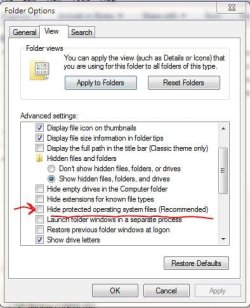
4. You MUST uncheck the box labelled Hide protected operating system files (Recommended)

General help Win Explorer - Attaching a comment-1.jpg

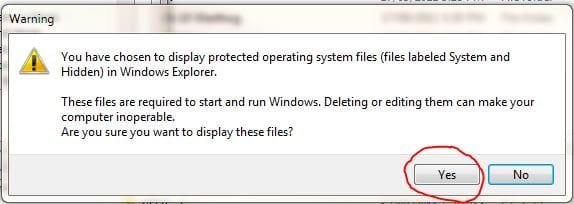
When prompted, you need to click YES.

General help Win Explorer - Attaching a comment-2.jpg

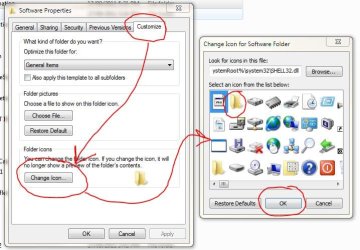
5. Right-click on the folder you are interested in, and then select Properties and then Customize. Select the Change Icon... button.

Note : you aren't actually going to change the icon if you don't wany to - this step is neccessary to get to the point that you can add comments to a folder.

In the icon panel, choose the FOLDER icon, or a different one if you like, and click OK.

General help Win Explorer - Attaching a comment-3.jpg

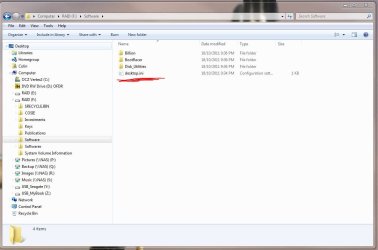
6. In the folder you are interested in, locate the file called desktop.ini and open it in Notepad.

General help Win Explorer - Attaching a comment-4.jpg

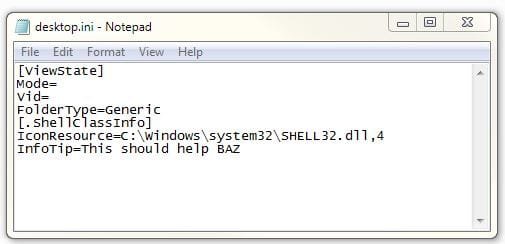
7. At the immediate bottom of the file, add this line:

InfoTip=

You can then add your comments immediately after the = symbol, like this for example:

Code:
 
InfoTip=This should help BAZ
This is what the file look like:

General help Win Explorer - Attaching a comment-5.jpg

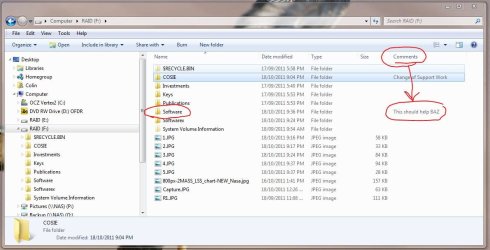
8. Save the file. You can add the Comments field to your columns in Windows Explorer, and now you should see this:

General help Win Explorer - Attaching a comment-6.jpg

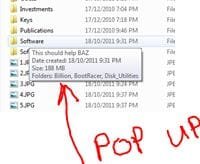
Also, when you hover your mouse over the folder, a pop-up baloon will display the folder comments.

Name:  7.JPG
Views: 292
Size:  15.1 KB

Regards,
Golden

Last edited by Golden; 18 Oct 2011 at 06:39 AM.. Reason: add warning about risk in editing desktop.ini file
My System SpecsSystem Spec
Reply

 General help Win Explorer - Attaching a comment problems?


Thread Tools


Similar help and support threads for: General help Win Explorer - Attaching a comment
Thread Forum
Some general weirdness with Windows Explorer, etc General Discussion
Document library different when attaching file from internet explorer Network & Sharing
How do I write a comment in Folder Details Comment column? General Discussion
Do not see root in Windows Explorer when attaching file from email,etc Browsers & Mail
Attaching VHD Virtualization


All times are GMT -5. The time now is 02:15 AM.


Seven Forums Android App Seven Forums IOS App Follow us on Facebook

Windows 7 Forums is an independent web site and has not been authorized,
sponsored, or otherwise approved by Microsoft Corporation.
"Windows 7" and related materials are trademarks of Microsoft Corp.
© Designer Media Ltd
  

1 2 3 4 5 6 7 8 9 10 11 12 13 14 15 16 17 18 19 20 21 22 23 24 25 26 27 28 29 30 31 32