Windows 7 Forums


Windows 7: Windows Explorer help needed

20 Oct 2011   #1
cr2

windows 7 home premium 64 bit
 
 
Windows Explorer help needed

In win xp clicking on a folder on the left side opened its sub folders on the left and right. Is there a way to make windows explorer work like this in win 7? As it is set up now, I either have to hunt and click the little arrow next to the folder on the left, or double click the folder on the right to open its sub folders.

My System SpecsSystem Spec

20 Oct 2011   #2

64-bit Windows 7 Ultimate SP1 & Windows 8 Enterprise
Texas


Hello cr2, and welcome to Seven Forums.

This may be able to help with that.

Navigation Pane - Automatically expand to current folder

Hope this helps,
Shawn
My System SpecsSystem Spec
20 Oct 2011   #3
cr2

windows 7 home premium 64 bit


Hi Shawn,

Thanks for the welcome and information. Unfortunately, I have tried all 4 options and restarted the pc twice, and the folders on the left still do not expand with one click. Are there any settings anywhere else that might prevent this from working?

Thanks,
Charlie
My System SpecsSystem Spec
.


20 Oct 2011   #4

64-bit Windows 7 Ultimate SP1 & Windows 8 Enterprise
Texas


You'll need to either click on the arrow to the left of the folder or double click on the folder to expand the folder in the navigation pane.
white outlined arrow = unexpanded
black arrow = expanded
The automatic expand option is only for when you open the folders from within the main window to have it also expand to that folder in the navigation pane automatically.

Last edited by Brink; 21 Oct 2011 at 10:12 AM.. Reason: clarify
My System SpecsSystem Spec
21 Oct 2011   #5
cr2

windows 7 home premium 64 bit


So the short answer to my initial question was/is 'no.' I consider this much less convenient that the way it worked in XP. Thanks anyway for trying to help.
My System SpecsSystem Spec
21 Oct 2011   #6

Windows 7 Home Premium x64
NJ


if you double click the folder on the left, it will expand the sub-folders underneath on the left and also show the sub-folders on the right... its not a single click but is a double click really that much less convenient?

otherwise, yes, they removed that feature starting with Vista I believe
My System SpecsSystem Spec
21 Oct 2011   #7

Windows 7 x64 SP1


Quote   Quote: Originally Posted by ddix1026 View Post
if you double click the folder on the left, it will expand the sub-folders underneath on the left and also show the sub-folders on the right... its not a single click but is a double click really that much less convenient?

otherwise, yes, they removed that feature starting with Vista I believe
Thanks, didn't know that - I really think I should explore Windows 7 a bit more.
My System SpecsSystem Spec
21 Oct 2011   #8

Microsoft Windows 7 Home Premium 64-bit 7601 Multiprocessor Free Service Pack 1
Hertfordshire


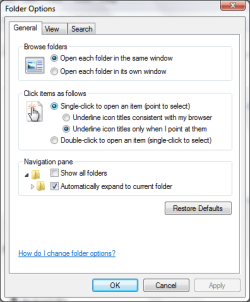
You can set Windows 7 to open with a single click for everything including executables.

Windows Explorer help needed-screenshot037.png

Except apparently the right pane of explorer

Last edited by kado897; 21 Oct 2011 at 09:50 AM.. Reason: oops
My System SpecsSystem Spec
Reply

 Windows Explorer help needed problems?


Thread Tools


Similar help and support threads for: Windows Explorer help needed
Thread Forum
Solved Explorer: Usage suggestion needed General Discussion
Solved Windows Explorer (Not Internet Explorer) Causing problems General Discussion
Solved FTP via Windows Explorer help needed Network & Sharing
How to show path in Windows Explorer / Windows Explorer Replacements? Customization
Internet Explorer 8 Problem help needed please Browsers & Mail


All times are GMT -5. The time now is 06:21 AM.


Seven Forums Android App Seven Forums IOS App Follow us on Facebook

Windows 7 Forums is an independent web site and has not been authorized,
sponsored, or otherwise approved by Microsoft Corporation.
"Windows 7" and related materials are trademarks of Microsoft Corp.
© Designer Media Ltd
  

1 2 3 4 5 6 7 8 9 10 11 12 13 14 15 16 17 18 19 20 21 22 23 24 25 26 27 28 29 30 31 32