Windows 7 Forums


Windows 7: Notification Area Icons getting more and more

13 Jan 2009   #1

Windows 7 Professional x64 (Build 7600)
Frankfurt
 
 
Notification Area Icons getting more and more

Did someone of you allready recognized that even after uninstalling several programs the icon is still shown in the Notification Area Icons Options?


Even when it was just one time used the icon is shown. Is there a way to delete those old entrys out of the Notification Area Icon Options?
My System SpecsSystem Spec

13 Jan 2009   #2

Windows 7 Ultimate Vista Ultimate x64
QLD, Cairns


You could have a look in the registries, do a search and see what comes up for your uninstalled programs. I have a different problem with it not remembering some of my customized icons.
My System SpecsSystem Spec
13 Jan 2009   #3

64-bit Windows 7 Ultimate SP1 & Windows 8 Enterprise
Texas


Hello Bansh,

Restart the computer to see if it is still there afterwards. Sometimes a restart is needed to fully uninstall some programs. If yes, then you might see if resetting the notification icons may help. This tutorial is for Vista, but it is the same for Windows 7.

Notification Icons - Reset - Vista Forums

Hope this helps,
Shawn
My System SpecsSystem Spec
.


13 Jan 2009   #4

Windows 7 Ultimate Vista Ultimate x64
QLD, Cairns


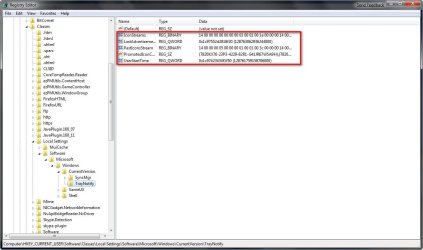
Hi Shawn, method 1 didn't seem to work but I was going to try the manual way but can you tell me if I can delete all of these.

Notification Area Icons getting more and more-2009-01-13_220733.jpg
My System SpecsSystem Spec
13 Jan 2009   #5

Windows 7 Professional x64 (Build 7600)
Frankfurt


Thanks for trying to help me. I tried several ways.. even searching the registry but its not working. I have no clue where these entrys are comming from.

I don t want to delete them all... just the the one i choose.
My System SpecsSystem Spec
13 Jan 2009   #6

64-bit Windows 7 Ultimate SP1 & Windows 8 Enterprise
Texas


Quote   Quote: Originally Posted by Mr GRiM View Post
Hi Shawn, method 1 didn't seem to work but I was going to try the manual way but can you tell me if I can delete all of these.

Attachment 2684
Mr GRiM,

You would only want to delete the IconStreams and PastIconsStream entries. It is critical to kill and restart explorer first and restart (or log off and log on) the computer afterwards for it to work though.
My System SpecsSystem Spec
13 Jan 2009   #7

Windows 7 Ultimate Vista Ultimate x64
QLD, Cairns


OK thanks, what are the rest of them?
My System SpecsSystem Spec
13 Jan 2009   #8

64-bit Windows 7 Ultimate SP1 & Windows 8 Enterprise
Texas


I'm not sure yet. They are new with Windows 7. Vista did not have these.
My System SpecsSystem Spec
13 Jan 2009   #9

64-bit Windows 7 Ultimate SP1 & Windows 8 Enterprise
Texas


Quote   Quote: Originally Posted by bansh View Post
Thanks for trying to help me. I tried several ways.. even searching the registry but its not working. I have no clue where these entrys are comming from.

I don t want to delete them all... just the the one i choose.
Bansh,

Doing what is in the tutorial will only remove the ones not in use. If they are still being used, then they will reload after the reset. Nothing to worry about.

Notification Icons - Reset - Vista Forums
My System SpecsSystem Spec
13 Jan 2009   #10

Windows 7 Professional x64 (Build 7600)
Frankfurt


Dunno why but that is not working for me :/

Edit:
Ok its working! Sorry for the circumstances. THANK YOU !!!!!!!
My System SpecsSystem Spec
Reply

 Notification Area Icons getting more and more problems?


Thread Tools


Similar help and support threads for: Notification Area Icons getting more and more
Thread Forum
Notification Area Icons - Customize Tutorials
Notification Area Icons - Hide or Show System Icons and Notifications Tutorials
Solved Old Icons in Notification Area General Discussion
Notification Area Icons disappearing... Software
Notification area icons Customization


All times are GMT -5. The time now is 01:23 AM.


Seven Forums Android App Seven Forums IOS App Follow us on Facebook

Windows 7 Forums is an independent web site and has not been authorized,
sponsored, or otherwise approved by Microsoft Corporation.
"Windows 7" and related materials are trademarks of Microsoft Corp.
© Designer Media Ltd
  

1 2 3 4 5 6 7 8 9 10 11 12 13 14 15 16 17 18 19 20 21 22 23 24 25 26 27 28 29 30 31 32