How can I gain access a folder? I have permission but cant view

2monkeys

New member
I have a USB DD with an image from an old computer. I can view the public folders but not the main computer folder. I went into security and set permission but still can not access the folder. Any help is appreciated. Thank you for your assistance.
Doug
 

My Computer

OS
windows 7 home premium 32bit
I clicked properties advanced and I get Unable to set new owner. The Media is write protected. This is a forensic copy of a drive from another computer. I can view the contents of the public folder but not the main computer files.
I appreciate any help
Doug

I am trying to access my files from a copy of my computer. I am just asking for help to access my files.
 
Last edited by a moderator:

My Computer

OS
windows 7 home premium 32bit
No luck

Thanks I installed it and ran it but still cant access it. I keep getting. I don't have permission to access. and the media is write protected error when I go to properties to try to change anything. I just need to read the files.

Doug
 

My Computer

OS
windows 7 home premium 32bit
Are you sure it ran properly? There must be some mistake... Never really seen the Take Ownership fail before... Can you view the files on a another computer or is it the same issue?

There might be a switch on the USB that locks the files or not. I used to have a USB like that, maybe yours is similar...
 

My Computer

Computer Manufacturer/Model Number
HP Pavilion dv6-2020ev
OS
Ubuntu 12.10
CPU
Intel Core i7 720QM
Motherboard
Its a HP secret...
Memory
4GB RAM
Graphics Card(s)
NVIDIA GeForce 230M
Sound Card
IDT
Screen Resolution
1366x768
Hard Drives
500 GB
Mouse
HP
Internet Speed
4 Mbps
If this is a VHD file, try to attach it via Disk Management > Action button
 

My Computer

Computer Manufacturer/Model Number
HP, Dell, Gateway, Toshiba - 4 laptops and 2 desktops
OS
Vista, Windows7, Mint Mate, Zorin, Windows 8
CPU
from 1.6GHz Duo to i7
Monitor(s) Displays
2x HP w2207
Hard Drives
5x HDD, 7x SSD, 12x Externals
Keyboard
with trackball - no mices
Mouse
Trackball mice
Internet Speed
DSL 6000
take ownership?

I am not sure it is running right. When I click on take ownership a box flashes on the screen and disappears. What should happen? I can access one of the folders on the drive (the public folder) but not the other main computer folder.
Thanks
Doug
 

My Computer

OS
windows 7 home premium 32bit
It'd be a lot easier for me to help you if you could take a screenshot of the drive and the folder you are trying to access.
 

My Computer

Computer Manufacturer/Model Number
HP Pavilion dv6-2020ev
OS
Ubuntu 12.10
CPU
Intel Core i7 720QM
Motherboard
Its a HP secret...
Memory
4GB RAM
Graphics Card(s)
NVIDIA GeForce 230M
Sound Card
IDT
Screen Resolution
1366x768
Hard Drives
500 GB
Mouse
HP
Internet Speed
4 Mbps
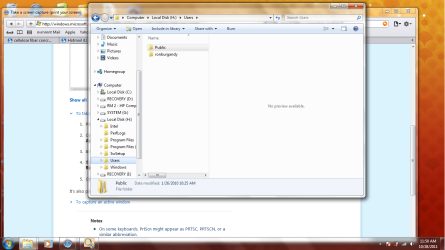
screen shot

Screen shotscreen shot.png
I am trying to open ronburgandy file
 
Last edited:

My Computer

OS
windows 7 home premium 32bit
When you try to open the RONBURGANDY folder are you getting the "Access Denied" message?

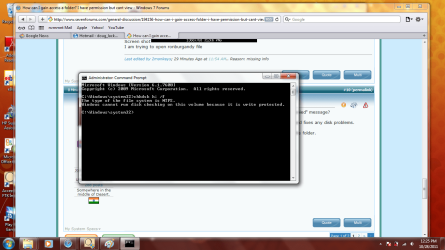
Try to do a CHKDSK H: /F on command prompt window. Let the CHKDSK finds and fixes any disk problems.

Now try to take ownership of the RONBURGANDY folder, and then try to open the folder.
 

My Computer

Computer Manufacturer/Model Number
Toshiba Satellite P775-S7232
OS
MS Windows 7 Ultimate 64-bit SP1
CPU
i5-2410M 2.3GHz (2.9GHz Turbo-Boost) Sandy Bridge 32nm
Motherboard
Toshiba PHRAA ver. PSBY1U-00F003
Memory
4GB+4GB Samsung DDR3 PC3-10700 (1333 MHz)
Graphics Card(s)
Video Intel(R) HD Graphics Family, 1696MB available memory
Sound Card
Realtek High Definition Audio version=6.0.1.6323
Monitor(s) Displays
17.3 " Trubrite TFT LCD, LED Backlit
Screen Resolution
1600x900 32 bit, Native support for 720P content
Hard Drives
TOSHIBA MK6476GSXN
580.614 [GB] partitioned C: 80GB and D: 500GB with hidden recovery partitons.

Spare bay for 2nd HDD but no SATA connector :-(
PSU
Toshiba AC/DC Adapter
Case
Notebook
Cooling
Built-in Fan
Keyboard
Premium Raised Tile keyboard
Mouse
Logitech M215 wireless mouse
Internet Speed
Not fast enough
Other Info
Built-in Harman Kardon speakers with Dolby Advanced Audio, Waves MaxxAudio® 3. HDMI, 1xUSB3+3xUSB2 ports, WebCam, Battery life 4hrs 11mins, 4GB Readyboost SDHC card, WD My Book Essential Ext HDDs 2 TB, 2x1TB, My Passport SE 1TB and WDTV 1st Gen for Multimedia playing on a Sony Wega 32" LCD.
Recent addition to my toys are Asus Transformer Pad TF300T with 32GB onboard sd card + 32GB microsd card.
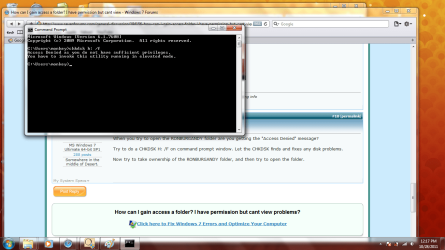
here is what i get

I get : You dont currently have permission to access this folder.
Screenshot of command linescreen shot.png
 

My Computer

OS
windows 7 home premium 32bit
Well, that is only because you did not run cmd as admin. Go to start > all programs > accessories > right click in cmd > run as admin
 

My Computer

Computer Manufacturer/Model Number
HP, Dell, Gateway, Toshiba - 4 laptops and 2 desktops
OS
Vista, Windows7, Mint Mate, Zorin, Windows 8
CPU
from 1.6GHz Duo to i7
Monitor(s) Displays
2x HP w2207
Hard Drives
5x HDD, 7x SSD, 12x Externals
Keyboard
with trackball - no mices
Mouse
Trackball mice
Internet Speed
DSL 6000
I guess I am done

Since I can open every folder on the drive except this one, would you say that the way it is set up that i can not access this folder. I know I am stating the obvious.
Would you agree.

Thanks
Doug
 

My Computer

OS
windows 7 home premium 32bit
I am having this exact same problem right now. I am able to access my main user folder on my old laptop, which has windows vista, but any image I mount where I try to access the main folder in documents and settings is denied access. When I try to change ownership, it says that there's an error because media is write protected.
 

My Computer

Computer type
PC/Desktop
OS
Windows 7
This is infuriating. I've tried to unboxed the read only option in properties. Hit okay, and go back to properties and it's still boxed. Tried to undo read only attribute in command prompt. Access Denied. How the hell am I supposed to gain access in the first place when it keeps telling me that I can't change ownership due to it being write protected? I've tried the "take ownership" registry add on and it still doesn't work. I am able to access this folder perfectly on my old laptop but why is my new laptop giving me such a hard time?
 

My Computer

Computer type
PC/Desktop
OS
Windows 7
Back
Top