Windows 7 Forums Search
Welcome to Windows 7 Forums. Our forum is dedicated to helping you find solutions with any problems, errors or issues you are experiencing with Windows 7. The Windows 7 forum also covers news and updates and has an extensive Windows 7 tutorial section that covers a wide range of tips and tricks.


Windows 7 - How do I group non-grouped applications in the taskbar?

 
08-05-2009   #1


Windows 7


How do I group non-grouped applications in the taskbar?

I know from this article, that applications use (or have automatically generated) an AppID that forces 7 to group them together.

Problem is that I now have an application that I run 30 instances of with different parameters. Since parameters are different they appearently get different AppID.

Can I somehow make a frontend-wrapper or in any other way tweak these to get grouped together?

My System SpecsSystem Spec
08-05-2009   #2


Windows 7 Ultimate x64


Quote   Quote: Originally Posted by odyssey View Post
I know from this article, that applications use (or have automatically generated) an AppID that forces 7 to group them together.

Problem is that I now have an application that I run 30 instances of with different parameters. Since parameters are different they appearently get different AppID.

Can I somehow make a frontend-wrapper or in any other way tweak these to get grouped together?
Try this:
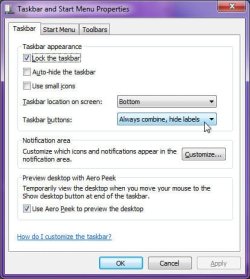
  1. Right-click the Start Orb, then select "Properties"
  2. Click the "Taskbar" tab
  3. Make sure that the "Taskbar buttons:" setting is at "Always combine, hide labels"
  4. Click OK
How do I group non-grouped applications in the taskbar?-group_icons.jpg
My System SpecsSystem Spec
08-06-2009   #3


Windows 7


Read my post carefully, and you'll see that I already are using grouping but only have problems with shortcuts that has DIFFERENT parameters - You could try yourself to see what I mean.

Quote:
Different shortcuts may provide different start up command line parameters to the same executable and launch different applications (imagine a “launcher” application) that will be grouped under the same Taskbar button. In such cases, the OS has the ability to look into the specific shortcut that launched the application, to find the executable, the command line parameters, and so on.
However I've made a workaround. I found out that If I use vbscript or autoitscript to launch my program even with the parameters I need, they are grouped as I would expect.
My System SpecsSystem Spec
.


08-06-2009   #4


Windows 7 Ultimate x64


Quote   Quote: Originally Posted by odyssey View Post
Read my post carefully, and you'll see that I already are using grouping but only have problems with shortcuts that has DIFFERENT parameters - You could try yourself to see what I mean.


However I've made a workaround. I found out that If I use vbscript or autoitscript to launch my program even with the parameters I need, they are grouped as I would expect.
When you use them before, and they are not grouped, are all of them using the same EXE file, just with different command-line parameters, or is each shortcut for a diffenent exe?
My System SpecsSystem Spec
Reply

 How do I group non-grouped applications in the taskbar? problems?


Thread Tools


Similar Threads for: How do I group non-grouped applications in the taskbar?
Thread Forum
rearrange grouped items in taskbar Customization
Change Order of Grouped Buttons on Taskbar General Discussion
grouped taskbar buttons switch places General Discussion
Taskbar list the number of grouped windows like XP? Customization
Grouped Taskbar Icon Button - Cascade Tutorials


All times are GMT -5. The time now is 01:56 AM.


Windows 7 Forums is an independent web site and has not been authorized,
sponsored, or otherwise approved by Microsoft Corporation.
"Windows 7" and related materials are trademarks of Microsoft Corp.
© Designer Media Ltd
  

1 2 3 4 5 6 7 8 9 10 11 12 13 14 15 16 17 18 19 20 21 22 23 24 25 26 27 28 29 30