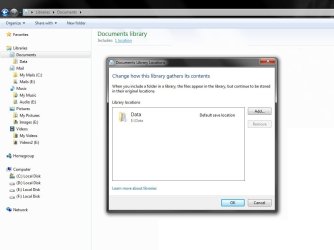
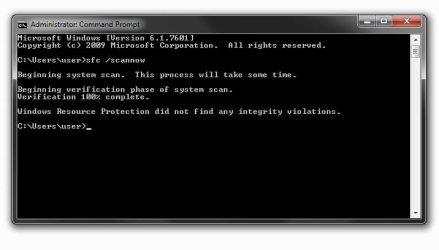
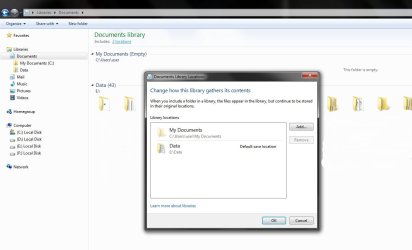
How do I recover "My Documents" folder to it's default location? I recently added (E:\Data (folder)) in one on my Libraries under Documents and relocated all my files in "My Documents" folder to (E:\Data folder) and assigned it as my 'default save location' as clearly shown in (fig. 1). During the process, I may have inadvertently deleted the "My Documents" folder as it is not showing in the navigation pane (fig. 1). I've tried locating the folder but it's really gone. Systems File Checker found no anomalies as indicated in fig. 2. I may have also deleted my "Public Folders" but that's not the issue I'm trying to solve right now and besides there's a tutorial somewhere here regarding missing 'public folders'. I would just like to know how do I recover the deleted "My Documents" folder to it's default location. I have tried 'restoring libraries to default locations' feature and unhid the hidden folders view option, still no "My Documents" folder. Any help would be greatly appreciated. Thank you for your time.
OS Windows 7 Ultimate SP1 32-bit CPU Intel Core i5 CPU - 760 @2.80 GHz Motherboard Asus P7P55 D E-LX Memory 4 GB (3.5 usable) Graphics Card Nvidia GTX 460 768MB Sound Card Via VT1708S Monitor(s) Displays LG Flatron E2350 LCD LED Screen Resolution 1920x1080
Keyboard Dell Mouse A4Tech X-710BH PSU Gigabyte Superb 720 Case Coolermaster CM690 Nvidia Edition Cooling 6x120mm LED fans Hard Drives Seagate Baraccuda 320 GB 7200 SATA Internet Speed 2.05 Mbps Other Info Coolermaster Hyper TX3 CPU air cooler
System Manufacturer/Model Number HP Pavilion Elite 495UK OS Windows 7 Ultimate SP1 64-Bit CPU Intel Core i7 870 @ 2.93GHz Motherboard MSI 2A9C (CPU1) Memory 8Gb Dual-Channel DDR3 @ 664MHz Graphics Card nVidia GeForce GTX 460 1024MB dedicated RAM Sound Card Realtek HD Audio Monitor(s) Displays HP2310i Screen Resolution 1920 x 1080
Keyboard Logitech K750 solar-powered keyboard Mouse Logitech Wireless M180 mouse PSU 460W Case HP Elite Cooling Air cooled Hard Drives 1x1954GB Hitachi HDS22020ALA 330 (RAID), 1x1954GB Hitachi External for backup and storage Internet Speed 2Mb Other Info Pure Avanti Flow Internet Radio with iPod Dock, 64Gb iPod, HP USB Speakers, Sony MDR-V500 Headphones, Sony Vaio F-Series Laptop
Did you try a System Restore point before you deleted the folder? Here> System Restore
That would be the easiest and fastest. If you have restore points.
When you get to this window check mark "Show more restore points" and it will give you a larger listing to chose from.
Go back earlier that day or a day or two before if possible.
System Manufacturer/Model Number Hopalong/ Godzilla OS Windows7 Pro 64bit SP-1; Windows XP Pro 32bit CPU Intel Core i7-870 Lynnfield 2.93GHz LGA 1156 95W Quad-Core Motherboard ASUS P7P55D-E PRO Memory 8GB@1400MHz Crucial Ballistix DDR3-1600 4x2GB Graphics Card ASUS ENGTX460 DirectCU/2DI/1GD5 1GB 256-bit GDDR5 Sound Card VIA Onboard Monitor(s) Displays Asus VS248H-P 24"; Samsung SyncMaster 941BW 19"ws Screen Resolution 1920x1080; 1440x900
Keyboard Logitech K-320 Mouse Kensington PSU COOLER MASTER Silent Pro RS850-AMBAJ3-US 850W Modular Case COOLER MASTER HAF 932 RC-932-KKN5-GP Black Cooling Scythe "Mugen-2 Rev.B" (2 ScytheKaze-Jyuni PWM fans) Hard Drives Samsung 830 120GB SSD
Intel 320 120GB SSD
Western Digital Caviar Black WD7501AALS 750GB 7200 RPM SATA 3.0Gb/s
Western Digital Caviar Black WD6401AALS 640GB 7200 RPM SATA 3.0Gb/s Antivirus Avast Inernet Suite Browser IE 9 ; Chrome
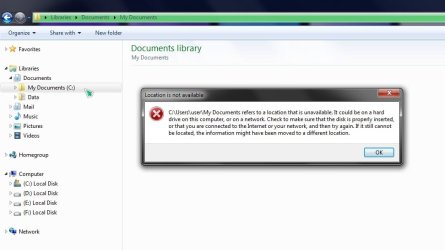
Had tried restoring libraries to default locations but "My Documents" folder didn't show up. Fixes from "answers.microsoft.com" didn't do good as well & have no restore point to go back to. But, thru research and patience I manage to create "My Documents" folder in it's default location (C:\Users\user\My Documents) but not entirely in it's original state. The 'Location tab' is missing in the properties window (Fig. 3) and further indicating that the folder is unavailable (Fig. 4) even though present. That's it. That's where I'm at right now. So any extended help to resolve this problem is greatly appreciated. Thank you for your time.
OS Windows 7 Ultimate SP1 32-bit CPU Intel Core i5 CPU - 760 @2.80 GHz Motherboard Asus P7P55 D E-LX Memory 4 GB (3.5 usable) Graphics Card Nvidia GTX 460 768MB Sound Card Via VT1708S Monitor(s) Displays LG Flatron E2350 LCD LED Screen Resolution 1920x1080
Keyboard Dell Mouse A4Tech X-710BH PSU Gigabyte Superb 720 Case Coolermaster CM690 Nvidia Edition Cooling 6x120mm LED fans Hard Drives Seagate Baraccuda 320 GB 7200 SATA Internet Speed 2.05 Mbps Other Info Coolermaster Hyper TX3 CPU air cooler
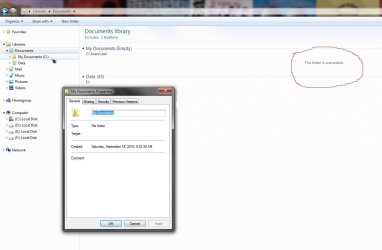
The "Location" tab will not be available from the library location. You will need to do this directly from the C:\Users\(user-name)\My Documents folder location instead.
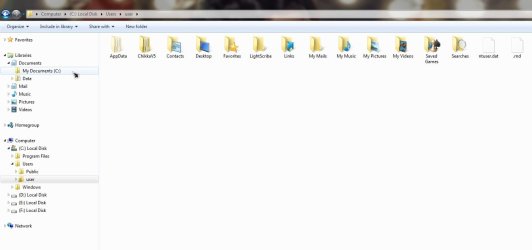
Went straight to user folder as instructed only to find "My Documents" folder nowhere except in the 'navigation pane' (Fig. 5) & when I click it Fig. 4 shows up.
OS Windows 7 Ultimate SP1 32-bit CPU Intel Core i5 CPU - 760 @2.80 GHz Motherboard Asus P7P55 D E-LX Memory 4 GB (3.5 usable) Graphics Card Nvidia GTX 460 768MB Sound Card Via VT1708S Monitor(s) Displays LG Flatron E2350 LCD LED Screen Resolution 1920x1080
Keyboard Dell Mouse A4Tech X-710BH PSU Gigabyte Superb 720 Case Coolermaster CM690 Nvidia Edition Cooling 6x120mm LED fans Hard Drives Seagate Baraccuda 320 GB 7200 SATA Internet Speed 2.05 Mbps Other Info Coolermaster Hyper TX3 CPU air cooler
No problem. You can use OPTION TWO in the tutorial I posted above to restore your My Documents folder back to the default location. Afterwards, you should see it again.
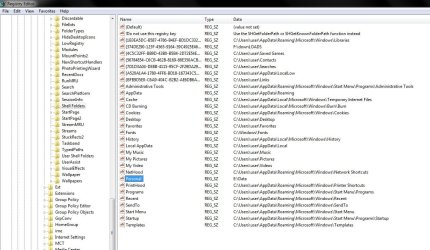
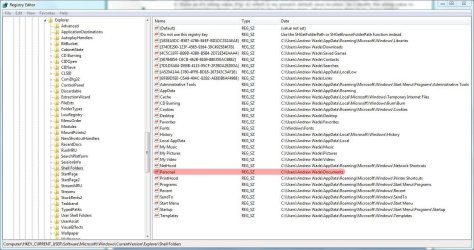
In regards to Step 19 (Option2), in my Registry, the (Name entry)Personal is present but with E:\Data as it's string value (Fig: 6) which is my present default save location. Do I modify the string value to C:\Users\user\Documents and proceed to the following steps. What happens then to my 'Data' folder?
OS Windows 7 Ultimate SP1 32-bit CPU Intel Core i5 CPU - 760 @2.80 GHz Motherboard Asus P7P55 D E-LX Memory 4 GB (3.5 usable) Graphics Card Nvidia GTX 460 768MB Sound Card Via VT1708S Monitor(s) Displays LG Flatron E2350 LCD LED Screen Resolution 1920x1080
Keyboard Dell Mouse A4Tech X-710BH PSU Gigabyte Superb 720 Case Coolermaster CM690 Nvidia Edition Cooling 6x120mm LED fans Hard Drives Seagate Baraccuda 320 GB 7200 SATA Internet Speed 2.05 Mbps Other Info Coolermaster Hyper TX3 CPU air cooler
Hi there, just logged on, so if you don't mind me cutting in: I checked my system registry and the string value should indeed be C:\Users\"User Name"\Documents where "User Name" is your User Name.
Obviously that overwrites the registry reference to your current default save location of E:\Data, but one would assume that can be rectified by recreating it once you've got your Documents folder back.
System Manufacturer/Model Number HP Pavilion Elite 495UK OS Windows 7 Ultimate SP1 64-Bit CPU Intel Core i7 870 @ 2.93GHz Motherboard MSI 2A9C (CPU1) Memory 8Gb Dual-Channel DDR3 @ 664MHz Graphics Card nVidia GeForce GTX 460 1024MB dedicated RAM Sound Card Realtek HD Audio Monitor(s) Displays HP2310i Screen Resolution 1920 x 1080
Keyboard Logitech K750 solar-powered keyboard Mouse Logitech Wireless M180 mouse PSU 460W Case HP Elite Cooling Air cooled Hard Drives 1x1954GB Hitachi HDS22020ALA 330 (RAID), 1x1954GB Hitachi External for backup and storage Internet Speed 2Mb Other Info Pure Avanti Flow Internet Radio with iPod Dock, 64Gb iPod, HP USB Speakers, Sony MDR-V500 Headphones, Sony Vaio F-Series Laptop
At last, my worries are over. Problem solved. "My Documents" folder's back. I couldn't have done this without your guiding help. Thank you Seavixen32, Hopalong X and specially to Brink for being patient with me. It has been a pleasure working with you guys and I thank you all. (Finished product screenshot attached.)
OS Windows 7 Ultimate SP1 32-bit CPU Intel Core i5 CPU - 760 @2.80 GHz Motherboard Asus P7P55 D E-LX Memory 4 GB (3.5 usable) Graphics Card Nvidia GTX 460 768MB Sound Card Via VT1708S Monitor(s) Displays LG Flatron E2350 LCD LED Screen Resolution 1920x1080
Keyboard Dell Mouse A4Tech X-710BH PSU Gigabyte Superb 720 Case Coolermaster CM690 Nvidia Edition Cooling 6x120mm LED fans Hard Drives Seagate Baraccuda 320 GB 7200 SATA Internet Speed 2.05 Mbps Other Info Coolermaster Hyper TX3 CPU air cooler