Windows 7 Forums


Windows 7: windows explorer not showing sizes of folders.

13 Nov 2011   #1

Windows 7 64bit
 
 
windows explorer not showing sizes of folders.

is there a way to get explorer to show size of File folders?

Attached Thumbnails
windows explorer not showing sizes of folders.-capture.png  
My System SpecsSystem Spec

13 Nov 2011   #2

Operating System : Windows 7 Home Premium Edition 6.01.7600 SP1 (x64)
MILTON KEYNES


hi not as such but there is third party programs and a registry hack im searching for you now but have a look at this Microsoft link To change advanced file and folder settings (See the size of a folder in a tip when you point to the folder)
Change folder options
My System SpecsSystem Spec
13 Nov 2011   #3
Arc

Windows 7 Home Premium 64 Bit SP 1


Place the mouse pointer on the folder for about two seconds ......
My System SpecsSystem Spec
.


13 Nov 2011   #4

Windows 7 Ultimate x64 sp1
Australia, Melbourne


My System SpecsSystem Spec
13 Nov 2011   #5

Operating System : Windows 7 Home Premium Edition 6.01.7600 SP1 (x64)
MILTON KEYNES


there is a free program called UltraExplorer just like windows explorer see here >>> UltraExplorer 2.0.3.1 - TechSpot Downloads


Quote:
Publisher's Description
UltraExplorer is an extremely customizable Unicode enabled replacement for Windows Explorer.

UltraExplorer's main purpose is to test these components but it can also be useful to anyone looking for a Windows Explorer replacement application.

UltraExplorer feature list is aimed at making file management and navigation fast and easier then ever before:

* Fully configurable user interface
- All windows are reconfigurable with multiple docking options as well as the ability to float or be hidden
- ToolWindows have Toolbars that maybe hidden or docked in any location.
- User definable shortcut keys
- User definable visual themes

* Fully configurable layouts
- Classic Treeview/Listview layout
- Dual Listview layout
- New ListMode layout
- Any combination of the above can also be designed

* Ultra fast display rendering and folder enumeration
* Fully integrated Tabbing feature
- Tabbing is context sensitive to which listview is currently active
- "New Tab" initial location user definable
- The Tabs are drag drop aware. You can drop files on the tab to place them in the folder.
Attached Thumbnails
windows explorer not showing sizes of folders.-ultraexplorer.png  
My System SpecsSystem Spec
13 Nov 2011   #6

Windows 7 Ultimate SP1 (64 bit), Windows XP SP3, Linux Mint 14 MATE (64 bit)
Adelaide


Quote   Quote: Originally Posted by brianzion View Post
there is a free program called UltraExplorer just like windows explorer see here >>> UltraExplorer 2.0.3.1 - TechSpot Downloads


Quote:
Publisher's Description
UltraExplorer is an extremely customizable Unicode enabled replacement for Windows Explorer.

UltraExplorer's main purpose is to test these components but it can also be useful to anyone looking for a Windows Explorer replacement application.

UltraExplorer feature list is aimed at making file management and navigation fast and easier then ever before:

* Fully configurable user interface
- All windows are reconfigurable with multiple docking options as well as the ability to float or be hidden
- ToolWindows have Toolbars that maybe hidden or docked in any location.
- User definable shortcut keys
- User definable visual themes

* Fully configurable layouts
- Classic Treeview/Listview layout
- Dual Listview layout
- New ListMode layout
- Any combination of the above can also be designed

* Ultra fast display rendering and folder enumeration
* Fully integrated Tabbing feature
- Tabbing is context sensitive to which listview is currently active
- "New Tab" initial location user definable
- The Tabs are drag drop aware. You can drop files on the tab to place them in the folder.
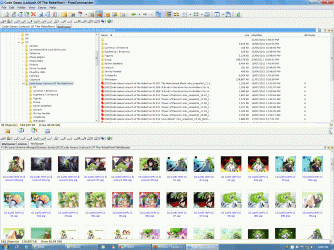
Umm ... that picture doesn't show folder sizes.

FreeCommander has a "folder size" setting.

windows explorer not showing sizes of folders.-fc-folder-size-01.gif

You can also adjust the configuration of the panes (horizontal or vertical).
My System SpecsSystem Spec
13 Nov 2011   #7

Operating System : Windows 7 Home Premium Edition 6.01.7600 SP1 (x64)
MILTON KEYNES


you have to change the settings to view the folder sizes (see my video)
Attached Thumbnails
windows explorer not showing sizes of folders.-folder-sizes.png  
Attached Files
File Type: zip folder sizes vid.zip (1.79 MB, 51 views)
My System SpecsSystem Spec
13 Nov 2011   #8

Windows 7 64bit


so the only way to get the file folder size displayed is to get third party software?
My System SpecsSystem Spec
13 Nov 2011   #9

Operating System : Windows 7 Home Premium Edition 6.01.7600 SP1 (x64)
MILTON KEYNES


it looks that way but as Arc pointed out if you hover the mouse cursor over selected folder you will see the the size (make sure you have "display file size information in folder tips" ticked in folder options view settings)
My System SpecsSystem Spec
Reply

 windows explorer not showing sizes of folders. problems?


Thread Tools


Similar help and support threads for: windows explorer not showing sizes of folders.
Thread Forum
Icon's sizes randomly change back to details sizes in random folders General Discussion
When selecting a file, folders aren't showing left of Windows Explorer General Discussion
Change Drive Icon sizes in Explorer Customization
favorites folders not showing in explorer General Discussion
Solved Control Panel not showing sizes 0f installed programs Software


All times are GMT -5. The time now is 10:00 PM.


Seven Forums Android App Seven Forums IOS App Follow us on Facebook

Windows 7 Forums is an independent web site and has not been authorized,
sponsored, or otherwise approved by Microsoft Corporation.
"Windows 7" and related materials are trademarks of Microsoft Corp.
© Designer Media Ltd
  

1 2 3 4 5 6 7 8 9 10 11 12 13 14 15 16 17 18 19 20 21 22 23 24 25 26 27 28 29 30 31 32
