I would like to be able to solve a problem with my operating system which is not loading all the way. I want to solve it without having to do a clean install.
The Problem:
Windows will stop loading at a point just before the initial desktop screen “Windows 7 screen”. The screen is black with the mouse cursor and stops. No matter how long I wait it will not proceed any further.
The History:
I purchase this laptop (Dell Studio 1747) 13 months ago with a touch screen, i7, 320gig/5400rpm hard drive, 4 gig of ram and with Windows 7 home premium. The first modification I made to the system in Jan 2011 was to add a Kingston 128gig v+ SSD. In installed Win7 with the ability to boot to either drive. In Sept I installed the Win8 developers preview. I shrank the original hard drive to be able to install Win8 in a new partition. I now had three OS's installed. I have been using the SSD drive as my main system for obvious reasons. Every week I would install any updates in the original Win7 installation.
The events leading to the initial problem:
This past week when I booted to Win8 I was unable to access the other disk partitions using Windows Explorer. I also was presented with a window indicating that a large number of files had an 'invalid security code and was being replaced with a default security code. After logging off Win8, I restarted Windows7(SSD) and found that it would stop loading at the place I described earlier. I then tried 'Safe BOOT' and it stopped at the same place. I then tried Win7 on the original hard drive and found the same issue/problem.
What I've done so far:
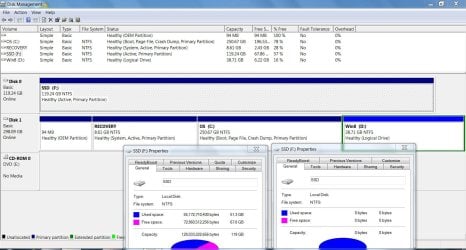
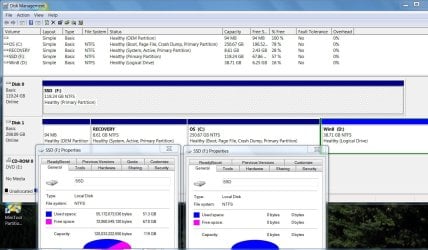
I've reinstalled Win7 in the original partition on the 320gig drive and run all updates. At this point Windows Explorer sees the SSD drive but ‘assess is denied’. I can still boot to the Win8 partition.
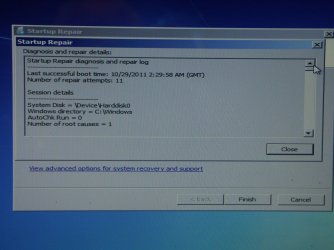
When booting Win7 on the SSD, the Win7 load still stops at the point I described earlier even in safe mode. I ran my ‘System Repair’ disk without success.
I then inserted the original OS/DVD which came with the computer and started from the DVD. I tried both the ‘repair’ and ‘system restore’ options. System repair did not find any issues and system restore did not find any restore points to use. I did open the command prompt option and was able to review all drives, directories and files including those in the SSD.
I was able to open/view log and ini files. In reviewing the 'windowsupdate.log’ file it shows the last update was on Nov 09th 2011. I didn’t see any issues in that log.
I ran ‘chkdsk’ and the process did not find any disk errors or issues on the SSD.
I tried booting with boot logging but have not found any file showing the list of boot processes.
I was hoping to find the reason why it stops and correct it but I'm at a loss on where to turn.
It’s not that I can’t reinstall the OS... It’s trying to find the problem and fix it. That is one way I learn.
But I could use some help...
How would I find out what failed in the load process?
Could it be a registry issue?... a bad dll?.. a bad ini file?
How would I find out?
Thanks in advance for any thoughts you may have!..
Joneszee
The Problem:
Windows will stop loading at a point just before the initial desktop screen “Windows 7 screen”. The screen is black with the mouse cursor and stops. No matter how long I wait it will not proceed any further.
The History:
I purchase this laptop (Dell Studio 1747) 13 months ago with a touch screen, i7, 320gig/5400rpm hard drive, 4 gig of ram and with Windows 7 home premium. The first modification I made to the system in Jan 2011 was to add a Kingston 128gig v+ SSD. In installed Win7 with the ability to boot to either drive. In Sept I installed the Win8 developers preview. I shrank the original hard drive to be able to install Win8 in a new partition. I now had three OS's installed. I have been using the SSD drive as my main system for obvious reasons. Every week I would install any updates in the original Win7 installation.
The events leading to the initial problem:
This past week when I booted to Win8 I was unable to access the other disk partitions using Windows Explorer. I also was presented with a window indicating that a large number of files had an 'invalid security code and was being replaced with a default security code. After logging off Win8, I restarted Windows7(SSD) and found that it would stop loading at the place I described earlier. I then tried 'Safe BOOT' and it stopped at the same place. I then tried Win7 on the original hard drive and found the same issue/problem.
What I've done so far:
I've reinstalled Win7 in the original partition on the 320gig drive and run all updates. At this point Windows Explorer sees the SSD drive but ‘assess is denied’. I can still boot to the Win8 partition.
When booting Win7 on the SSD, the Win7 load still stops at the point I described earlier even in safe mode. I ran my ‘System Repair’ disk without success.
I then inserted the original OS/DVD which came with the computer and started from the DVD. I tried both the ‘repair’ and ‘system restore’ options. System repair did not find any issues and system restore did not find any restore points to use. I did open the command prompt option and was able to review all drives, directories and files including those in the SSD.
I was able to open/view log and ini files. In reviewing the 'windowsupdate.log’ file it shows the last update was on Nov 09th 2011. I didn’t see any issues in that log.
I ran ‘chkdsk’ and the process did not find any disk errors or issues on the SSD.
I tried booting with boot logging but have not found any file showing the list of boot processes.
I was hoping to find the reason why it stops and correct it but I'm at a loss on where to turn.
It’s not that I can’t reinstall the OS... It’s trying to find the problem and fix it. That is one way I learn.
But I could use some help...
How would I find out what failed in the load process?
Could it be a registry issue?... a bad dll?.. a bad ini file?
How would I find out?
Thanks in advance for any thoughts you may have!..
Joneszee
My Computer
At a glance
Win 7 Home premium 64 biti7 Q720 1.6gh4 gigATI HD 4650
- Computer Manufacturer/Model Number
- Dell 1747 laptop
- OS
- Win 7 Home premium 64 bit
- CPU
- i7 Q720 1.6gh
- Motherboard
- Intel PCH PM55
- Memory
- 4 gig
- Graphics Card(s)
- ATI HD 4650
- Sound Card
- IDT high definition Audio codec
- Monitor(s) Displays
- ? touch screen
- Screen Resolution
- 1600 x 900
- Hard Drives
- Kingston V+ SNVP325s2 128gig SSD
WDC WD3200BEVT
- Case
- laptop
- Mouse
- Microsoft 4000
- Internet Speed
- 5000