Windows 7 Forums Search
Welcome to Windows 7 Forums. Our forum is dedicated to helping you find solutions with any problems, errors or issues you are experiencing with Windows 7. The Windows 7 forum also covers news and updates and has an extensive Windows 7 tutorial section that covers a wide range of tips and tricks.


Windows 7 - Solution to display minimized apps in notification area

 
01-13-2009   #1


Windows 7 RC 7100 32bit/64bit


Solution to display minimized apps in notification area

I saw people are trying to get icons to the lower right side of the taskbar, so I played around and found this way. Starting with Windows Live Messenger 9.

1. Pin the program to the taskbar.

2. Close the program so it's not running.

3. Hold down shift key and right-click the program's icon.

4. Select Compatibility Troubleshooter.

5. Move along the selections , select "The program worked in earlier versions of Windows..." and when asked for OS of compatibility mode choose Windows XP or "I don't know" (should default to Windows XP).

6. Finish the wizard and you're done. I'm including screenshots for messenger.

7. You can now unpin the program from the taskbar. It will appear on the notification area when minimized.

The difference with this way is that instead of manually setting compatibility mode to the executable, Windows sets it to all the application's resources and dependency files.

Try it and let me know of your results.

Attached Thumbnails
Solution to display minimized apps in notification area-troubleshoot.jpg   Solution to display minimized apps in notification area-program-compatibility.jpg   Solution to display minimized apps in notification area-options.jpg   Solution to display minimized apps in notification area-version.jpg   Solution to display minimized apps in notification area-final.png  

My System SpecsSystem Spec
01-13-2009   #2


Windows 7


OK- this is what I am trying to do. But, the icons that I am trying to hide appear in the Taskbar only when I start the program. So there is no way for me to close the program AND have its icon in the Taskbar so I can do Step 3. When I close the program, the icon is removed from teh taskbar.
My System SpecsSystem Spec
01-13-2009   #3


Windows 7 RC 7100 32bit/64bit


Quote   Quote: Originally Posted by Burger23 View Post
OK- this is what I am trying to do. But, the icons that I am trying to hide appear in the Taskbar only when I start the program. So there is no way for me to close the program AND have its icon in the Taskbar so I can do Step 3. When I close the program, the icon is removed from teh taskbar.
The notification area on the bottom right side shows only running programs.

If your application can run as an icon minimized on notification area even when it's closed(which means it would be able to do that in XP and Vista too), then you should be able to do that. Otherwise , you cannot have a closed application on notification area. Only pinned on taskbar. Period.
My System SpecsSystem Spec
.


01-13-2009   #4


Windows 7


I was able to use your steps by finding the application in the program folder and shift-right click on program. But, it opens the porgram in the Taskbar, not in the minimized area on the right (beside the TIME).

This is a RUNNING program that I simply want the icon hidden, or minimized in area at right bottom beside clock (called the System Tray I think). I could do this easily in VISTA by clicking on icon in Tasbar where there was an option to Minimize to System Tray.
My System SpecsSystem Spec
01-13-2009   #5


Windows 7 RC 7100 32bit/64bit


Oh...then you got me here....Does the application have a selection within its inner options to do that?
My System SpecsSystem Spec
01-13-2009   #6


Windows 7 Ultimate Vista Ultimate x64


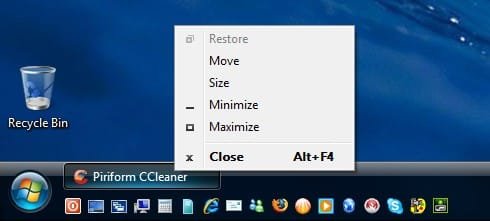
Just loaded up Vista and tried 2 different apps, the first one I have never seen in the system tray and the 2nd one start on Taskbar and system tray.

Solution to display minimized apps in notification area-2009-01-14_101043.jpg

Solution to display minimized apps in notification area-2009-01-14_101212.jpg

So there you have it, basically the program needs to support the minimize to system tray to begin with if your going to have any chance of doing it in Windows 7
My System SpecsSystem Spec
01-13-2009   #7


Windows 7 RC 7100 32bit/64bit


Exactly...If the program can stay in System Tray, then the above method works. Otherwise, it never worked anyway.
My System SpecsSystem Spec
01-13-2009   #8


Windows 7


I was able to successfully minimize a couple of icons. Please go here to the thread that I originally started.
My System SpecsSystem Spec
03-08-2009   #9


windows 7 RC1 Build 7100


The given method doesn't work, instead following the procedure corrupted my outlook
My System SpecsSystem Spec
Reply

 Solution to display minimized apps in notification area problems?


Thread Tools


Similar Threads for: Solution to display minimized apps in notification area
Thread Forum
Minimized apps and Running apps not on task bar General Discussion
Notification area Performance & Maintenance
adding Icons\Apps to notification area Customization
Virtual window is minimized to the notification area General Discussion
Notification Area General Discussion


All times are GMT -5. The time now is 01:57 AM.


Windows 7 Forums is an independent web site and has not been authorized,
sponsored, or otherwise approved by Microsoft Corporation.
"Windows 7" and related materials are trademarks of Microsoft Corp.
© Designer Media Ltd
  

1 2 3 4 5 6 7 8 9 10 11 12 13 14 15 16 17 18 19 20 21 22 23 24 25 26 27 28 29 30