
I often get a message that I must submit permission to perform some action like delete a folder. Apparently I unintentionally set a password that I don't remember for the administrator account. Fortunately this is on my laptop which has no important files that are not also on my desktop so losing data is not a huge issue. I want to try the steps in the tutorial Brink suggests but I don't see an administrator account in the user accounts but there is a folder for it. I'm kind of lost at this point about where to work on the problem.
BTW: This is one of those machines that came with Vista with a free upgrade to Win7 so I don't have Vista installation disks.

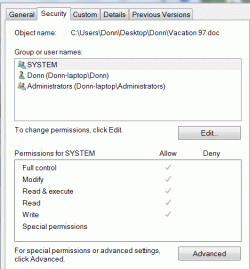

BTW: This is one of those machines that came with Vista with a free upgrade to Win7 so I don't have Vista installation disks.
Last edited by a moderator:
My Computer
At a glance
Windows 7 Home PremiumDual Core T42004 GB
- Computer Manufacturer/Model Number
- HP G60
- OS
- Windows 7 Home Premium
- CPU
- Dual Core T4200
- Motherboard
- HP
- Memory
- 4 GB


