Windows 7 Forums Search
Welcome to Windows 7 Forums. Our forum is dedicated to helping you find solutions with any problems, errors or issues you are experiencing with Windows 7. The Windows 7 forum also covers news and updates and has an extensive Windows 7 tutorial section that covers a wide range of tips and tricks.


Windows 7 - How to remove lock icon from folders?


08-08-2009   #1


Windows 7 x64


How to remove lock icon from folders?

I was messing around with WMP12, and ended up accidentally sharing all of my libraries. Oops! I unshared them all, however ever since that happened all of the folders now have the 'lock' icon over them. The only way I can seem to get rid of them, is to reshare.. which I don't want to do.

Anyone know how to remedy this? It's been bugging me

My System SpecsSystem Spec
08-10-2009   #2


Windows 7 x64


Everything under the sun documented by now, except this!
My System SpecsSystem Spec
08-10-2009   #3


Win7 Build 7600 x86


Quote   Quote: Originally Posted by Celeras View Post
Everything under the sun documented by now, except this!
Don't worry about the locks. It only means users with lower rights than admin can't edit them.

If you want to get rid of them, search for locks in this forum.
I know it's there, because I wrote a few posts about it.

good luck
My System SpecsSystem Spec
.


08-10-2009   #4


Windows 7 Enterprise x64 SP1 | Windows 8 build 7989


@OP:

Actually, you're mistaken.

You'll need to take ownership of those folders again - when you shared them that OS took control of the folders so it could handle the sharing and such - but when you unshared, it did not revert the ownership and control over the folder s back to you.

Check our tutorials on taking ownership.
My System SpecsSystem Spec
08-10-2009   #5


Simple really ... go to the tutorial section and read Brinks tut on taking ownership and you'll be good to go...

That was easy wasn't it??
My System SpecsSystem Spec
08-10-2009   #6


Quote   Quote: Originally Posted by johngalt View Post
@OP:

Actually, you're mistaken.

You'll need to take ownership of those folders again - when you shared them that OS took control of the folders so it could handle the sharing and such - but when you unshared, it did not revert the ownership and control over the folder s back to you.

Check our tutorials on taking ownership.
LOL .. great minds DO think alike don't they John??
My System SpecsSystem Spec
08-10-2009   #7


Windows 7 Enterprise x64 SP1 | Windows 8 build 7989


Yup - but I imitate a great mind often, so....

My System SpecsSystem Spec
08-10-2009   #8


Win7 Build 7600 x86


Quote   Quote: Originally Posted by johngalt View Post
@OP:

Actually, you're mistaken.

You'll need to take ownership of those folders again - when you shared them that OS took control of the folders so it could handle the sharing and such - but when you unshared, it did not revert the ownership and control over the folder s back to you.

Check our tutorials on taking ownership.

Sorry to contradict you.

Locks have nothing to do with ownership.

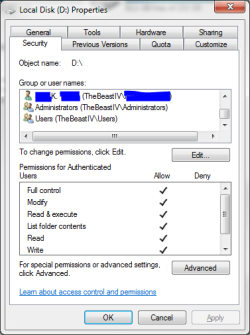
I have ownership of documents and settings and my useraccount is set to it with full permissions.
Yet I have a lock on it
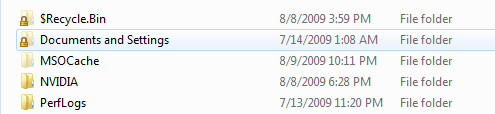
Name:  lock.PNG
Views: 6651
Size:  13.4 KB

I have never shared it.
What I did is rip out all user accounts except mine. Not even administrators.

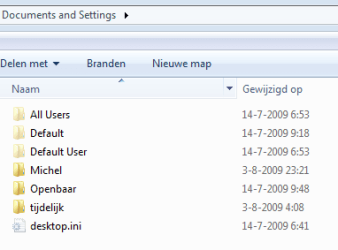
When I doubleclick I enter and see this
How to remove lock icon from folders?-lock2.png

As far as I know you get these locks when you delete the everyone user from the security tab.

Greetz
My System SpecsSystem Spec
08-10-2009   #9


Win7 Build 7600 x86


I reproduced it.

I created a folder.

by default my username and everyone were in the security tab

I took ownership, disabled the distribute permissions to subcontainers, and deleted the everyone.

Now it has a lock and only my username in security. I can still enter the folder and share it.


In my oppinion the lock says, users without admin rights can't enter.
My System SpecsSystem Spec
08-10-2009   #10


Windows 7 Enterprise x64 SP1 | Windows 8 build 7989


And I hate to contradict *you* - but I haven't done that and I too have a lock on the Doc an Settings folder - b/v that is not a real folder it is a virtual folder established for compatibility with older programs designed for XP, thus it allows the system to redirect the application to where it needs to go to.

In point of fact, if you check the ownership, even if you take ownership and add your permissions, they are over ridden b/c the System ownership has special permissions which you are not in effect changing , and the virtual folder and its tree are inheriting from that first and foremost.

How to remove lock icon from folders?-w7-d-s-lock.png

Remember, I have not done anything like you are describing regarding having ripped out all other users - every thing in this install is as it was when I finished installing 2 days ago.
My System SpecsSystem Spec
Reply

How to remove lock icon from folders? problems?


Thread Tools


Similar Threads for: How to remove lock icon from folders?
Thread Forum
How to remove lock icon over my folder Network & Sharing
Remove lock from folders and files General Discussion
Why have some of my folders got a lock! General Discussion


All times are GMT -5. The time now is 04:28 AM.


Windows 7 Forums is an independent web site and has not been authorized,
sponsored, or otherwise approved by Microsoft Corporation.
"Windows 7" and related materials are trademarks of Microsoft Corp.
© Designer Media Ltd
  

1 2 3 4 5 6 7 8 9 10 11 12 13 14 15 16 17 18 19 20 21 22 23 24 25 26 27 28 29 30