Windows 7 Forums


Windows 7: Why "System Type" says 32 bit OS?

09 Aug 2009   #1

Windows 7
 
 
Why "System Type" says 32 bit OS?

Hello,

I have a 64-bit processor and in "System" it says that the "System Type" is 32-bit Operating System.
How can I change the system to be 64-bit? Do I have to reinstall? I didn't have any choice between 32-bit and 64-bit during the installation.

Attached Thumbnails
Why "System Type" says 32 bit OS?-capture.jpg  
My System SpecsSystem Spec

09 Aug 2009   #2

Windows 7 Ultimate
The Southern Hinterlands


You will have to reinstall the 64bit version..there is no option to select which version you want to install...it assumes that you already know this....
My System SpecsSystem Spec
09 Aug 2009   #3

7600x64 RTM


That may be assuming a lot....
My System SpecsSystem Spec
.


09 Aug 2009   #4

Windows 7


What does it mean the "64bit version"? The 64bit and 32bit are two separate different copies? I thought each copy can install the 32 bit or 64 bit according to the user's choice.

EDIT:
Is worthwhile to reinstall? or is it OK like that?
My System SpecsSystem Spec
09 Aug 2009   #5

Windows 7 x64 Ultimate
A Finnish immigrant in Leipzig, Germany


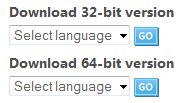
You have installed a 32-bit version of Windows 7. A 64-bit Windows 7 can legally be found here. As the image taken from that site here shows, you have to choose if you want to download a 32-bit or 64-bit Windows 7.

Name:  32_64.PNG
Views: 831
Size:  4.2 KB

You have to do a clean install, a 32-bit system can not be upgraded to a 64-bit system.

Kari

EDIT: Please remember that free downloads will only be available until August 20, 2009.
My System SpecsSystem Spec
09 Aug 2009   #6

Window 7 build 7600, Xp pro(VM)
West Bengal


First of all you have to download the 64 bit version of Windows 7 and then you have to perform clean Installation. You cant update a 32 bit OS to 64bit OS and vice versa.
My System SpecsSystem Spec
09 Aug 2009   #7

Windows 7 Ulti. x64
KANSAS


Welcome 1gnition to seven forums
You will need to download the 64 bit version of the Windows 7 os. And then reinstall that. Good luck to you.

Last edited by myzr7; 09 Aug 2009 at 08:19 AM.. Reason: spelling
My System SpecsSystem Spec
09 Aug 2009   #8

Window 7 build 7600, Xp pro(VM)
West Bengal


Quote   Quote: Originally Posted by 1gnition View Post
I thought each copy can install the 32 bit or 64 bit according to the user's choice.
You have to make that kind of DVD by your own.
here is a tutorial for that: http://www.sevenforums.com/tutorials...tml#post194511

Quote   Quote: Originally Posted by 1gnition View Post
EDIT:
Is worthwhile to reinstall? or is it OK like that?
It is ok like that. And 32 bit version of the OS is more efficient.
My System SpecsSystem Spec
09 Aug 2009   #9

Windows 7


Thank you all.

Quote   Quote: Originally Posted by septprince View Post
You have to make that kind of DVD by your own.
here is a tutorial for that: http://www.sevenforums.com/tutorials...tml#post194511

It is ok like that. And 32 bit version of the OS is more efficient.
You actually mean it is better to install the 32-bit even if this is a 64-bit processor? Why? Where can I read about that?
My System SpecsSystem Spec
09 Aug 2009   #10

Windows 7 x64 Ultimate
A Finnish immigrant in Leipzig, Germany


Quote   Quote: Originally Posted by 1gnition View Post
Is worthwhile to reinstall? or is it OK like that?
You only have 1 gig RAM, I see. In my opinion it's definitely better you keep your 32-bit Windows 7.

Kari
My System SpecsSystem Spec
Reply

 Why "System Type" says 32 bit OS? problems?


Thread Tools


Similar help and support threads for: Why "System Type" says 32 bit OS?
Thread Forum
"Splitting" 40 Gb user file system into ten 4 Gb "chunks" Backup and Restore
Solved Where is "VIEW", "ARRANGE ICONS BY", "TYPE" General Discussion
Random "Bad Pool Header" and "System Service Exception" BSODs BSOD Help and Support
Solved Both "System reserved" and "C" partition cloned to external HDD: boot? Installation & Setup
"Return computer to factory condition" or "Use A System Image Crea..." Backup and Restore


All times are GMT -5. The time now is 01:31 PM.


Seven Forums Android App Seven Forums IOS App Follow us on Facebook

Windows 7 Forums is an independent web site and has not been authorized,
sponsored, or otherwise approved by Microsoft Corporation.
"Windows 7" and related materials are trademarks of Microsoft Corp.
© Designer Media Ltd
  

1 2 3 4 5 6 7 8 9 10 11 12 13 14 15 16 17 18 19 20 21 22 23 24 25 26 27 28 29 30 31 32