| Windows 7: How does one change the Taskbar Color |
06 Dec 2011
|
#1 | | Windows 7 Home Premium 32bit. |
How does one change the Taskbar Color I'm not pleased with the default color (light grey) that Windows 7 presents. That color practically 'washes out' some of my icons in the quick launch, and the notification areas of the taskbar. I'd like to make the taskbar background color a dark blue to match my Active Window Title Bar color.
I've tried various freeware utilities and MS Control Panel (themes) to attempt to modify the taskbar's color and transparency. All of those approaches have been unsuccessful (after reboot the light grey color remains). Note that in each case, I've remembered to Save the modified theme.
At this point I'm scouring the registry to find entry(s) that might pertain, but that too has failed to yield any success- have tried multiple REGEDIT FINDs (Taskbar, color, transparency, and others) to no avail.
I've also followed the instructions for right-clicking on the Desktop then Personalization that just takes you to Control Panel's Personalization window as if you had manually traversed thru Control Panel manually.
Is anyone out there who is aware of registry keys that might "get me home", or utility that has shown success. Facts:
Win 7 SP1 Build 7601 (all current updates applied)
Samsung hi-res 22-inch flat screen.
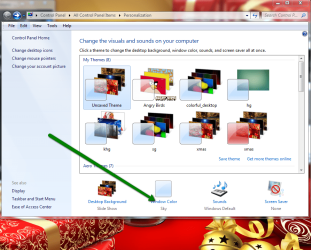
Control Panel >> Personalization >> Windows Color...
I'm currently using a default (blue white) Windows Classic (non-Aero) high contrast theme with personalized colors, wallpaper, screen saver, and sound.
Sure hope that there's someone out there who has been down this road. I'm hopeful that someone is able to provide some guidance.
Thanks in advance.
Last edited by Lairbear; 06 Dec 2011 at 04:07 PM..
Reason: grammar, typing
| My System Specs |
| System Manufacturer/Model Number Gigabyte OS Windows 7 Home Premium 32bit. CPU Intel(R) Core(TM) i7 920 @ 2.67 GHz Motherboard ? Memory 6 Gb Graphics Card NVIDIA GeForce GTX Sound Card RealTek High Definition Audio/Video Monitor(s) Displays Samsung SyncMaster SW2333SW, CX2333SW(Analog) PSU ? Case ? Cooling ? Hard Drives WDC WD 10EARS-00Y5B1
WDC WD 5000AAKS-00V1A0 |
06 Dec 2011
|
#2 | | Microsoft Windows 7 Home Premium 64-bit 7600 cornwall UK |
welcome to seven forums
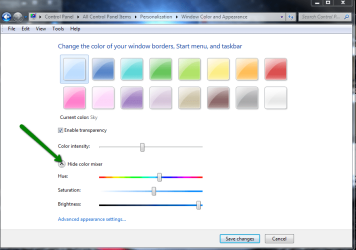
right click on the desktop and select personalize, then click the window color link and then select the color you want ,
if you click the show color mixer you can get a different more personal choice color 
remember to save the changes! | My System Specs | | System Manufacturer/Model Number Hewlett packard/p6512uk OS Microsoft Windows 7 Home Premium 64-bit 7600 CPU IIx4 amd athelon 635 processor Motherboard FOXCONN 2AA9 Memory 2x2gb Graphics Card ati radeon HD 5450 Sound Card (1) Realtek High Definition Audio (2) AMD High Definition Monitor(s) Displays samsung lcd tv 32" Screen Resolution 1360x 768 Keyboard wireless hp Mouse wireless Hp,optical PSU ? Cooling air! Hard Drives (1) WDC WD10 01FAES-60Z2A0 SATA Disk Device (2) Maxtor OneTouch USB Device (3) ST310003 33AS USB Device (4) WD My Book 1111 USB Device Internet Speed 1.10mb/s Antivirus MSE Browser Firefox |
06 Dec 2011
|
#3 | | Win 7 Pro x64 Council Bluffs, Iowa |
Welcome to the Seven Forums
Using that Classic theme you are limited to using Windows Color and Appearance look at Option 2 step seven will show you how to use it Window Color and Appearance - Change to change to color of the taskbar go to 3D Object and change to color their be aware that will change the color in many places.
Jerry | My System Specs | | Computer type Laptop System Manufacturer/Model Number Sager NP9170 OS Win 7 Pro x64 CPU Intel(R) Core(TM) i7-3630QM CPU @ 2.40GHz Motherboard CLEVO P170EM Memory 12 GB Graphics Card (1) Intel(R) HD Graphics 4000 (2) NVIDIA GeForce GTX 675M Sound Card (1) Realtek High Definition Audio (2) Intel(R) Display Aud Monitor(s) Displays 17.3 Screen Resolution 1920x1080 Keyboard Backlite Hard Drives (1) M4-CT256M4SSD2 ATA Device 256 GB (2) ST9500424AS ATA Device 500 GB Antivirus MSE, Malwarebytes Pro Browser Firefox Other Info Desktop.
System Manufacturer: Custom-built.
OS: Win 7 Home Premium x64.
Case: Rosewill R5.
CPU: Intel I5 4670K CPU @ 3.40GHz.
CPU Cooler: Cool Master Hyper 212 EVO.
Motherboard: Asus Z87-A.
Memory: Kingston Hyper 2x4 GB.
Graphics Card: Intel HD Graphics 4600.
Power Supply: Corsair TX750.
Hard Drives: (1) Samsung 840 120 GB (2) Western Digital blue 500 GB 7200 RPM. |
06 Dec 2011
|
#4 | | |
Hi, if you want to customise Windows Classic to look better I suggest you download TuneUp Utilities to remove Gradient Title Bars, if anyone knows how to do this manually I would be happy to hear.
Then right click on the Desktop and select Personalise, click Windows Colour, it should open a dialogue box.
3D Objects - The main interfact, will also change the taskbar.
Active Titlebar - Changes the color of the titlebar (the bar at the top of the screen).
Active Window Border - The border around your Active Window.
Application Background - Not sure, but I think it is your background around your application :P
Border Padding - Changes the size of the borders.
CaptionButtons - Changes the size of the Titlebars.
Desktop - Changes the colour of your Desktop.
Disabled Item - Not sure.
Hyperlink - Changes the colour of the Hyperlink.
Icon - Changes the size of the Icons and the font and font size of Icons.
Icon Spacing Horizontal - The Icon spacing's width.
Icon Spacing Vertical - The Icon spacing's length.
Inactive Title Bar - Same as active title bar, but when you have a folder or application or anything opened you see a Title Bar, if you have an application open where you can see the Title bar behind that that will go to the colour you selected - Font is customisable too.
Menu - The colour, font and font size of the Menubar (File, Edit, Copy, etc).
Message Box - Changes the colour of the text on the Notepad typing box for example.
Pallette Title - Again unsure, but only fonts are customisable.
Scrollbar - Changes the colour of the Scrollbar in Windows Explorer or maybe your Browser (customise Size too).
Selected Items - Change the colour of Highlighted text (first box is the background, second is the text colour).
ToolTip - Colour and font of the boxes like (Device has been safely unplugged)
Window - ......
Please correct me where I am wrong
Joe. | My System Specs | | System Manufacturer/Model Number iRush Pro OS Windows 7 Ultimate x64 CPU Intel Core i5 2500K Processor Motherboard Intel H67 Chipset Motherboard (Micro ATX) Memory 2x4GB DDR3 1333Mhz Memory Graphics Card Novatech Radeon 6770 1GB Graphics Card Keyboard Novatech Wired Keyboard Mouse Novatech Wired Mouse PSU Novatech 500W Case Novatech ATX Gaming Case Cooling - Hard Drives 1TB Internet Speed VirginMedia 10MB/s |
06 Dec 2011
|
#5 | | Win7 x 6 PC's California, Florida, Boston |
Hi Joe -
Why are you using Classic Theme which is closest to Win2000's file cabinet graphics?
The reason I ask is that if the system supports Aero then the resources used are not that much more, so disabling is never a step suggested to conserve low resources.
Your posted specs would definitely support Aero.
You can troubleshoot aero by typing it in Start Search box. | My System Specs | | |
06 Dec 2011
|
#6 | | |

Quote: Originally Posted by gregrocker Hi Joe -
Why are you using Classic Theme which is closest to Win2000's file cabinet graphics?
The reason I ask is that if the system supports Aero then the resources used are not that much more, so disabling is never a step suggested to conserve low resources.
Your posted specs would definitely support Aero.
You can troubleshoot aero by typing it in Start Search box. Hi there, I tested this on my other PC:
1GB Ram, my netbook has this theme too, I have modified it a lot an now I really like it | My System Specs | | System Manufacturer/Model Number iRush Pro OS Windows 7 Ultimate x64 CPU Intel Core i5 2500K Processor Motherboard Intel H67 Chipset Motherboard (Micro ATX) Memory 2x4GB DDR3 1333Mhz Memory Graphics Card Novatech Radeon 6770 1GB Graphics Card Keyboard Novatech Wired Keyboard Mouse Novatech Wired Mouse PSU Novatech 500W Case Novatech ATX Gaming Case Cooling - Hard Drives 1TB Internet Speed VirginMedia 10MB/s |
06 Dec 2011
|
#7 | | Windows 7 Home Premium 32bit. |
How does one change the Taskbar Color 
Quote: Originally Posted by Faceofjoe421 Hi, if you want to customise Windows Classic to look better I suggest you download TuneUp Utilities to remove Gradient Title Bars, if anyone knows how to do this manually I would be happy to hear.
Then right click on the Desktop and select Personalise, click Windows Colour, it should open a dialogue box. 3D Objects - The main interfact, will also change the taskbar.
.
.
.
Please correct me where I am wrong
Joe. My humble thanks to all of you who responded- outstanding interest and support from you all. I chose to follow the suggestion of FaceofJoe421...life is a series of decisions, some are good and others not. While, as Joe admitted, there are some undesirable side effects (via the wisdom of Microsoft designers), those side effects are tolerable. Joe, your suggestion to use the 3D selection was SPOT ON! My kudos to you. Forgot to mention Bongo (Jerry) also for making the same suggestion.
In response to gregrocker, I made my decision based upon what I knew (familiarity), that is, I danced with them that brung me. I had used the classic pull-down menu many times in the past when customizing on Windows XP. Randy
Last edited by Lairbear; 06 Dec 2011 at 07:25 PM..
Reason: structure, my bad memory (memory parity error)
| My System Specs | | System Manufacturer/Model Number Gigabyte OS Windows 7 Home Premium 32bit. CPU Intel(R) Core(TM) i7 920 @ 2.67 GHz Motherboard ? Memory 6 Gb Graphics Card NVIDIA GeForce GTX Sound Card RealTek High Definition Audio/Video Monitor(s) Displays Samsung SyncMaster SW2333SW, CX2333SW(Analog) PSU ? Case ? Cooling ? Hard Drives WDC WD 10EARS-00Y5B1
WDC WD 5000AAKS-00V1A0 |
06 Dec 2011
|
#8 | | |
Thank you Lairbear, glad you got it working, welcome to the Sevenforums | My System Specs | | System Manufacturer/Model Number iRush Pro OS Windows 7 Ultimate x64 CPU Intel Core i5 2500K Processor Motherboard Intel H67 Chipset Motherboard (Micro ATX) Memory 2x4GB DDR3 1333Mhz Memory Graphics Card Novatech Radeon 6770 1GB Graphics Card Keyboard Novatech Wired Keyboard Mouse Novatech Wired Mouse PSU Novatech 500W Case Novatech ATX Gaming Case Cooling - Hard Drives 1TB Internet Speed VirginMedia 10MB/s How does one change the Taskbar Color problems? All times are GMT -5. The time now is 01:46 AM. | |