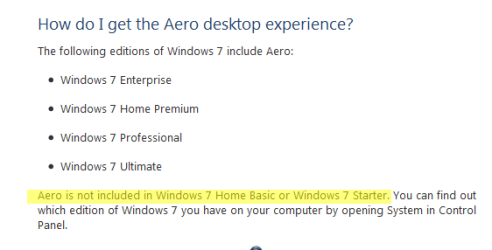
I have Win 7 on an older laptop. It works fine except that there is no Aero. The Taskbar is this "washed out" blue which does not change regardless of what wallpaper is there. I have looked on Google and found seveal threads (most of which are 2009) trying to find a way to change the color of the Taskbar but nothing worthwhile. I was wondering if any of you could tell me how to change the color of the Taskbar that has no Aero. Thanks,
System Manufacturer/Model Number Custom Build OS Windows 7 Home Premium 32-Bit - Build 7600 SP1 CPU Intel Core i3-2120 3.30Ghz Motherboard Asus P8Z68-V LX Intel Z68 Socket H2 ATX Memory Kingston 4 GB DDR3 1333 mhz Graphics Card Zotac GeForce 9400 GT 512MB Sound Card Sound Blaster Audigy SE 24-Bit Monitor(s) Displays Samsung Sync Master 940 = 19 inch Screen Resolution 1440 X 900
Keyboard Microsoft Natural 4000 Mouse Microsoft Custom Optical 3000 PSU 500 watt Case NZXT Apollo - Silver with Clear Side Panel Cooling Three 120 mm Fans Hard Drives OCZ Vertex 3 120 GB Sata 3 SSD ==
Western Digital 160 GB Caviar Blue 7200 RPM ==
Western Digital 500 GB Caviar Green 7200 RPM == Internet Speed AT&T Fiber Optic Wireless Network Other Info 120 mm Blue LED Fan -- Three Blue LED Lazer Light Sticks
If you are using Windows Classic theme use Windows Color and Appearance and in the drop-down menu go to 3-D Objects and changed color that will change color of the taskbar but it also changes the appearance of the window to.
Jerry
System Manufacturer/Model Number Custom Build OS Windows 7 Home Premium 32-Bit - Build 7600 SP1 CPU Intel Core i3-2120 3.30Ghz Motherboard Asus P8Z68-V LX Intel Z68 Socket H2 ATX Memory Kingston 4 GB DDR3 1333 mhz Graphics Card Zotac GeForce 9400 GT 512MB Sound Card Sound Blaster Audigy SE 24-Bit Monitor(s) Displays Samsung Sync Master 940 = 19 inch Screen Resolution 1440 X 900
Keyboard Microsoft Natural 4000 Mouse Microsoft Custom Optical 3000 PSU 500 watt Case NZXT Apollo - Silver with Clear Side Panel Cooling Three 120 mm Fans Hard Drives OCZ Vertex 3 120 GB Sata 3 SSD ==
Western Digital 160 GB Caviar Blue 7200 RPM ==
Western Digital 500 GB Caviar Green 7200 RPM == Internet Speed AT&T Fiber Optic Wireless Network Other Info 120 mm Blue LED Fan -- Three Blue LED Lazer Light Sticks
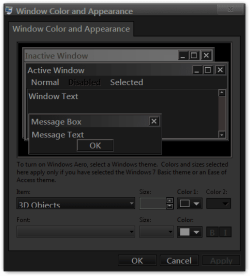
I didn't mention that I had found the Windows Classic, but I was trying to do it with the Windows 7 Basic.
The only way to change the taskbar color on Windows 7 basic is by a custom theme, the basic theme is tied to that Aero theme.
Take a screenshot of your taskbar showing your start button and I may be able to help.
Jerry
System Manufacturer/Model Number Custom Build OS Windows 7 Home Premium 32-Bit - Build 7600 SP1 CPU Intel Core i3-2120 3.30Ghz Motherboard Asus P8Z68-V LX Intel Z68 Socket H2 ATX Memory Kingston 4 GB DDR3 1333 mhz Graphics Card Zotac GeForce 9400 GT 512MB Sound Card Sound Blaster Audigy SE 24-Bit Monitor(s) Displays Samsung Sync Master 940 = 19 inch Screen Resolution 1440 X 900
Keyboard Microsoft Natural 4000 Mouse Microsoft Custom Optical 3000 PSU 500 watt Case NZXT Apollo - Silver with Clear Side Panel Cooling Three 120 mm Fans Hard Drives OCZ Vertex 3 120 GB Sata 3 SSD ==
Western Digital 160 GB Caviar Blue 7200 RPM ==
Western Digital 500 GB Caviar Green 7200 RPM == Internet Speed AT&T Fiber Optic Wireless Network Other Info 120 mm Blue LED Fan -- Three Blue LED Lazer Light Sticks
System Manufacturer/Model Number Hewlett packard/p6512uk OS Microsoft Windows 7 Home Premium 64-bit 7600 CPU IIx4 amd athelon 635 processor Motherboard FOXCONN 2AA9 Memory 2x2gb Graphics Card ati radeon HD 5450 Sound Card (1) Realtek High Definition Audio (2) AMD High Definition Monitor(s) Displays samsung lcd tv 32" Screen Resolution 1360x 768
Keyboard wireless hp Mouse wireless Hp,optical PSU ? Cooling air! Hard Drives (1) WDC WD10 01FAES-60Z2A0 SATA Disk Device (2) Maxtor OneTouch USB Device (3) ST310003 33AS USB Device (4) WD My Book 1111 USB Device Internet Speed 1.10mb/s Antivirus MSE Browser Firefox
That is why I chose Win Basic. My video card is built into my laptop motherboard and is only 32 MB. It will not support Aero. Things are fine except I would like to change my Taskbar color to something dark. I don't really want to use the Windows Classic, but will go to that if I have too.
System Manufacturer/Model Number Custom Build OS Windows 7 Home Premium 32-Bit - Build 7600 SP1 CPU Intel Core i3-2120 3.30Ghz Motherboard Asus P8Z68-V LX Intel Z68 Socket H2 ATX Memory Kingston 4 GB DDR3 1333 mhz Graphics Card Zotac GeForce 9400 GT 512MB Sound Card Sound Blaster Audigy SE 24-Bit Monitor(s) Displays Samsung Sync Master 940 = 19 inch Screen Resolution 1440 X 900
Keyboard Microsoft Natural 4000 Mouse Microsoft Custom Optical 3000 PSU 500 watt Case NZXT Apollo - Silver with Clear Side Panel Cooling Three 120 mm Fans Hard Drives OCZ Vertex 3 120 GB Sata 3 SSD ==
Western Digital 160 GB Caviar Blue 7200 RPM ==
Western Digital 500 GB Caviar Green 7200 RPM == Internet Speed AT&T Fiber Optic Wireless Network Other Info 120 mm Blue LED Fan -- Three Blue LED Lazer Light Sticks
hi bigmck, i was responding to gregs post , i dont suppose a third part theme can be used can it, i have never used win 7 basic so i dont know if it can be themed, but if it can then im sure its just a case of getting an experienced themer to direct you to a third party taskbar to install. bongo is an experienced themer.
System Manufacturer/Model Number Hewlett packard/p6512uk OS Microsoft Windows 7 Home Premium 64-bit 7600 CPU IIx4 amd athelon 635 processor Motherboard FOXCONN 2AA9 Memory 2x2gb Graphics Card ati radeon HD 5450 Sound Card (1) Realtek High Definition Audio (2) AMD High Definition Monitor(s) Displays samsung lcd tv 32" Screen Resolution 1360x 768
Keyboard wireless hp Mouse wireless Hp,optical PSU ? Cooling air! Hard Drives (1) WDC WD10 01FAES-60Z2A0 SATA Disk Device (2) Maxtor OneTouch USB Device (3) ST310003 33AS USB Device (4) WD My Book 1111 USB Device Internet Speed 1.10mb/s Antivirus MSE Browser Firefox