| Windows 7: Icons sizes change back to details sizes on specific folder |
18 Dec 2011
|
#1 | | Windows 7 SP1 Ultimate x64 bit |
Icons sizes change back to details sizes on specific folder hi there
as the title said i have really weird issue here...
the story goes like that...
i have a folder named "Desktop's icons that not in used" since old XP, i used to add all the icons of the progrems that i don't used (and use) often to it so i will find them right away when i need them, even when i format my pc and i backup stuff i also take this folder with me , put it again on the new OS and add each icon to it again when i reinstall it progrem. anyway long story short (and i think it will be right to add Weird xD) when i enter to this folder which i used to put on medium icons all this years it randomly change back to details sizes... mostly when i close other folder that have details sizes before i enter to this one.. but not allways, the windows keep remeber the icons's sizes and even the windows position and size in other folders ...so why only this folder just suddenly stop to remeber it own icon's size? is it corruption registry or something of sort?
i also tried to make a new folder with the same name, cut paste all of the icons into it and the issue still occur, and tried to disable some option that let the system choose what to change in my system's view (from look to performance) if it have hard time to display anything (which is hard for me to believe because i have I7 and Geforce 295 gtx..) and the issue still persist...
i know it just one weird and idiotic issue to make fuss about.. but i want to know if something is wrong with my system ...
thanks in advance for these who going to help | My System Specs |
| System Manufacturer/Model Number Windows 7 SP1 Ultimate x64 bit OS Windows 7 SP1 Ultimate x64 bit CPU Intel I7 3770 Motherboard Asus maximus v gene BIOS Version 1408 Memory Corsair Vengeance Low Profile (LP) version 16 GB (4x4GB) DDR Graphics Card Geforce 580 GTX 3 GB version From Gigabyte, 3072 MB GDDR5, Monitor(s) Displays DELL U2410 A010 Screen Resolution 1920x1200 Keyboard Some simple Logitech keybored Mouse SteelSeries Sensei PSU AcBel R88 1100W Case ThermalTake M5 Cooling ZALMAN CPU COOLER CNPS9900A LED + 2 more fans in the case Hard Drives TOSHIBA MK1002TSKB 1TB 24/7, 7200 RPM, 64MB, SATA II
Hitachi HDS721010CLA332 1TB, 7200 RPM, SATA 2-3Gb/s
WESTERN DIGITAL Caviar Black 1TB, 7200 RPM, 64MB, SATA III WD1002FAEX |
18 Dec 2011
|
#2 | | Windows 7 SP1 Ultimate x64 bit |
Update:
it seem like it happening in more then one folder and it keep to happened randomly... even the window's size keep getting back to the default size....
it like after some time most of the recent chances that i've done going back to the window's default ... why it happening? = (
anyone?
there is any way to fix it? | My System Specs | | System Manufacturer/Model Number Windows 7 SP1 Ultimate x64 bit OS Windows 7 SP1 Ultimate x64 bit CPU Intel I7 3770 Motherboard Asus maximus v gene BIOS Version 1408 Memory Corsair Vengeance Low Profile (LP) version 16 GB (4x4GB) DDR Graphics Card Geforce 580 GTX 3 GB version From Gigabyte, 3072 MB GDDR5, Monitor(s) Displays DELL U2410 A010 Screen Resolution 1920x1200 Keyboard Some simple Logitech keybored Mouse SteelSeries Sensei PSU AcBel R88 1100W Case ThermalTake M5 Cooling ZALMAN CPU COOLER CNPS9900A LED + 2 more fans in the case Hard Drives TOSHIBA MK1002TSKB 1TB 24/7, 7200 RPM, 64MB, SATA II
Hitachi HDS721010CLA332 1TB, 7200 RPM, SATA 2-3Gb/s
WESTERN DIGITAL Caviar Black 1TB, 7200 RPM, 64MB, SATA III WD1002FAEX |
18 Dec 2011
|
#3 | | Windows 7 Ultimate X64 SP1 Mt. Crumpit/Whoville |
There are two ways to do this.
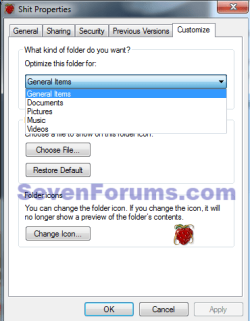
1. Right click the (closed) folder/Properties/Customize tab. Under Customize this folder for:, choose one which you like, Pictures, Video, General items, etc, and click apply. Do this for each folder in question.
2. Open the folder in question and select the icon view you want, then in the menu (1) click Tools, Drop down menu click Folder options (2), in the window that opens View tab (3) click Apply
to folders (4). This will set that view for all folders on your system of the same type to the current view. | My System Specs | | Computer type PC/Desktop System Manufacturer/Model Number Home Built Desktop By DataTech OS Windows 7 Ultimate X64 SP1 CPU Intel i5-2550K, Differing ~4.4-4.8GHz No built in GPU Motherboard ASUS P8Z68-V PRO/GEN3 Memory 16GB G.Skill Sniper 2133MHz 4x4GB Graphics Card ASUS ENGTX460 DirectCU/2DI/1GD5 GeForce GTX 460 Sound Card Onboard Realtek 5-1 Monitor(s) Displays Samsung P2570HD Screen Resolution 1920x1080 Keyboard Old, beat-up Dell USB From 10 yrs Ago Mouse Gigabyte m6900 wired PSU Corsair HX650W Case Inwin Dragon Rider Cooling Hyper 212 EVO w/two Noctua fans, push-pull, @1300 RPM Hard Drives Crucial M4 128GB for OS, 750GB Seagate MomentusXT for data, 500GB Seagate Constellation for storage Internet Speed 8-19 Mbs down, 3-4 Mbs up Comcast Cable Antivirus Norton Internet Security Browser IE 9, Opera when needed Other Info 4 case fans, LG BluRay-RE, ASUS DVD-RW, Mr. Fusion power generator with flux capacitor, 1.21 gigawatts. |
19 Dec 2011
|
#4 | | Windows 7 SP1 Ultimate x64 bit |
thanks for the help
but i done that allready.. dosn't seem to help...
also i don't want that every folder will have the same view as this one...
the only thing that i need now is more folders that stuck with one view xD | My System Specs | | System Manufacturer/Model Number Windows 7 SP1 Ultimate x64 bit OS Windows 7 SP1 Ultimate x64 bit CPU Intel I7 3770 Motherboard Asus maximus v gene BIOS Version 1408 Memory Corsair Vengeance Low Profile (LP) version 16 GB (4x4GB) DDR Graphics Card Geforce 580 GTX 3 GB version From Gigabyte, 3072 MB GDDR5, Monitor(s) Displays DELL U2410 A010 Screen Resolution 1920x1200 Keyboard Some simple Logitech keybored Mouse SteelSeries Sensei PSU AcBel R88 1100W Case ThermalTake M5 Cooling ZALMAN CPU COOLER CNPS9900A LED + 2 more fans in the case Hard Drives TOSHIBA MK1002TSKB 1TB 24/7, 7200 RPM, 64MB, SATA II
Hitachi HDS721010CLA332 1TB, 7200 RPM, SATA 2-3Gb/s
WESTERN DIGITAL Caviar Black 1TB, 7200 RPM, 64MB, SATA III WD1002FAEX |
19 Dec 2011
|
#5 | | Windows 7 Ultimate X64 SP1 Mt. Crumpit/Whoville |
Really odd, do you have any 3rd party theme programs installed? | My System Specs | | Computer type PC/Desktop System Manufacturer/Model Number Home Built Desktop By DataTech OS Windows 7 Ultimate X64 SP1 CPU Intel i5-2550K, Differing ~4.4-4.8GHz No built in GPU Motherboard ASUS P8Z68-V PRO/GEN3 Memory 16GB G.Skill Sniper 2133MHz 4x4GB Graphics Card ASUS ENGTX460 DirectCU/2DI/1GD5 GeForce GTX 460 Sound Card Onboard Realtek 5-1 Monitor(s) Displays Samsung P2570HD Screen Resolution 1920x1080 Keyboard Old, beat-up Dell USB From 10 yrs Ago Mouse Gigabyte m6900 wired PSU Corsair HX650W Case Inwin Dragon Rider Cooling Hyper 212 EVO w/two Noctua fans, push-pull, @1300 RPM Hard Drives Crucial M4 128GB for OS, 750GB Seagate MomentusXT for data, 500GB Seagate Constellation for storage Internet Speed 8-19 Mbs down, 3-4 Mbs up Comcast Cable Antivirus Norton Internet Security Browser IE 9, Opera when needed Other Info 4 case fans, LG BluRay-RE, ASUS DVD-RW, Mr. Fusion power generator with flux capacitor, 1.21 gigawatts. |
19 Dec 2011
|
#6 | | Windows 7 SP1 Ultimate x64 bit |

Quote: Originally Posted by Britton30 Really odd, do you have any 3rd party theme programs installed? nope
however after i tried what you told me to do on the second time.. the issue seem to be fixed =)
thanks alot mate
and happy holiday! | My System Specs | | System Manufacturer/Model Number Windows 7 SP1 Ultimate x64 bit OS Windows 7 SP1 Ultimate x64 bit CPU Intel I7 3770 Motherboard Asus maximus v gene BIOS Version 1408 Memory Corsair Vengeance Low Profile (LP) version 16 GB (4x4GB) DDR Graphics Card Geforce 580 GTX 3 GB version From Gigabyte, 3072 MB GDDR5, Monitor(s) Displays DELL U2410 A010 Screen Resolution 1920x1200 Keyboard Some simple Logitech keybored Mouse SteelSeries Sensei PSU AcBel R88 1100W Case ThermalTake M5 Cooling ZALMAN CPU COOLER CNPS9900A LED + 2 more fans in the case Hard Drives TOSHIBA MK1002TSKB 1TB 24/7, 7200 RPM, 64MB, SATA II
Hitachi HDS721010CLA332 1TB, 7200 RPM, SATA 2-3Gb/s
WESTERN DIGITAL Caviar Black 1TB, 7200 RPM, 64MB, SATA III WD1002FAEX |
19 Dec 2011
|
#7 | | Windows 7 Ultimate X64 SP1 Mt. Crumpit/Whoville |
You're welcome, added as friend.
And Merry Christmas to you too! | My System Specs | | Computer type PC/Desktop System Manufacturer/Model Number Home Built Desktop By DataTech OS Windows 7 Ultimate X64 SP1 CPU Intel i5-2550K, Differing ~4.4-4.8GHz No built in GPU Motherboard ASUS P8Z68-V PRO/GEN3 Memory 16GB G.Skill Sniper 2133MHz 4x4GB Graphics Card ASUS ENGTX460 DirectCU/2DI/1GD5 GeForce GTX 460 Sound Card Onboard Realtek 5-1 Monitor(s) Displays Samsung P2570HD Screen Resolution 1920x1080 Keyboard Old, beat-up Dell USB From 10 yrs Ago Mouse Gigabyte m6900 wired PSU Corsair HX650W Case Inwin Dragon Rider Cooling Hyper 212 EVO w/two Noctua fans, push-pull, @1300 RPM Hard Drives Crucial M4 128GB for OS, 750GB Seagate MomentusXT for data, 500GB Seagate Constellation for storage Internet Speed 8-19 Mbs down, 3-4 Mbs up Comcast Cable Antivirus Norton Internet Security Browser IE 9, Opera when needed Other Info 4 case fans, LG BluRay-RE, ASUS DVD-RW, Mr. Fusion power generator with flux capacitor, 1.21 gigawatts. Icons sizes change back to details sizes on specific folder problems? All times are GMT -5. The time now is 10:44 PM. | |