| Windows 7: Identifying 32-bit and 64-bit programs in Windows Explorer? |
18 Dec 2011
|
#1 | | Windows 7 HP 64-bit Boynton Beach, FL |
Identifying 32-bit and 64-bit programs in Windows Explorer? Most of the programs that I have dl'd, have been placed into Program Files (x86), even if the installer was recommending Program Files. Not really sure why I was doing this. I have now found out that the difference between these two folders is one is for 32-bit and the other for 64-bit programs. So, now I have many programs that are in the wrong folder, but don't know how to identify with is 64-bit and which is 32-bit. I'd like to be able to identify which is which and then move the programs into their correct folders. However, I must also say, that as far as I can tell, all my programs are working fine and I really wonder if I have to do this house-keeping??? | My System Specs |
| System Manufacturer/Model Number Gateway DX4720-03/HP Pavilion dv6 OS Windows 7 HP 64-bit Memory 4GB/4GB Other Info Firefox 10, IE 9, Thunderbird 10, Norton Security Suite (Comcast) |
18 Dec 2011
|
#2 | | Windows 7 SP1, Home Premium, 64-bit |

Quote: Originally Posted by flycaster I'd like to be able to identify which is which and then move the programs into their correct folders. However, I must also say, that as far as I can tell, all my programs are working fine and I really wonder if I have to do this house-keeping??? I wouldn't move them.
I'd do one of two things:
Uninstall the programs and reinstall them to the proper folder.
Do nothing until and unless problems develop. I don't know how likely that is. | My System Specs | | System Manufacturer/Model Number Ignatz Special; 4 speed manual gearbox; factory air conditioning; one of one OS Windows 7 SP1, Home Premium, 64-bit CPU Intel Sandy Bridge i5-2500, not overclocked Motherboard Gigabyte H67A-UD3H-B3, full ATX Memory 4 GB Crucial DDR3-1333 Graphics Card none; graphics are integrated on CPU Sound Card onboard: Realtek ALC892; external: USB Behringer UF0-202 Monitor(s) Displays NEC 90GX2-BK 19" LCD Screen Resolution 800 x 640 Keyboard Leopold Tenkeyless with Cherry Blue switches, USB Mouse Logitech or Microsoft optical wired; either USB or PS 2 PSU Seasonic SS-560KM, modular Case Antec Solo II Cooling CPU: Scythe Big Shuriken; Case: Scythe Slipstream 800 & 500 Hard Drives System: Intel 320 Series SSD, 80 GB;
Data: Samsung Spinpoint 103SJ, 1 TB;
Backup: WD Caviar Green WD15EADS-00P8B0, 1.5TB Other Info Power consumption of this system, including monitor: 68 watts at idle; 144 watts at full load |
18 Dec 2011
|
#3 | | Windows 7 HP 64-bit Boynton Beach, FL |

Quote: Originally Posted by ignatzatsonic 
Quote: Originally Posted by flycaster I'd like to be able to identify which is which and then move the programs into their correct folders. However, I must also say, that as far as I can tell, all my programs are working fine and I really wonder if I have to do this house-keeping??? I wouldn't move them.
I'd do one of two things:
Uninstall the programs and reinstall them to the proper folder.
Do nothing until and unless problems develop. I don't know how likely that is. OK, as they don't seem to be causing any known problems, I'll leave them as is. However, I am still interested in knowing how to identify the 32-bit from the 64-bit programs.
Also, let's say that although I have no problems with programs in the wrong folders, what is wrong with moving them to their correct folder? | My System Specs | | System Manufacturer/Model Number Gateway DX4720-03/HP Pavilion dv6 OS Windows 7 HP 64-bit Memory 4GB/4GB Other Info Firefox 10, IE 9, Thunderbird 10, Norton Security Suite (Comcast) |
18 Dec 2011
|
#4 | | Windows 7 Ultimate SP1 64-Bit Peterborough, England |
They really shouldn't be placed in any other than their default directory.
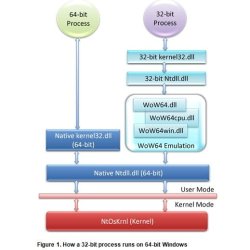
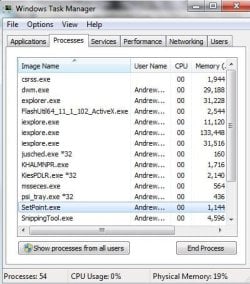
You can look in Task Manager under the Processes tab and it should notify you whether it is a 32-bit or 64-bit application. | My System Specs | | System Manufacturer/Model Number HP Pavilion Elite 495UK OS Windows 7 Ultimate SP1 64-Bit CPU Intel Core i7 870 @ 2.93GHz Motherboard MSI 2A9C (CPU1) Memory 8Gb Dual-Channel DDR3 @ 664MHz Graphics Card nVidia GeForce GTX 460 1024MB dedicated RAM Sound Card Realtek HD Audio Monitor(s) Displays HP2310i Screen Resolution 1920 x 1080 Keyboard Logitech K750 solar-powered keyboard Mouse Logitech Wireless M180 mouse PSU 460W Case HP Elite Cooling Air cooled Hard Drives 1x1954GB Hitachi HDS22020ALA 330 (RAID), 1x1954GB Hitachi External for backup and storage Internet Speed 2Mb Other Info Pure Avanti Flow Internet Radio with iPod Dock, 64Gb iPod, HP USB Speakers, Sony MDR-V500 Headphones, Sony Vaio F-Series Laptop |
18 Dec 2011
|
#5 | | Windows 7 SP1, Home Premium, 64-bit |

Quote: Originally Posted by flycaster However, I am still interested in knowing how to identify the 32-bit from the 64-bit programs.
Also, let's say that although I have no problems with programs in the wrong folders, what is wrong with moving them to their correct folder? I'm not sure there an easy way to identify 32-bit versus 64-bit from looking at file properties of any type. Normally, you would just look to see if the app was in Program Files or Program Files (x86) and draw a conclusion---which method you have foiled.
Moving non-personal files around within C is begging for problems. Try it and see how you make out. The registry would point to location A and you would have moved a file to location B. | My System Specs | | System Manufacturer/Model Number Ignatz Special; 4 speed manual gearbox; factory air conditioning; one of one OS Windows 7 SP1, Home Premium, 64-bit CPU Intel Sandy Bridge i5-2500, not overclocked Motherboard Gigabyte H67A-UD3H-B3, full ATX Memory 4 GB Crucial DDR3-1333 Graphics Card none; graphics are integrated on CPU Sound Card onboard: Realtek ALC892; external: USB Behringer UF0-202 Monitor(s) Displays NEC 90GX2-BK 19" LCD Screen Resolution 800 x 640 Keyboard Leopold Tenkeyless with Cherry Blue switches, USB Mouse Logitech or Microsoft optical wired; either USB or PS 2 PSU Seasonic SS-560KM, modular Case Antec Solo II Cooling CPU: Scythe Big Shuriken; Case: Scythe Slipstream 800 & 500 Hard Drives System: Intel 320 Series SSD, 80 GB;
Data: Samsung Spinpoint 103SJ, 1 TB;
Backup: WD Caviar Green WD15EADS-00P8B0, 1.5TB Other Info Power consumption of this system, including monitor: 68 watts at idle; 144 watts at full load |
18 Dec 2011
|
#6 | | Windows 7 HP 64-bit Boynton Beach, FL |
Thanks all. I can now identify 32-bit from 64-bit. However, for the time being, I think I'll just leave things as they are. And, maybe later, if I feel adventurous, I'll change some programs to their proper folders. My main concern is ignaatzatsonic's counseling on that "...Moving non-personal files around within C is begging for problems. Try it and see how you make out. The registry would point to location A and you would have moved a file to location B." | My System Specs | | System Manufacturer/Model Number Gateway DX4720-03/HP Pavilion dv6 OS Windows 7 HP 64-bit Memory 4GB/4GB Other Info Firefox 10, IE 9, Thunderbird 10, Norton Security Suite (Comcast) Identifying 32-bit and 64-bit programs in Windows Explorer? problems? All times are GMT -5. The time now is 04:19 PM. | |