| Windows 7: Trouble in Partition |
28 Dec 2011
|
#11 | | Win7 x 6 PC's California, Florida, Boston |
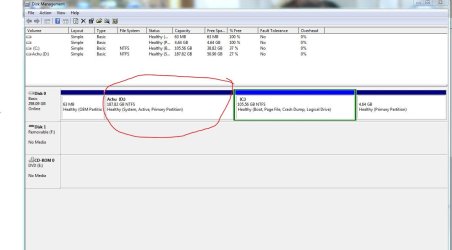
The 4.64 gb may be the Dell Recovery partition. Boot into Partition Wizard to rightclick>Explore it to see what's in it.
Did you do anything with partitions other except Shrink XP to install Windows 7?
If the Dell came with XP then it would be an XP Recovery partition and may not run now - you can try cueing it up to see: Dell Restoring Your Computer´s Software to the Factory Settings
You'll need to burn the PW CD ISO file to CD first to boot it, yes.
Then follow the steps I gave earlier to convert C to Primary, mark it Active, Rebuild MBR and if necessary run Startup Repairs to move the System boot files to C.
Once C boots and is marked System Active, you can boot back into PW CD to delete D and Resize C into it's space if you want. | My System Specs |
| |
28 Dec 2011
|
#12 | | |
Gesundheit. (ACHU). | My System Specs | | System Manufacturer/Model Number Custom OS Windows 7 CPU AMD Phenom II X2 (dual-core) Motherboard GA-MA785GM-US2H Memory 4G Graphics Card integrated ATI HD 4200 Sound Card integrated Monitor(s) Displays Samsung 24" Screen Resolution 1920x1080 Keyboard Microsoft Digital Media Pro Mouse Logitech WIRED! PSU Ultra X4 500W Case Ultra X-blaster Hard Drives 1 SATA (750GB, 32MB cache, 7200 RPM)
1 IDE (80GB, 8MB cache, 7200 RPM)
1 SSD (Intel 320, 120GB, installed but not activated) Internet Speed 15 Mbps FIOS |
29 Dec 2011
|
#13 | | Windows 7 Pro x64 (1), Win7 Pro X64 / WinXP Pro x86 on (2) |

Quote: Originally Posted by ignatzatsonic I don't see a Q partition in your picture. Which partition are you referring to? I believe the Q partition referred to is probably associated with Microsoft's Office 2010 Starter, which for example comes pre-installed on Lenovo K330 IdeaCenter desktop machines I've purchased for family members.
You can use this limited functionality Office product for free, but it includes only Word and Excel. It also presents some advertising from Microsoft. Upgrade to a fully-featured licensed version can done directly.
Anyway, the Q drive is a pointer to a virtual file system that Office Starter accesses. Having a Q drive does not add any extra space on your system. It also cannot be removed or deleted, and attempts to even look at its contents produces "access denied". | My System Specs | | System Manufacturer/Model Number Home-built, two systems (1) and (2) OS Windows 7 Pro x64 (1), Win7 Pro X64 / WinXP Pro x86 on (2) CPU i5-3350p 3.1Ghz/6MB-cache (1); E8400 3.0Ghz/6MB-cache (2) Motherboard ASUS P8Z77-V Pro (1); ASUS P5Q3 (2) Memory 8GB PC3-12800 DDR3 (1); 4GB PC3-10600 DDR3 (2) Graphics Card ATI HD5770 dual-DVI (1), (see TV cards); ATI HD4850 (2) Sound Card Realtek ALC892 HD Audio (1); Realtek ALC1200 HD Audio (2) Monitor(s) Displays Eizo HD2441W LCD, Eizo S2433W (1); Eizo 24" S2433W (2) Screen Resolution 1920x1200, 1920x1200 (1); 1920x1200 (2) Keyboard IBM PS/2 (1) and (2) Mouse Logitech MX Revolution wireless (1); Microsoft wired (2) PSU Nesteq ECS-6001 600W (1); Nesteq ECS-5001 500W (2) Case Acousti-Case 360 (1) and (2) Cooling Noctua NH-U12P SE2 for CPU, 2x120mm case fans (1) and (2) Hard Drives (1) 1TB SATA-II (7200RPM), 2TB SATA-II (7200RPM), 2TB SATA-III (7200RPM), 250GB SATA-III (10000RPM) for OS;
(2) 320GB SATA-II (7200RPM), 750GB SATA-II (7200RPM), 150GB SATA-II (10000RPM) for OS Internet Speed 15mbps down / 2mbps up Other Info Ceton InfiniTV 4-tuner cablecard-enabled TV card as well as Hauppauge HVR-2250 OTA/ATSC 2-tuner TV card in (1), running under Win7 WMC |
29 Dec 2011
|
#14 | | |
From another thread in Backup and Restore, the Q drive will interfere with some VSS commands (shadow inquiries). You can get around this by disabling 2 services that begin with Application Virtualization. | My System Specs | | System Manufacturer/Model Number Custom OS Windows 7 CPU AMD Phenom II X2 (dual-core) Motherboard GA-MA785GM-US2H Memory 4G Graphics Card integrated ATI HD 4200 Sound Card integrated Monitor(s) Displays Samsung 24" Screen Resolution 1920x1080 Keyboard Microsoft Digital Media Pro Mouse Logitech WIRED! PSU Ultra X4 500W Case Ultra X-blaster Hard Drives 1 SATA (750GB, 32MB cache, 7200 RPM)
1 IDE (80GB, 8MB cache, 7200 RPM)
1 SSD (Intel 320, 120GB, installed but not activated) Internet Speed 15 Mbps FIOS |
10 Jan 2012
|
#15 | | |
Ok so this is my first post and my problem has probably been resolved elsewhere but this is where i stand. My version of Windows 7 was said to be not genuine so I decided to try something else. In my quest for a new OS I came across Ubuntu and liked what I saw so I downloaded and installed via flash drive. I didn't really like the user interface so I deleted everything from the 180gb partition I created for Ubuntu and now that area is just shown as free space when I look at it under the disk management section of my computer.
What I want is to get that "free space" back to C. How do I go about doing that.
Should I just make C smaller and move everything to the larger "free space" partition? if so how should I do that?
Also, after resolving this problem, what should I do as far as making Windows 7 genuine?
thanks for any help you may give | My System Specs | | System Manufacturer/Model Number HP G60 OS Windows 7 CPU AMD Athlon Dual-Core QL-62 2.00 GHz Memory 250 |
10 Jan 2012
|
#16 | | Win7 x 6 PC's California, Florida, Boston |
Please post back a screenshot of your maximized Disk Management drive map with listings, using the Snipping Tool in Start Menu. Screen Shots | My System Specs | | Trouble in Partition problems? All times are GMT -5. The time now is 03:55 AM. | |