| Windows 7: Trouble in Partition |
21 Dec 2011
|
#1 | | Windows 7 Home Premium 32bit |
Trouble in Partition I have two partition done for my dimension 9200 and installed windows 7 and windows xp This was done few months back but now, I cannot access one of the partition. Can I format it in any way so that I can utilise that .? | My System Specs |
| System Manufacturer/Model Number dell dimension 9200 OS Windows 7 Home Premium 32bit Memory 2048mb Graphics Card Nvidia GE 1700 Monitor(s) Displays Dell 1707 |
21 Dec 2011
|
#2 | | Windows 7 Pro x64 San Tan Valley, AZ |
Which partition can you not access and why?
If it is the primary partition and you are dual booting then you will lose the other partition, if it is the other way around then go for it. | My System Specs | | System Manufacturer/Model Number Home build OS Windows 7 Pro x64 CPU AMD FX 4100 4 Core 3.6GHz AM3+ Motherboard ASROCK 970 Extreme3 Memory 16GB G.Skill RipjawsX Graphics Card Radeon 6850 Sound Card ASUS Xonar D1 Monitor(s) Displays ASUS 23" LCD PSU 700W Case Antec 100 Cooling Hyper 212 Plus Hard Drives SSD 120GB
WD 750GB Black series
WD 640GB Black series Internet Speed 50MB |
21 Dec 2011
|
#3 | | Win7 x 6 PC's California, Florida, Boston |

Quote: Originally Posted by Joshyklukose I have two partition done for my dimension 9200 and installed windows 7 and windows xp This was done few months back but now, I cannot access one of the partition. Can I format it in any way so that I can utilise that .? Hi Josh -
Can you post back a screenshot of your maximized Disk Management drive map using Snipping Tool in the Windows 7 Start Menu, or if it's from XP use this: Screenshot with Paint
Tell us what's on each partition, which one isn't working and which you want to remove. We will give you the steps to do this, including recovering the disk space into the remaining OS partition if you wish. | My System Specs | | |
21 Dec 2011
|
#4 | | Windows 7 Professional x32 Planet |
Maybe yous Os crashed on that partition.You can format and install new os on that partition again and use it if its a normal problem.
Anyway more clarification and details needed for further help | My System Specs | | System Manufacturer/Model Number Sony VAIO VPCSB25FG/B OS Windows 7 Professional x32 CPU Intel® Core™ i3-2310M Processor 2.10 GHz*1 Motherboard Asus Memory 4GB Graphics Card AMD Radeon™ HD 6470M (SPEED MODE) / Intel® HD Graphics 3000 Sound Card Intel® High Definition Audio Monitor(s) Displays 13.3 (33.8cm) wide (WXGA: 1366x768) TFT colour display (VAIO Screen Resolution 1366x768 Hard Drives 500 GB*4 (Serial ATA, 5400 rpm) |
28 Dec 2011
|
#5 | | Windows 7 Home Premium 32bit |
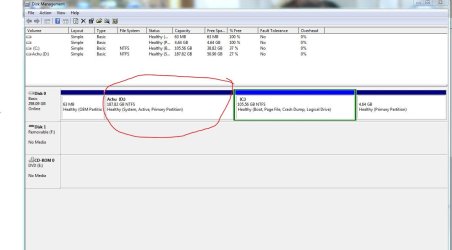
Trouble in partition. Hai Gregrocker, I am sending the maximised snapshot of disk management page. I cannot access the drive Achu D:. | My System Specs | | System Manufacturer/Model Number dell dimension 9200 OS Windows 7 Home Premium 32bit Memory 2048mb Graphics Card Nvidia GE 1700 Monitor(s) Displays Dell 1707 |
28 Dec 2011
|
#6 | | Win7 x 6 PC's California, Florida, Boston |
I'd move the System boot files to Windows 7 partition which works better, but first you must convert it to a Primary partition so that it can be marked Active and receive it's own boot files, because Windows 7 was installed to a Logical partition which cannot be marked Active.
To do this, boot into free Partition Wizard bootable CD, rightclick on C, select Modify>Convert to Primary, click OK, then Apply.
Once it completes and is now a Primary partition, rightclick on C to Modify>set to Active, OK. Then I'd delete the small empty partition to it's right so you can Resize Windows 7 into that space. Apply all steps.
Now click on the Disk # to highlight it, from Disk tab select Rebuild MBR, Apply. Reboot to see if Windows 7 will start. If not boot into System Recovery Options on Windows 7 DVD or System Repair Disk to run Startup Repair - Run 3 Separate Times until Windows 7 starts on its own and is labeled System Active.
Now you can install EasyBCD 2.02 to Windows 7 to Add XP, Save and reboot to see if it will boot from new Dual Boot menu. If not you may need to run XP Repair Install or reinstall XP. | My System Specs | | |

28 Dec 2011
|
#7 | | Windows 7 Home Premium 32bit |
Thanks a lot Greg. For this do I have to download and make a partition wizard bootable CD ? Do I need to back up my files before booting up ? Actually, I do not need to install another operating system, but want to use the partition as a storage. The small partition (Q: is also not accessible. Will there be any problem if I remove that partition ? How can I remove that partition if it is not accessible ? | My System Specs | | System Manufacturer/Model Number dell dimension 9200 OS Windows 7 Home Premium 32bit Memory 2048mb Graphics Card Nvidia GE 1700 Monitor(s) Displays Dell 1707 |
28 Dec 2011
|
#8 | | Windows 7 SP1, Home Premium, 64-bit |
I don't see a Q partition in your picture. Which partition are you referring to?
I would leave the small 63 MB OEM partition alone.
What about the 4.64 GB partition..did you make that partition or was it there when you bought the PC? If you did not make it, I would leave it alone.
You should always have your data backed up any time you begin fiddling with partitions. Things can and do go wrong from time to time.
I think the bootable Partition Wizard is likely to be less problematic. If all you want to do is delete Achu D, that should be easily done. | My System Specs | | System Manufacturer/Model Number Ignatz Special; 4 speed manual gearbox; factory air conditioning; one of one OS Windows 7 SP1, Home Premium, 64-bit CPU Intel Sandy Bridge i5-2500, not overclocked Motherboard Gigabyte H67A-UD3H-B3, full ATX Memory 4 GB Crucial DDR3-1333 Graphics Card none; graphics are integrated on CPU Sound Card onboard: Realtek ALC892; external: USB Behringer UF0-202 Monitor(s) Displays NEC 90GX2-BK 19" LCD Screen Resolution 800 x 640 Keyboard Leopold Tenkeyless with Cherry Blue switches, USB Mouse Logitech or Microsoft optical wired; either USB or PS 2 PSU Seasonic SS-560KM, modular Case Antec Solo II Cooling CPU: Scythe Big Shuriken; Case: Scythe Slipstream 800 & 500 Hard Drives System: Intel 320 Series SSD, 80 GB;
Data: Samsung Spinpoint 103SJ, 1 TB;
Backup: WD Caviar Green WD15EADS-00P8B0, 1.5TB Other Info Power consumption of this system, including monitor: 68 watts at idle; 144 watts at full load |
28 Dec 2011
|
#9 | | Windows 7 Home Premium 32bit |
I did not make the small partition Q, 4.64 gb, neither it came with the system. I will leave it alone. If I delete the partition Achu D, will it be merged with C: automatically ? or will it stay as a free space ? | My System Specs | | System Manufacturer/Model Number dell dimension 9200 OS Windows 7 Home Premium 32bit Memory 2048mb Graphics Card Nvidia GE 1700 Monitor(s) Displays Dell 1707 |
28 Dec 2011
|
#10 | | Windows 7 SP1, Home Premium, 64-bit |
If you delete Achu D, it will become "unallocated space".
You can then use Partition Wizard to add that unallocated space to C.
I'd investigate the 4.64 GB partition. You say it did not come with the system and that you did not create it. Who did create it? Normally, I'd think it was a recovery partition of some type that the manufacturer put there---in which case I would leave it alone. But you say it was not on your PC when you bought it, so who knows what it is. | My System Specs | | System Manufacturer/Model Number Ignatz Special; 4 speed manual gearbox; factory air conditioning; one of one OS Windows 7 SP1, Home Premium, 64-bit CPU Intel Sandy Bridge i5-2500, not overclocked Motherboard Gigabyte H67A-UD3H-B3, full ATX Memory 4 GB Crucial DDR3-1333 Graphics Card none; graphics are integrated on CPU Sound Card onboard: Realtek ALC892; external: USB Behringer UF0-202 Monitor(s) Displays NEC 90GX2-BK 19" LCD Screen Resolution 800 x 640 Keyboard Leopold Tenkeyless with Cherry Blue switches, USB Mouse Logitech or Microsoft optical wired; either USB or PS 2 PSU Seasonic SS-560KM, modular Case Antec Solo II Cooling CPU: Scythe Big Shuriken; Case: Scythe Slipstream 800 & 500 Hard Drives System: Intel 320 Series SSD, 80 GB;
Data: Samsung Spinpoint 103SJ, 1 TB;
Backup: WD Caviar Green WD15EADS-00P8B0, 1.5TB Other Info Power consumption of this system, including monitor: 68 watts at idle; 144 watts at full load Trouble in Partition problems? All times are GMT -5. The time now is 11:48 AM. | |