| Windows 7: Windows 7 User Setup Question |
29 Dec 2011
|
#1 | | |
Windows 7 User Setup Question Is there a way with Win7Pro to either copy your profile over to a 'power user' status OR disable the need for a password after the machine has not been used? Generally after a length of time where a screen saver might kick in, I'm required to re-enter the password which is kind of annoying since nobody else uses the machine. So again, I guess I'd like to either copy my admin profile (desktop) over to another user OR disable the admin password where I'm not prompted for a password if the machine sets idle for 20 minutes. Thanks | My System Specs |
| System Manufacturer/Model Number Dell OS Win 7 Pro 64 |
30 Dec 2011
|
#2 | | Windows® 7 Home Premium SP-1 |

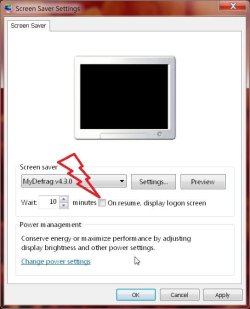
Quote: Originally Posted by cover Is there a way with Win7Pro to either copy your profile over to a 'power user' status OR disable the need for a password after the machine has not been used? Generally after a length of time where a screen saver might kick in, I'm required to re-enter the password which is kind of annoying since nobody else uses the machine. So again, I guess I'd like to either copy my admin profile (desktop) over to another user OR disable the admin password where I'm not prompted for a password if the machine sets idle for 20 minutes. Thanks I'm guessing its this you're talking about. If so, just select the Yes to a No.
it never happens for me cause i turned off that feature where my monitor goes off.
Last edited by koolkat77; 05 Oct 2012 at 11:12 AM..
| My System Specs | | Computer type PC/Desktop OS Windows® 7 Home Premium SP-1 CPU Intel Pentium(R) E5200 @ 2.50GHz Motherboard Intel Corporation DG41WV (PROCESSOR) Memory 4096 MBytes Dual-Channel DDR3 @ 398MHz Graphics Card ATI Radeon HD 5450 (ASUStek Computer Inc) Sound Card Realtek High Definition Audio Monitor(s) Displays DELL E170S on ATI Radeon HD 5450 Screen Resolution 1280x1024 pixels Keyboard Logitech PS/2 Keyboard Mouse A4 Tech Co Ltd/Logitech PSU 400W Case Nothing Fancy Cooling Fans Hard Drives 466GB Western Digital WDC Internet Speed 512 Kbps Antivirus Microsoft Security Essentials & Malwarebytes Browser Chrome & Internet Explorer 9 Other Info Imation 8 GB USB, 6 GB Seagate External Hard drive, ASUS DVD-E818A7T ATA Device |
30 Dec 2011
|
#3 | | |
I'll give 'er a try - thanks very much... :-) | My System Specs | | System Manufacturer/Model Number Dell OS Win 7 Pro 64 |
30 Dec 2011
|
#4 | | Windows® 7 Home Premium SP-1 |
do post back | My System Specs | | Computer type PC/Desktop OS Windows® 7 Home Premium SP-1 CPU Intel Pentium(R) E5200 @ 2.50GHz Motherboard Intel Corporation DG41WV (PROCESSOR) Memory 4096 MBytes Dual-Channel DDR3 @ 398MHz Graphics Card ATI Radeon HD 5450 (ASUStek Computer Inc) Sound Card Realtek High Definition Audio Monitor(s) Displays DELL E170S on ATI Radeon HD 5450 Screen Resolution 1280x1024 pixels Keyboard Logitech PS/2 Keyboard Mouse A4 Tech Co Ltd/Logitech PSU 400W Case Nothing Fancy Cooling Fans Hard Drives 466GB Western Digital WDC Internet Speed 512 Kbps Antivirus Microsoft Security Essentials & Malwarebytes Browser Chrome & Internet Explorer 9 Other Info Imation 8 GB USB, 6 GB Seagate External Hard drive, ASUS DVD-E818A7T ATA Device |
31 Dec 2011
|
#5 | | MS Windows 7 Ultimate 64-bit SP1 Somewhere in the middle of Desert :-) |
Open the screen saver settings by right clicking on desktop and select "Personalize - Screen Saver". On the opened Screen Saver Settings, just remove the checkmark from "On Resume Display logon screen" apply OK and close the screen.
While the screensaver is running pressing any key will stop screensaver and will bring back the desktop without asking for any password. | My System Specs | | System Manufacturer/Model Number Toshiba Satellite P775-S7232 OS MS Windows 7 Ultimate 64-bit SP1 CPU i5-2410M 2.3GHz (2.9GHz Turbo-Boost) Sandy Bridge 32nm Motherboard Toshiba PHRAA ver. PSBY1U-00F003 Memory 4GB+4GB Samsung DDR3 PC3-10700 (1333 MHz) Graphics Card Video Intel(R) HD Graphics Family, 1696MB available memory Sound Card Realtek High Definition Audio version=6.0.1.6323 Monitor(s) Displays 17.3 " Trubrite TFT LCD, LED Backlit Screen Resolution 1600x900 32 bit, Native support for 720P content Keyboard Premium Raised Tile keyboard Mouse Logitech M215 wireless mouse PSU Toshiba AC/DC Adapter Case Notebook Cooling Built-in Fan Hard Drives TOSHIBA MK6476GSXN
580.614 [GB] partitioned C: 80GB and D: 500GB with hidden recovery partitons.
Spare bay for 2nd HDD but no SATA connector :-( Internet Speed Not fast enough Other Info Built-in Harman Kardon speakers with Dolby Advanced Audio, Waves MaxxAudio® 3. HDMI, 1xUSB3+3xUSB2 ports, WebCam, Battery life 4hrs 11mins, 4GB Readyboost SDHC card, WD My Book Essential Ext HDDs 2 TB, 2x1TB, My Passport SE 1TB and WDTV 1st Gen for Multimedia playing on a Sony Wega 32" LCD.
Recent addition to my toys are Asus Transformer Pad TF300T with 32GB onboard sd card + 32GB microsd card. |
31 Dec 2011
|
#6 | | Win7 x 6 PC's California, Florida, Boston |
Turn off ScreenSaver as it isn't needed with modern LCD monitors. Use the Windows 7 background slideshow.
Set no password for wake up. | My System Specs | | |
01 Jan 2012
|
#7 | | |
Thanks you guys - appreciate the replies. HAPPY NEW YEAR! | My System Specs | | System Manufacturer/Model Number Dell OS Win 7 Pro 64 |
01 Jan 2012
|
#8 | | Windows® 7 Home Premium SP-1 |
did any of the posts above solve your problem?
Happy new year to you also. | My System Specs | | Computer type PC/Desktop OS Windows® 7 Home Premium SP-1 CPU Intel Pentium(R) E5200 @ 2.50GHz Motherboard Intel Corporation DG41WV (PROCESSOR) Memory 4096 MBytes Dual-Channel DDR3 @ 398MHz Graphics Card ATI Radeon HD 5450 (ASUStek Computer Inc) Sound Card Realtek High Definition Audio Monitor(s) Displays DELL E170S on ATI Radeon HD 5450 Screen Resolution 1280x1024 pixels Keyboard Logitech PS/2 Keyboard Mouse A4 Tech Co Ltd/Logitech PSU 400W Case Nothing Fancy Cooling Fans Hard Drives 466GB Western Digital WDC Internet Speed 512 Kbps Antivirus Microsoft Security Essentials & Malwarebytes Browser Chrome & Internet Explorer 9 Other Info Imation 8 GB USB, 6 GB Seagate External Hard drive, ASUS DVD-E818A7T ATA Device |
01 Jan 2012
|
#9 | | |

Quote: Originally Posted by koolkat77 did any of the posts above solve your problem?
Happy new year to you also. 
Yep, I tried yours as soon as you posted it and it worked. Others were good reading too. Thanks | My System Specs | | System Manufacturer/Model Number Dell OS Win 7 Pro 64 |
01 Jan 2012
|
#10 | | Windows® 7 Home Premium SP-1 |

Quote: Originally Posted by cover 
Quote: Originally Posted by koolkat77 did any of the posts above solve your problem?
Happy new year to you also. 
Yep, I tried yours as soon as you posted it and it worked. Others were good reading too. Thanks alright glad it worked, thanks for posting back. | My System Specs | | Computer type PC/Desktop OS Windows® 7 Home Premium SP-1 CPU Intel Pentium(R) E5200 @ 2.50GHz Motherboard Intel Corporation DG41WV (PROCESSOR) Memory 4096 MBytes Dual-Channel DDR3 @ 398MHz Graphics Card ATI Radeon HD 5450 (ASUStek Computer Inc) Sound Card Realtek High Definition Audio Monitor(s) Displays DELL E170S on ATI Radeon HD 5450 Screen Resolution 1280x1024 pixels Keyboard Logitech PS/2 Keyboard Mouse A4 Tech Co Ltd/Logitech PSU 400W Case Nothing Fancy Cooling Fans Hard Drives 466GB Western Digital WDC Internet Speed 512 Kbps Antivirus Microsoft Security Essentials & Malwarebytes Browser Chrome & Internet Explorer 9 Other Info Imation 8 GB USB, 6 GB Seagate External Hard drive, ASUS DVD-E818A7T ATA Device Windows 7 User Setup Question problems? All times are GMT -5. The time now is 10:36 AM. | |