JavaScript is disabled. For a better experience, please enable JavaScript in your browser before proceeding.
You are using an out of date browser. It may not display this or other websites correctly.
You should upgrade or use an
alternative browser .
Solved most visited folders not shown when right click on folder icon
when I right-clicked on the folder icon in taskbar a popup window showing some options and some of recently opened (I think most visited) folders are shown. But now, as you can see in the image, the folders are not shown anymore
why?
what should I do to bring it back?
Computer Manufacturer/Model Number VAIO VGN-CS36GJ_Q OS windows 7 CPU Intel Core 2 Duo Processor P8700 (2.53 GHz) Memory 4 GB Graphics Card(s) NVIDIA GeForce 9300M GS Sound Card Realtek High Definition Audio
٩͡[๏̯͡๏]۶
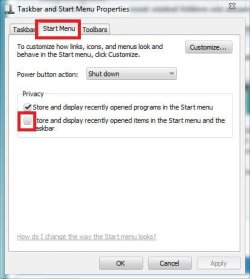
Right click on the taskbar, and select "properties" in the context menu .... the taskbar and start menu properties window will appear. Click on the "start menu tab, and check this box by clicking on it !
If it is already checked, you must have performed a disk cleanup shortly .... a disk cleanup cleans the recent history , and so the top part of the trigger is eventually cleaned up.
Computer type PC/Desktop Computer Manufacturer/Model Number Self Assembled OS Microsoft Windows 10 Pro Insider Preview 64-bit CPU Intel(R) Core(TM) i3-4130 CPU @ 3.40GHz Motherboard Gigabyte Technology Co., Ltd. B85M-D3H Memory Corsair Vengence 4GB x2 (8.00GB Dual-Channel DDR3 @ 798MHz) Graphics Card(s) 2047MB GeForce GTS 450 (ZOTAC International) Sound Card Onboard (Realtek High Definition Audio) Monitor(s) Displays LG Flatron E2040T Screen Resolution 1600x900 Hard Drives Western Digital 1 TB PSU Corsair VS550 Case Cooler Master K380 Cooling Cooler Master Seidon 120V Plus Keyboard Logitech MK260r Mouse Logitech MK260r Internet Speed PMPL Broadband Antivirus Windows Defender + MBAM Browser Firefox Other Info Dell Studio 15" Laptop
It was already checked. I haven't performed any disk cleanups.
Computer Manufacturer/Model Number VAIO VGN-CS36GJ_Q OS windows 7 CPU Intel Core 2 Duo Processor P8700 (2.53 GHz) Memory 4 GB Graphics Card(s) NVIDIA GeForce 9300M GS Sound Card Realtek High Definition Audio
Welcome to Seven Forums hapoogold. Try this:
Start> In search box type (or copy and paste)
%AppData%\Microsoft\Windows\Recent\AutomaticDestinations
See if any of the files are significantly larger in size than the rest of the files, such as a file of 1 MB or more.
Delete the large file.
If you don't mind if you lose all Jump Lists recent history, just delete all the automaticDestinations-ms files in the folder.
See if this allows the jump lists to repopulate.
A Guy
Last edited by a moderator: Dec 31, 2011
Computer type PC/Desktop OS Windows 10 Home x64 CPU INTEL Core i5-750 Quad-Core 3.37GHz Motherboard ASUS P7P55D Memory HyperX Fury Black Series 8GB (2 x 4GB) 1866Mhz Graphics Card(s) EVGA GeForce GTX 750 Superclocked 1GB 128-Bit GDDR5 Monitor(s) Displays LG 32MA68HY 32" IPS Screen Resolution 1920 x 1080 Hard Drives Samsung 840 Evo 120GB, SEAGATE 500GB Barracuda® 7200.12, SATA 3 Gb/s, 7200 RPM, 16MB cache PSU ANTEC TruePower New TP-550, 80 PLUS, 550W Case ANTEC Three Hundred Illusion Cooling COOLER MASTER Hyper 212 Plus, 4 x 120mm 1 x 140mm Noctua's Internet Speed 85 + Mbps Antivirus Avast Browser Vivaldi
Thank you "
A Guy "; this has solved my problem.
It's good to see real professionals here.
Computer Manufacturer/Model Number VAIO VGN-CS36GJ_Q OS windows 7 CPU Intel Core 2 Duo Processor P8700 (2.53 GHz) Memory 4 GB Graphics Card(s) NVIDIA GeForce 9300M GS Sound Card Realtek High Definition Audio
You're welcome, glad we could help. Thanks to Brink for the added info (He's the professional, I'm just a fellow member
). Enjoy your stay st Seven Forums.
A Guy
Computer type PC/Desktop OS Windows 10 Home x64 CPU INTEL Core i5-750 Quad-Core 3.37GHz Motherboard ASUS P7P55D Memory HyperX Fury Black Series 8GB (2 x 4GB) 1866Mhz Graphics Card(s) EVGA GeForce GTX 750 Superclocked 1GB 128-Bit GDDR5 Monitor(s) Displays LG 32MA68HY 32" IPS Screen Resolution 1920 x 1080 Hard Drives Samsung 840 Evo 120GB, SEAGATE 500GB Barracuda® 7200.12, SATA 3 Gb/s, 7200 RPM, 16MB cache PSU ANTEC TruePower New TP-550, 80 PLUS, 550W Case ANTEC Three Hundred Illusion Cooling COOLER MASTER Hyper 212 Plus, 4 x 120mm 1 x 140mm Noctua's Internet Speed 85 + Mbps Antivirus Avast Browser Vivaldi





 ). Enjoy your stay st Seven Forums.